EN 37
Miracast -
Shares the screen from an Android phone or tablet wirelessly.
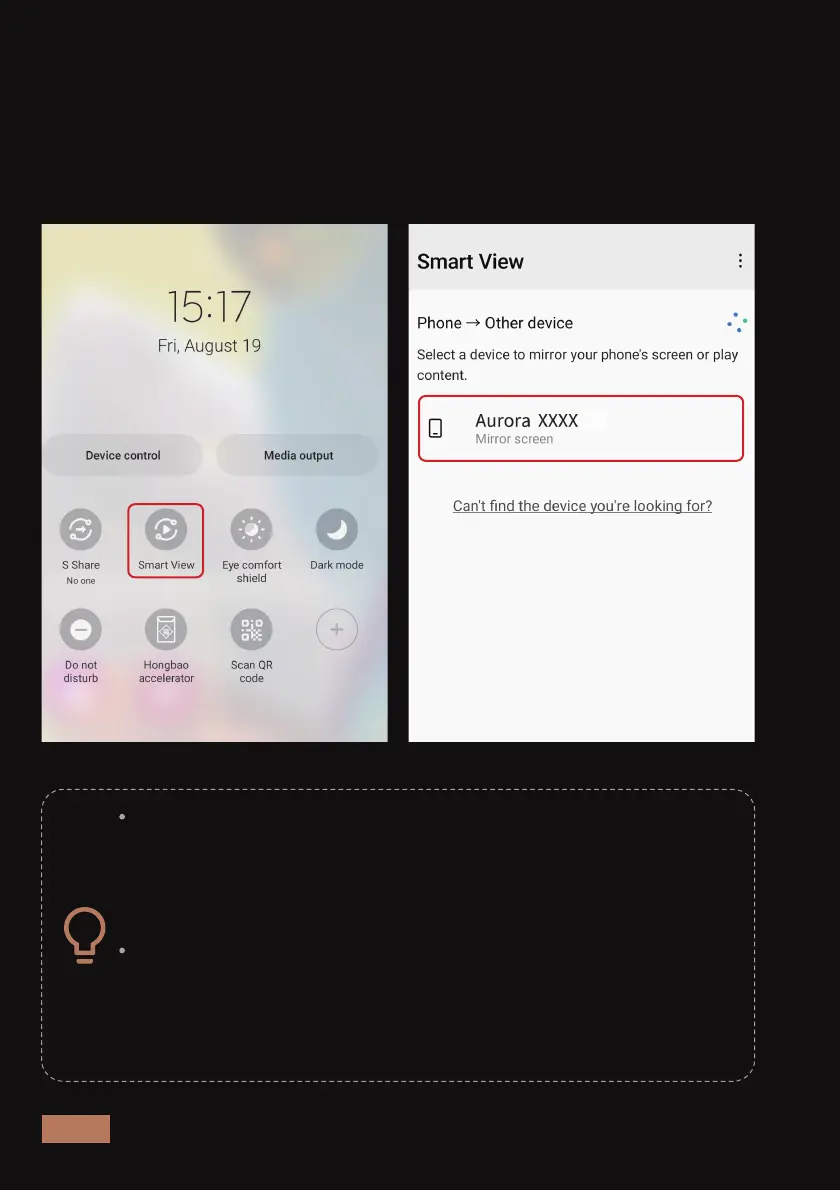
To connect, make sure both devices are connected to the same Wi-Fi
network. Open System Settings on your Android device and search for
its casting software. Once you have opened the casting software, go to
the list of available mirroring devices and select "Aurora Pro XXXX".
Android devices may have mixed functionality with Miracast.
Most devices have a built-in app that supports it. (OnePlus /
Google Pixel - Search Cast, Samsung - Search Smart View,
Sony - Search Screen Mirroring.) Please refer to the
instructions of your device for details.
Additionally, there may be third-party apps you can down-
load to your Android device to provide Miracast functionality.
We cannot guarantee that this will work as intended with all
Android devices. Check your device manufacturer for
information regarding support for this standard.



 To Next Page