7251 / 7351 Slide Gate Operator
INSTALLATION AND PROGRAMMING MANUAL
46
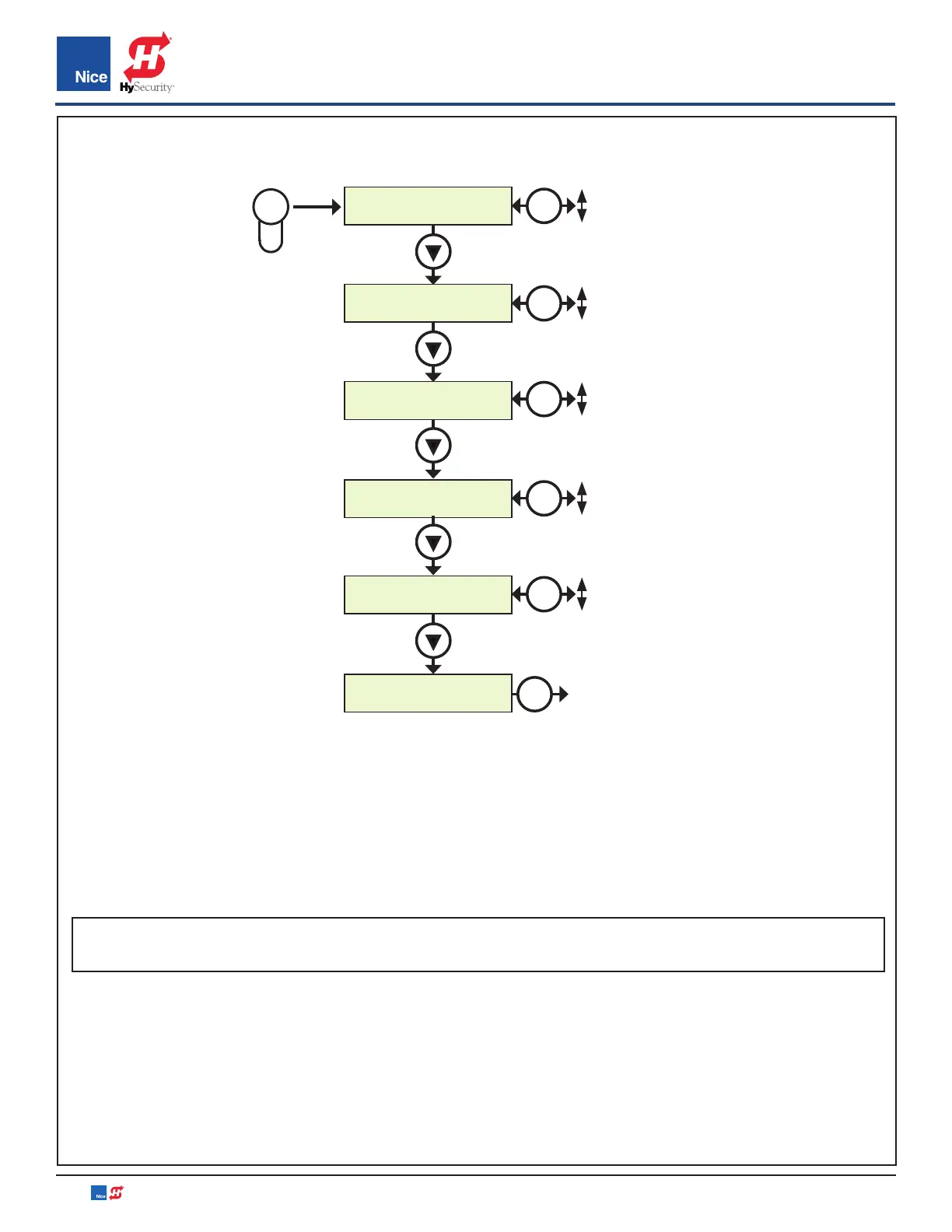
Press
DELAY
1. Auto Close :10
DELAY
2. Slave :0.0
DELAY
3. Lamp :0.0
DELAY
4. Lock :5.0
DELAY
5. Run Timer :120
DELAY
6. ESC
DELAY
EXIT
OK
DELAY BUTTON MENU:
• AUTO CLOSE: Sets the time before the gate closes automatically from the fully open position. Settings
from 0 (off) to 90 seconds. Setting this to 0 will disable the auto close timer.
• SLAVE: Enables overlapping dual gates to dovetail smoothly by creating a momentary delay for Slave
operator when opening and Master when closing. Settings from 0-5 seconds with increments of 0.5.
EXAMPLE: If 03 is selected, in the OPEN direction the Slave Operator will begin to OPEN 3 seconds after
the Master. In the CLOSE direction the Master Operator will begin to CLOSE 3 seconds after the Slave
NOTE: For 12V residential operators the Master is Motor 1 by default but can be changed in the Advance
Settings menu.
• LAMP/STROBE: Sets the amount of time the Lamp accessory output is activated prior to gate movement.
Settings from 0 to 5 seconds with a step of 0.5 seconds.
• LOCK: Sets the amount of time the Magnetic Lock accessory output is activated to disable the lock when
opening the gate. Settings from 0 to 5 seconds with a step of 0.5 seconds.
• RUN TIME: Sets the maximum run time for the gate. Used in case the gate doesn’t reach its limits. Settings
from 15 to 120 seconds with a step of 1 sec.
• ESC: Exit the DELAY menu.
DELAY BUTTON
OK
0 SEC.
90 SEC.
OK
0 SEC.
5 SEC.
OK
0 SEC.
5 SEC.
OK
0 SEC.
5 SEC.
OK
15 SEC.
120 SEC.
www.ApolloGateOpeners.com | (800) 878-7829 | Sales@ApolloGateOpeners.com


 To Next Page