152
Using the Menu
The Movie Menu
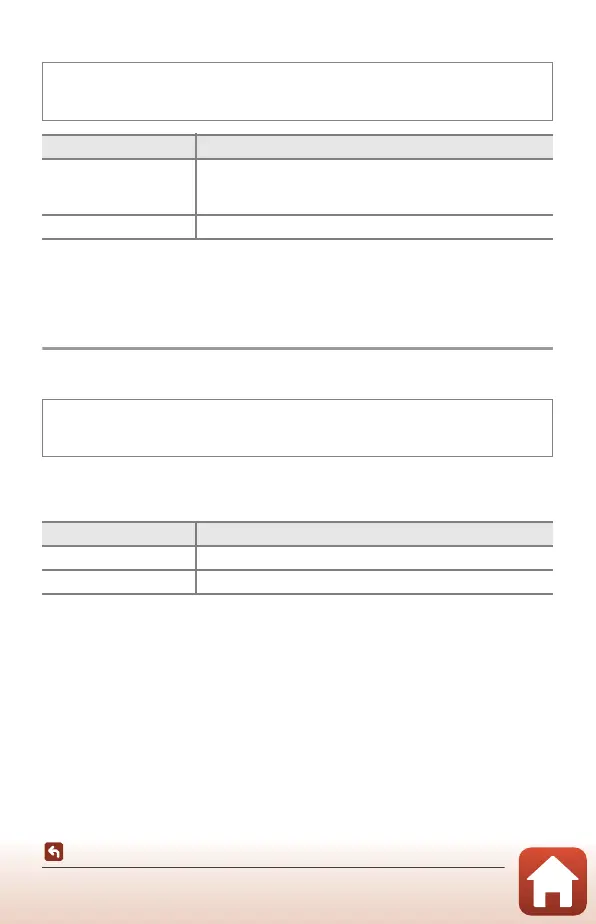
Wind Noise Reduction
B Notes About Wind Noise Reduction
When an HS movie option is selected in Movie options, the setting is fixed at Off.
Frame Rate
Select the frame rate used in time-lapse movie, short movie show mode, or when
recording movies. When the frame rate setting is switched, options that can be set in
Movie options (A145) change.
Enter shooting mode M d button M e menu icon M Wind noise reduction
M k button
Option Description
Y On
Reduces the sound that is produced when wind passes over
the microphone during movie recording. Other sounds may
become difficult to hear during playback.
Off (default setting) Wind noise reduction is disabled.
Enter shooting mode M d button M e menu icon M Frame rate M k
button
Option Description
30 fps (30p/60p) Suited for playback on a TV using the NTSC standard.
25 fps (25p/50p) Suited for playback on a TV using the PAL standard.



 To Next Page
 Loading...











