77
Shooting Features
Focusing
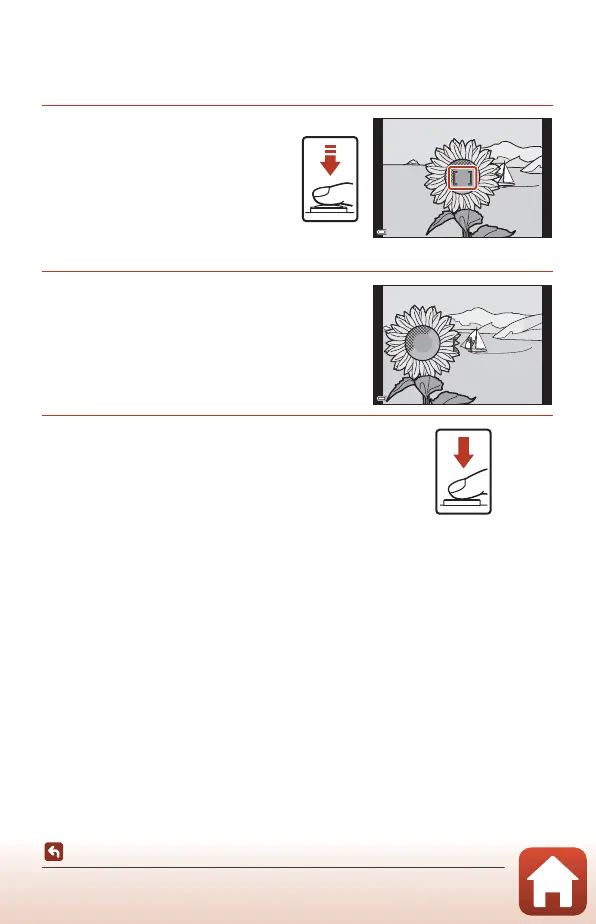
Focus Lock
Use focus lock to capture creative compositions even when the focus area is set to the
center of the frame.
1 Position the subject in the
center of the frame and
press the shutter-release
button halfway.
• The camera focuses on the subject
and the focus area is displayed in
green.
• Exposure is also locked.
2 Without lifting your finger,
recompose the picture.
• Make sure to maintain the same distance
between the camera and the subject.
3 Press the shutter-release button all the
way down to take the picture.
C Moving the Focus Area to the Desired Position
In A, B, C, or D shooting mode, the focus area can be moved using the multi selector by
setting AF area mode (A140) in the shooting menu to one of the manual options.
C Using the g (AE-L/AF-L) Button
You can also use the g button to lock the exposure or focus instead of pressing and
holding the shutter-release button halfway (A171).
F3.4
1/250



 To Next Page
 Loading...











