50
P, S, A and M modes
S (Shutter-Priority Auto) Mode
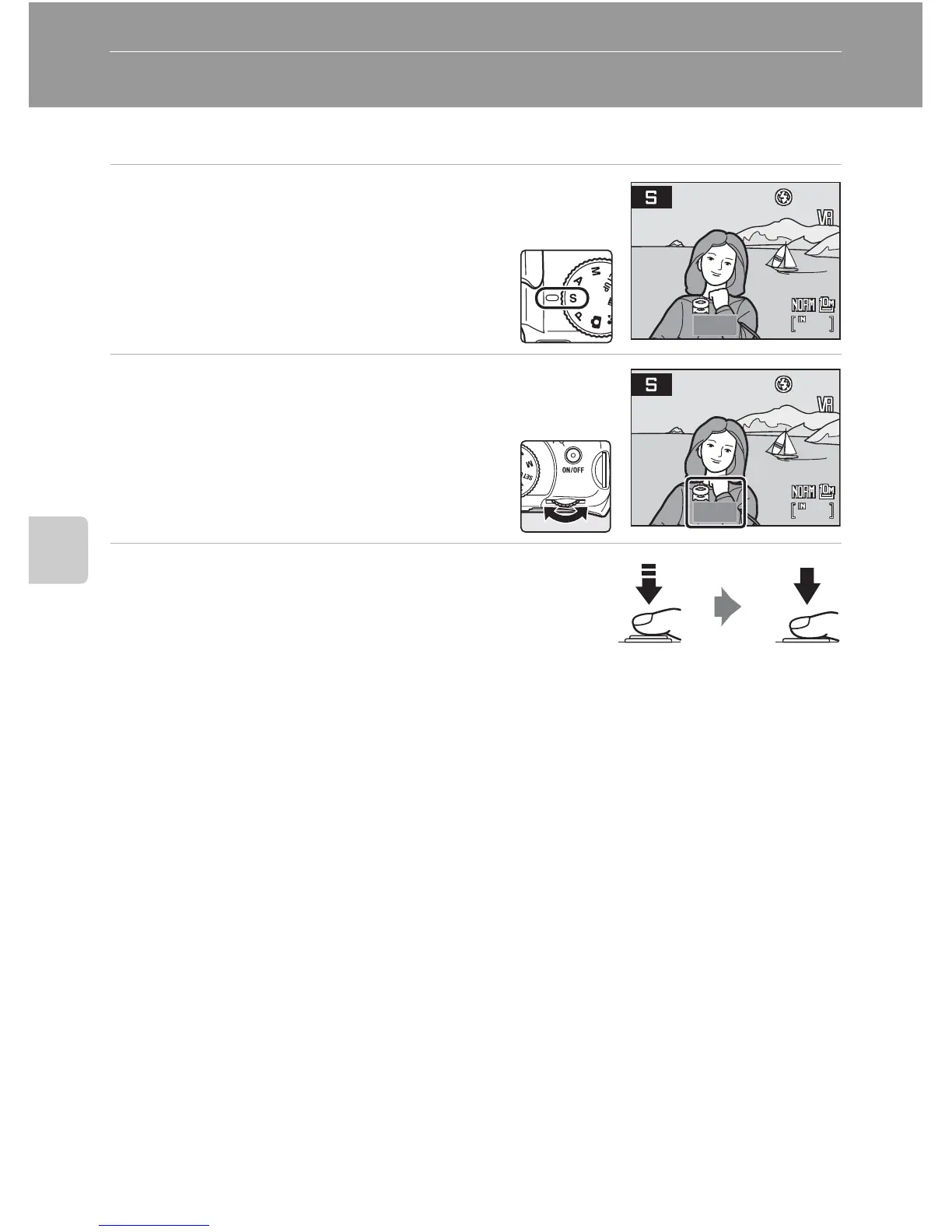
Set the shutter speed and shoot pictures (A 48).
1 Rotate the mode dial to S.
2 Rotate the command dial to choose
the shutter speed value between
1/2,000 sec. and 8 sec.
3 Focus and shoot.
At default setting, the camera automatically selects the
focus area containing the closest subject, from nine focus
areas, and adjusts focus accordingly (A 102).
B S (Shutter-Priority Auto) Mode
• If the selected shutter speed would result in the picture being over- or underexposed, the shutter-
speed display will flash when the shutter-release button is pressed halfway. Choose another
shutter speed and try again.
• At speeds slower than 1/4 sec, the shutter speed indicator will turn red to show that noise
reduction (A 105) is recommended to reduce “noise” in the form of randomly-spaced, brightly
colored dots.
B Note on Shutter Speed
When Continuous, BSS or Multi-shot 16 is selected for Continuous (A 98), or when a setting
other than Off is selected for Auto bracketing (A 101), the slowest shutter speed available is
down to 1/2 sec.
20







 To Next Page