133
Configuring Wireless LAN Settings from the Camera
Wireless Services
Creating a Recipient Group
Recipients can be grouped for specification of multiple recipients as a single
Picture Mail recipient. This is useful when sending multiple Picture Mails to
the same recipients.
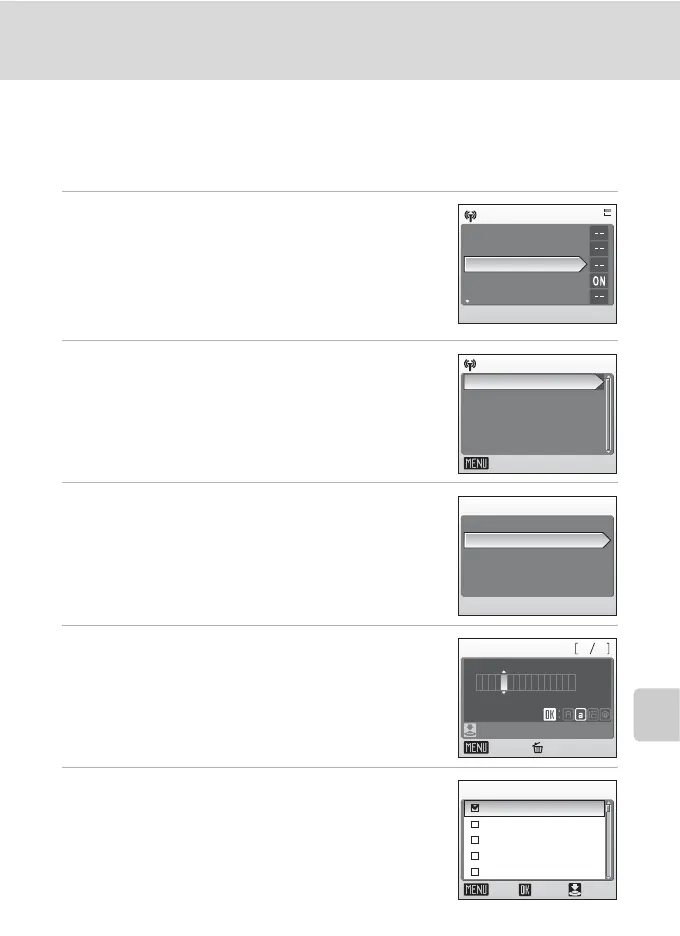
1 Select [Address options] from the
[Wireless settings] option in the camera’s
setup menu and press d.
If a password has been applied (c 134), enter the
password and press the shutter-release button. For
information on entering text, see “Entering Text with
the Camera” (c 127).
2 Select [New] and press d.
The group information can be edited by following the
same procedure used for specifying a new group.
Choose a group and press d, and proceed to step 4.
To delete a group, select the group and press T.
3 Select [Group] and press d.
Up to 5 groups can be created.
4 Specify the group’s name (up to 16
alphanumerical characters) and press the
shutter-release button.
5 Select recipients for the group.
Use the rotary multi selector to highlight recipients by
their aliases (e-mail addresses) and press
d
to select the
recipients (
y
). Press
d
again to cancel the selection.
Up to 30 recipients can be added to each group.
Press the shutter-release button to finalize recipient
selection.
Wireless settings
Network profile
Sender
Address options
Picture Bank
Password
Back
New
Choose address
n
New
Address
Group
n
Group
Confirm
Back Delete
165
Nik no
ON/OFF
n
Confirm
Back
Choose address
Nikon2@xxx.com
Nikon1@xxx.com
Nikon3
Nikon4
Nikon5@xxx.com



 To Next Page
 Loading...








