80
Connecting to a Printer
Connecting to Televisions, Computers, and Printers
Connecting the Camera and Printer
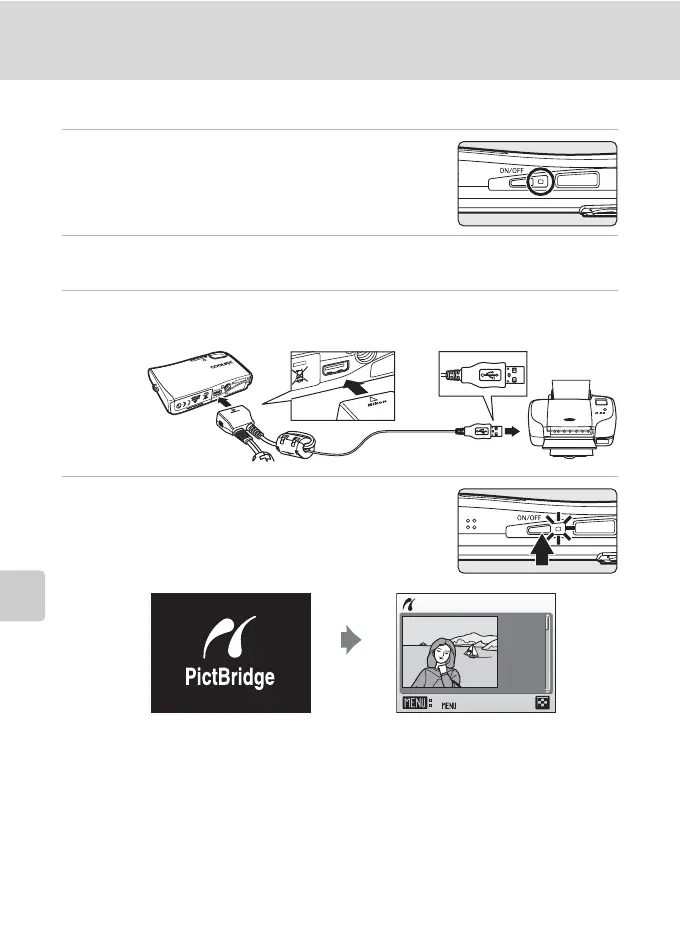
1 Turn off the camera.
2 Turn on the printer.
Check printer settings.
3 Connect the camera to the printer using the supplied audio
video/USB cable.
4 Turn on the camera.
When connected correctly, the PictBridge start-up
screen 1 will be displayed in the camera monitor.
Then the print selection screen will be displayed 2.
j Connecting the Audio Video/USB Cable
When connecting the audio video/USB cable, be sure that the connectors are oriented
correctly. Do not use force when connecting the audio video/USB cable. When disconnecting
the audio video/USB cable, do not pull the connector at an angle.
w
Print selection
15/11
2007
NO. 1
[ 57]
12



 To Next Page
 Loading...








