EasyManua.ls Logo

Nikon D700 - Framing Pictures in the Monitor (Live View)

Nikon D700
533 pages
Print Icon
To Next Page IconTo Next Page
To Previous Page IconTo Previous Page
Loading...
Framing
Pictures
in
the Monitor
(Live
View)
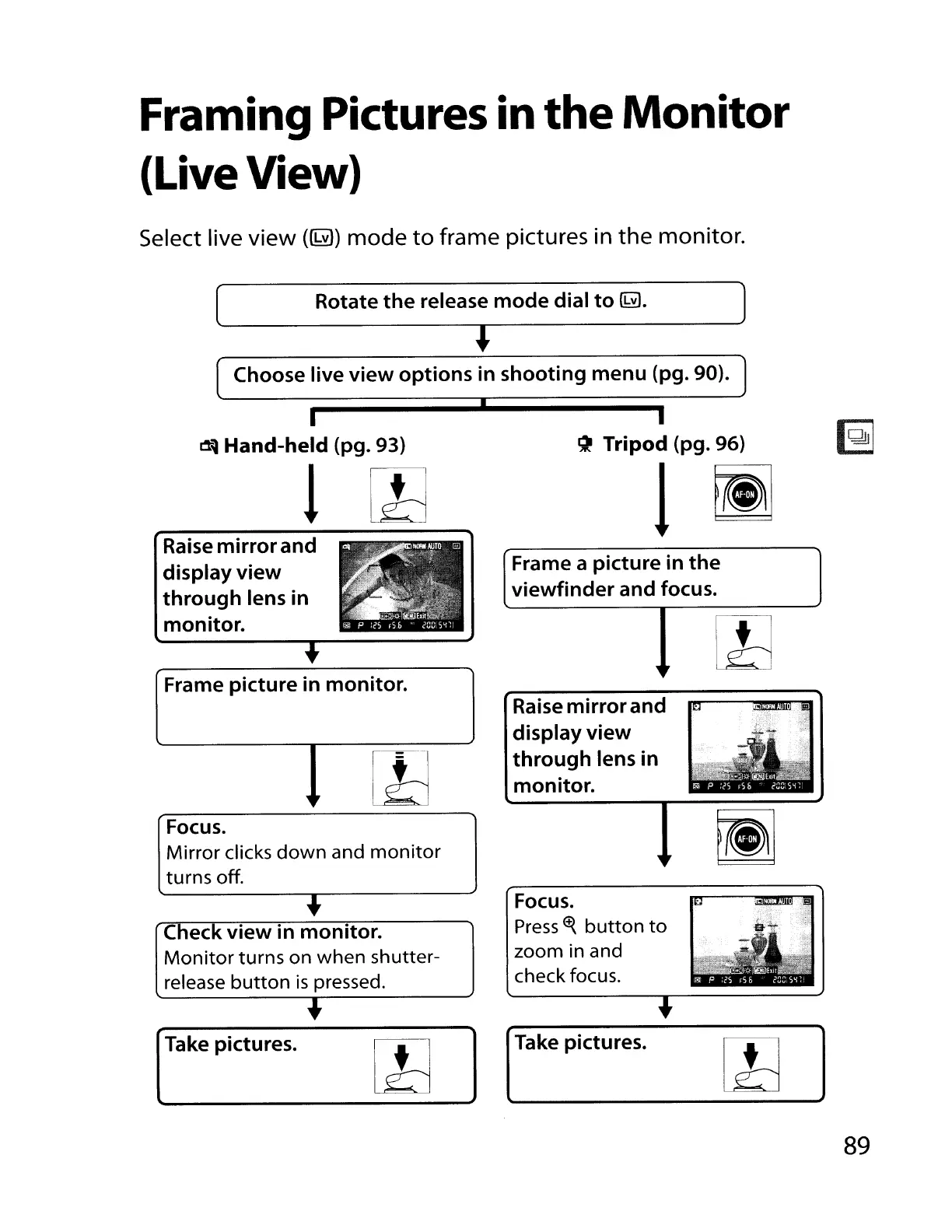
Select live
view
(~)
mode
to
frame pictures in
the
monitor.
(
Rotate
the
release_m_O_d_e_d_ia_l_to_~_.
~)
OJ
Choose
live
view
options
in
shooting
menu
(pg. 90).
I
.....
T_a_ke_p_ic_t_u_re_s_.
I_Jd
__
I_
.....
J ITake
pictures.
1
11d
~
Tripod (pg. 96)
l~
Focus.
Press
~
button
to
zoom in and
check focus.
Raise
mirror
and
display
view
through
lens
in
monitor.
Frame a
picture
in
the
viewfinder
and
focus.
~
Hand-held (pg. 93)
1
,
Frame
picture
in
monitor.
Raise
mirror
and
display
view
through
lens
in
monitor.
Focus.
Mirror
clicks
down
and
monitor
turns off.
+
Check
view
in
monitor.
Monitor
turns on
when
shutter-
release
button
is
pressed.
+
89

Table of Contents

Other manuals for Nikon D700

Related product manuals