EasyManua.ls Logo

Nikon D700 - Using Camera Menus

Nikon D700
533 pages
Print Icon
To Next Page IconTo Next Page
To Previous Page IconTo Previous Page
Loading...
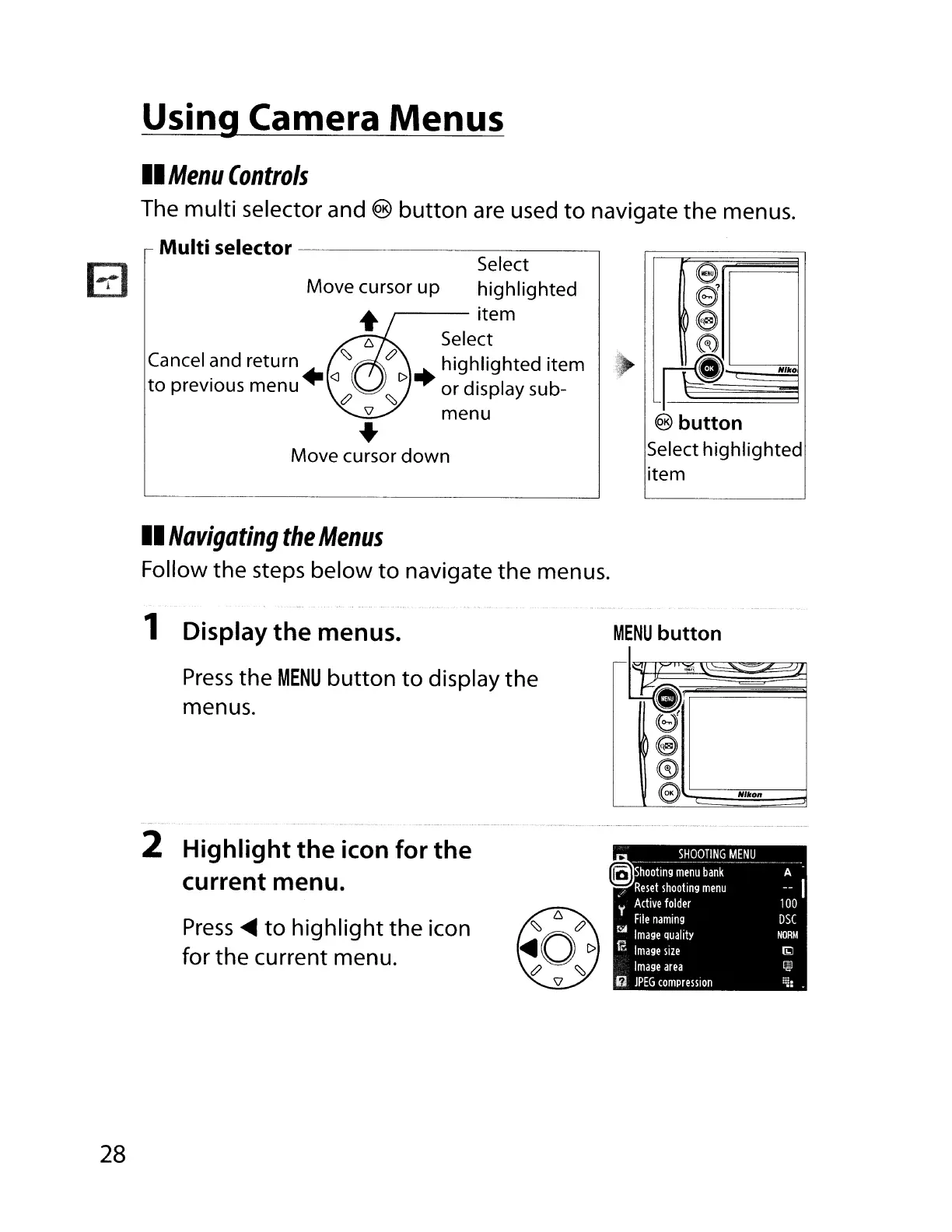
Using Camera Menus
II
Menu
Controls
The multi selector and ®
button
are
used
to
navigate the menus.
Multi selector
------------,
e
s
e
~
L~
Nllro
@ button
Select highlighted
item
Select
Move cursor
up
highlighted
r----
item
Select
t?
+highlighted item
<::::,r>
or
display sub-
menu
Cancel and return
<::::,
. +
<J
to
prevIous menu
t?
..
Move cursor
down
II
Navigating
the
Menus
Follow the steps below
to
navigate the menus.
r-I
.~
II
0
e
0
e
Nllton
MENU
button
q;
1 Display
the
menus.
Press
the
MENU
button
to
display the
menus.
2 Highlight the icon for the
current menu.
Press
~
to
highlight
the
icon
for
the
current menu.
28

Table of Contents

Other manuals for Nikon D700

Related product manuals