EasyManua.ls Logo

Nikon D700 - Using the Built-In Flash

Nikon D700
533 pages
Print Icon
To Next Page IconTo Next Page
To Previous Page IconTo Previous Page
Loading...
Using
the Built-in
Flash
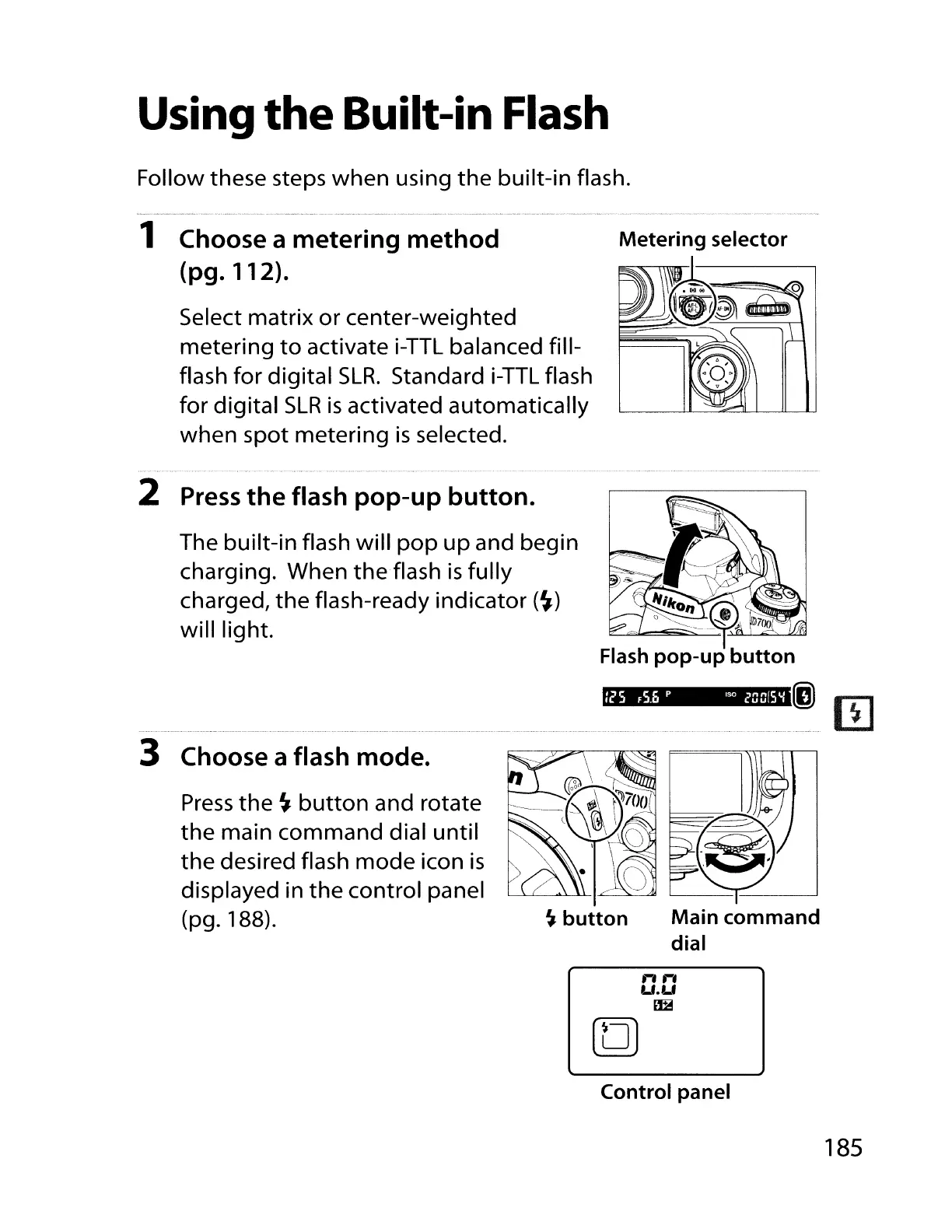
Follow these steps when using
the
built-in flash.
1 Choose a metering
method
(pg.
112).
Select matrix
or
center-weighted
metering
to
activate
i-TTL
balanced fill-
flash for digital
SLR.
Standard
i-TTL
flash
for digital
SLR
is
activated automatically
when spot metering
is
selected.
Metering
selector
2
Press
the
flash
pop-up
button.
The built-in flash will
pop
up
and begin
charging. When
the
flash
is
fully
charged,
the
flash-ready indicator
(~)
will light.
. (j)
II]
Main
command
dial
/25
F5.b
P
ISO
2QQ[5'i
~
button
Press
the
~
button
and rotate
the
main command dial
until
the
desired flash
mode
icon
is
displayed in
the
control panel
(pg.188).
3 Choose a flash mode.
n
....
U.U
~
Control
panel
185

Table of Contents

Other manuals for Nikon D700

Related product manuals