EasyManua.ls Logo

Nikon D700 - Creating Custom Picture Controls

Nikon D700
533 pages
Print Icon
To Next Page IconTo Next Page
To Previous Page IconTo Previous Page
Loading...
Creating Custom Picture Controls
The Nikon Picture Controls supplied
with
the camera
can
be
modified and saved
as
custom Picture Controls.
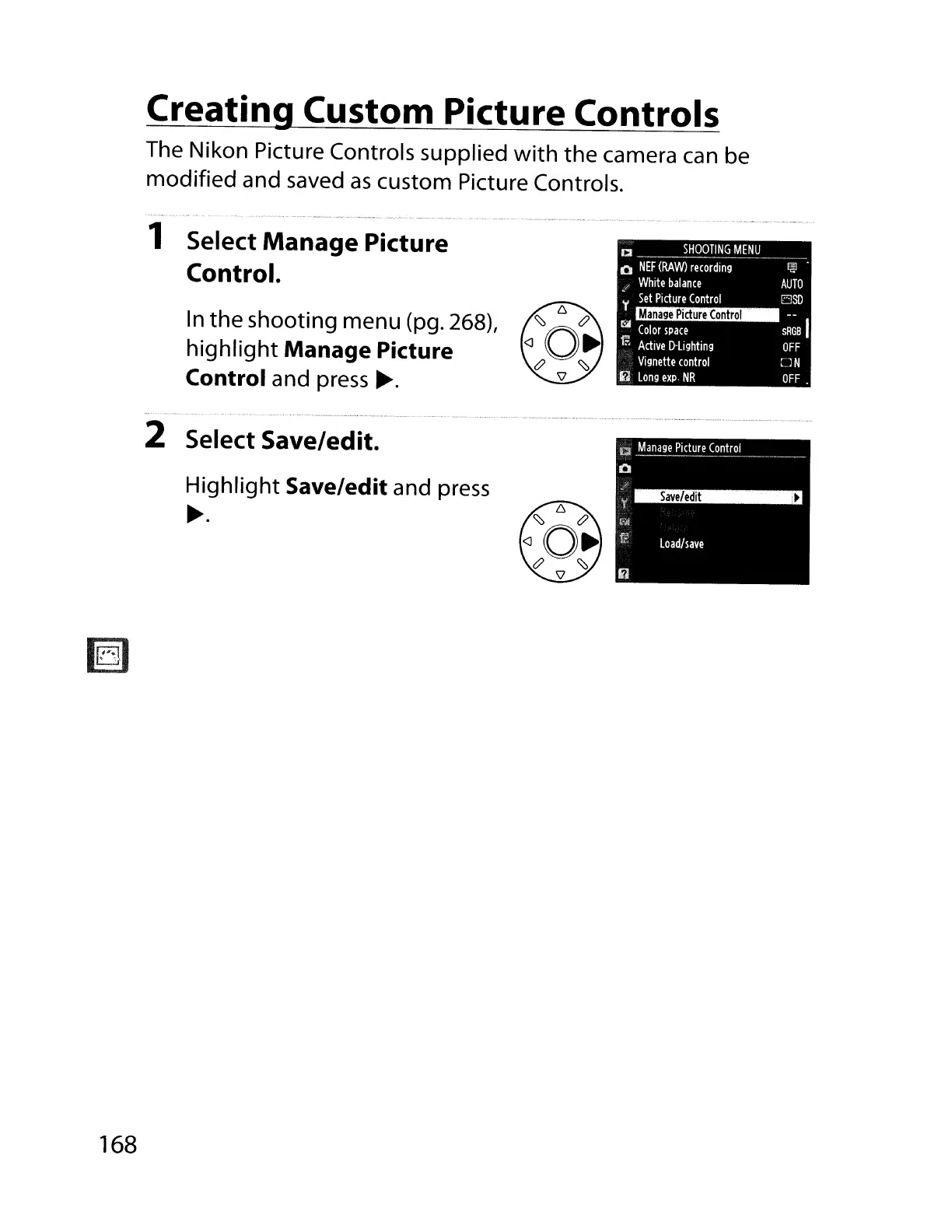
1 Select
Manage
Picture
Control.
In
the shooting menu (pg. 268),
highlight
Manage Picture
Control
and press
~.
CI
__
._
SHOOTlN~~E~y
_
Q
NEF
(RAW)
recording
I@
/
White
balance
AUTO
y
Set
Picture
Control
ElSD
ri.:i
Color
space
SRGsl
fR
Active
D-lighting
OFF
Vignette
control
::J N
~
Long
exp·
NR
OFF
~,.""-"
...•
_-------¥' .-._
.....•..
-.-
..
---
..
- .•.-
••
"
-._.......
•...•...
.
..•....•.....
----_
....•..
- •.- .
2 Select Save/edit.
Highlight
Save/edit and press
~.
168

Table of Contents

Other manuals for Nikon D700

Related product manuals