The
QUK:k
Settings
Display
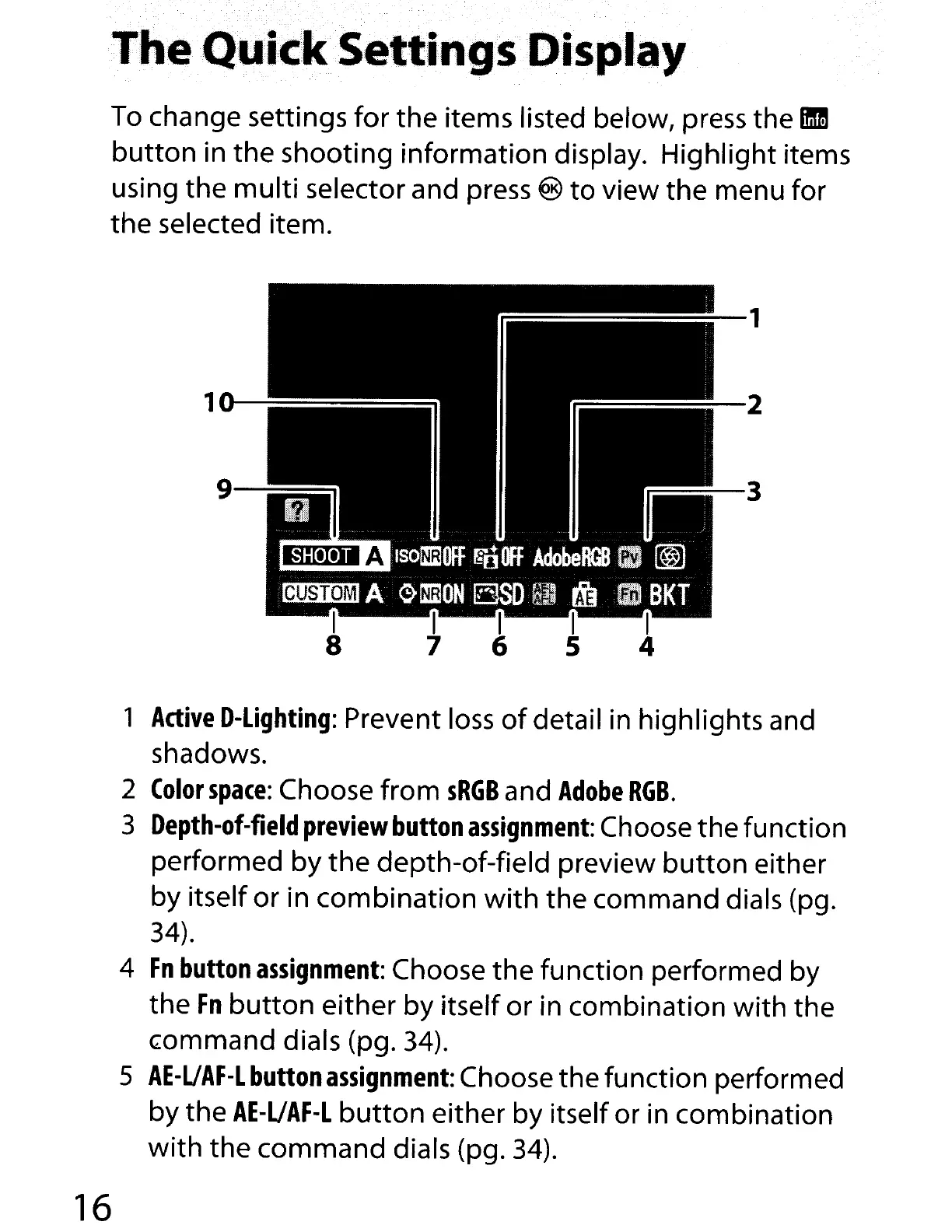
To
change settings
for
the items listed below, press the
1m!
button
in the shooting information display. Highlight items
using the
multi
selector and press ®
to
view the menu for
the selected item.
=~-3
1
Active
D-Lighting:
Prevent
loss
of
detail
in
highlights and
shadows.
2
Color
space:
Choose from
sRGB
and
Adobe
RGB.
3
Depth-of-field
preview
button
assignment:
Choose
the
function
performed by
the
depth-of-field preview
button
either
by itself or in combination
with
the command dials (pg.
34).
4
Fn
button
assignment:
Choose the function performed by
the
Fn
button
either by itself or in combination with the
G:ommand
dials (pg.
34).
5
AE-UAF-L
button
assignment:
Choose the function performed
by the
AE-UAF-L
button
either by itself or
in
combination
with
the command dials (pg.
34).
16



 To Next Page