EasyManua.ls Logo

Nikon D700 - Interval Timer Photography

Nikon D700
533 pages
Print Icon
To Next Page IconTo Next Page
To Previous Page IconTo Previous Page
Loading...
Interval Timer
Photography
The camera
is
equipped
to
take photographs automatically at
preset intervals.
-_._----------_._-----_._-----_.
__
..
_-------
..
_
__
..
-
_._--------
..
_. _.. -
._--_
..
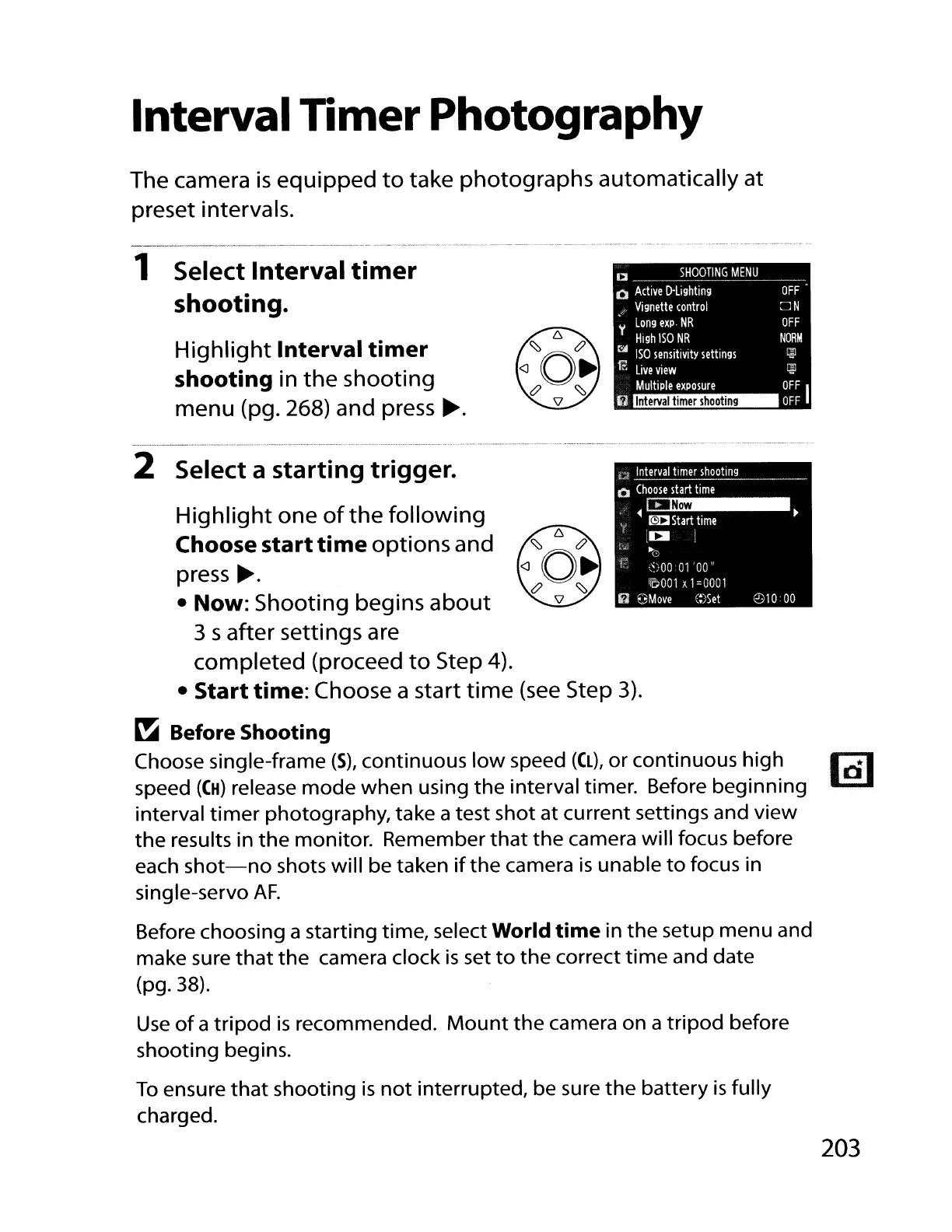
1 Select Interval
timer
shooting.
Highlight
Interval
timer
shooting
in
the
shooting
menu (pg. 268) and press
~.
CI
SHOOTING
MENU
o
Active
D-Lighting
._
Vignette
control
~
Long
expo
NR
High
ISO
NR
t>'
ISO
sensitivity
settings
f1o:
Live
view
Multiple
exposure
Interval
timer
shooting
OFF
~N
OFF
NORM
~
~
OFF
I
OFF
2 Select a
starting
trigger.
Highlight
one
of
the
following
Choose
start
time
options and
press
~.
Now:
Shooting begins
about
3 s after settings are
completed (proceed
to
Step 4).
Start
time: Choose a start
time
(see
Step
3).
~
Before
Shooting
Choose single-frame
(5),
continuous
low
speed ((L), or continuous high
101
speed
((H)
release
mode
when
using
the
interval timer. Before beginning
interval
timer
photography, take a test
shot
at current settings and
view
the
results in
the
monitor. Remember
that
the
camera will focus before
each
shot-no
shots will be taken
if
the
camera
is
unable
to
focus in
single-servo
AF.
Before choosing a starting time, select
World
time
in
the
setup menu and
make sure
that
the
camera clock
is
set
to
the
correct
time
and date
(pg.38).
Use
of
a
tripod
is
recommended.
Mount
the
camera on a
tripod
before
shooting begins.
To
ensure
that
shooting
is
not
interrupted, be sure
the
battery
is
fully
charged.
203

Table of Contents

Other manuals for Nikon D700

Related product manuals