EasyManua.ls Logo

Nikon D700 - Page 117

Nikon D700
533 pages
Print Icon
To Next Page IconTo Next Page
To Previous Page IconTo Previous Page
Loading...
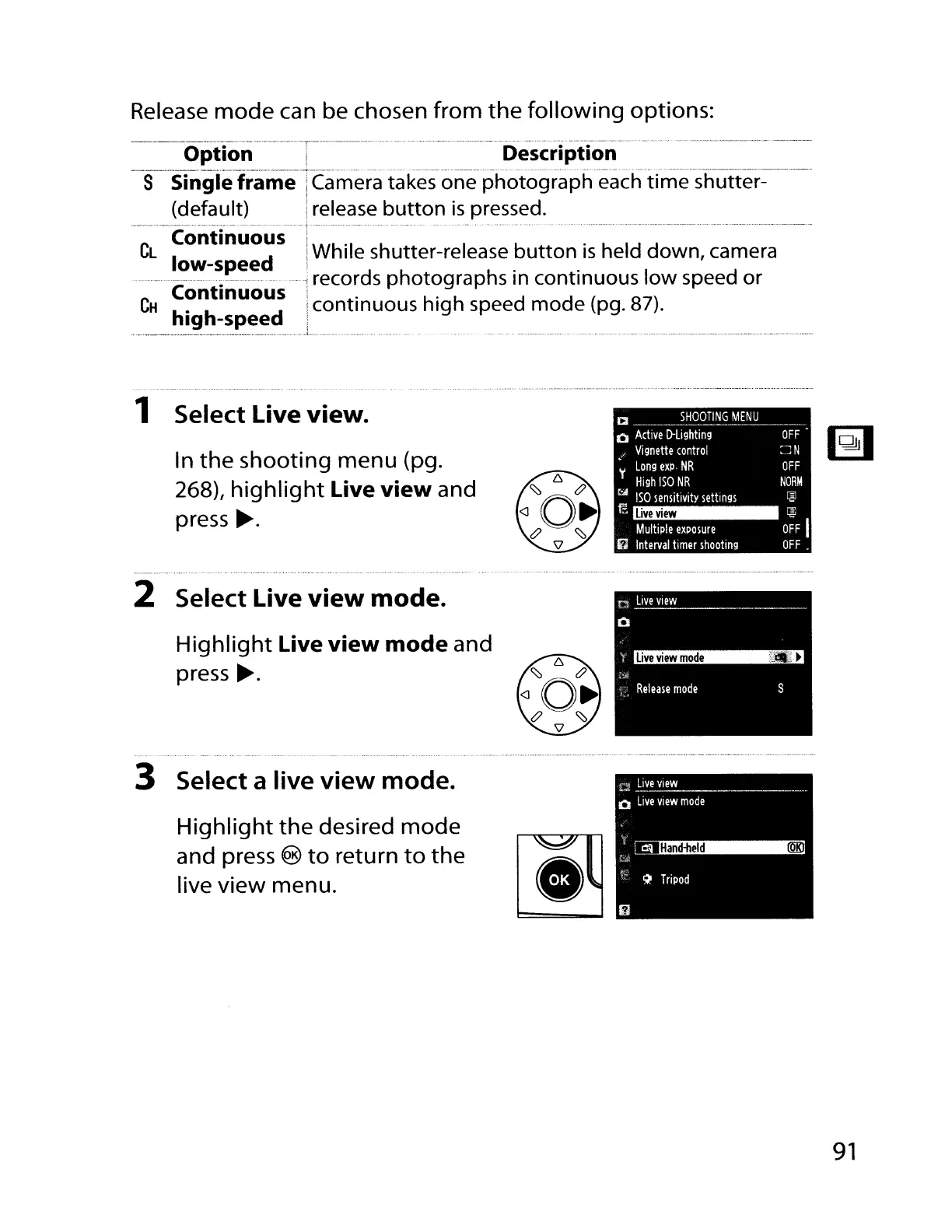
Release
mode
can be chosen
from
the
following
options:
----_
..
_--_._-_
...,.-._----_._--_.- ---_.-
-----.
__
._--_.-
....
_.
__
._
..
_._----------_._--_._
.........•_
..
__
..
__
..
_-----
Option i Description
______
..
-4-
.
__
__
.
..
~
._.
..
.
__
.
__
_
..
. _
..
. _ .
__
.hh
__
_
S Single frame iCamera takes one
photograph
each
time
shutter-
(default)
irelease
button
is
pressed.
---ContInlio"lis--T----.--····------···-
.-
...
--..
--
...
- -
--.----.---------.------
..
----------
....
-
...
--
CL
I d
I.
While shutter-release
button
is
held
down,
camera
ow-spee
1
••
------;----·-·---1
records
photographs
In
continuous
low
speed
or
.~~~Ign:;~~:;
Jcontinuous
high
speed
mode
(pg. 87).
....
~_._.
CI
s~g~NG~~N~
_
o
Active
D-lighting
OFF
/
Vignette
control
~
N
Long
expo
NR
OFF
'I'
High
ISO
NR
NORM
~
ISO
sensitivity
settings
~
1 Select
Live
view.
In
the
shooting menu (pg.
268)/
highlight
Live
view
and
press
~.
live
view
Multiple
exposure
I(;
Interval
timer
shootmg
-e
OFF
I
OFF.
2 Select Live
view
mode.
Highlight
Live
view
mode
and
press
~.
3 Select a
live
view
mode.
Highlight
the
desired
mode
and press ®
to
retu
rn
to
the
live
view
menu.
91

Table of Contents

Other manuals for Nikon D700

Related product manuals