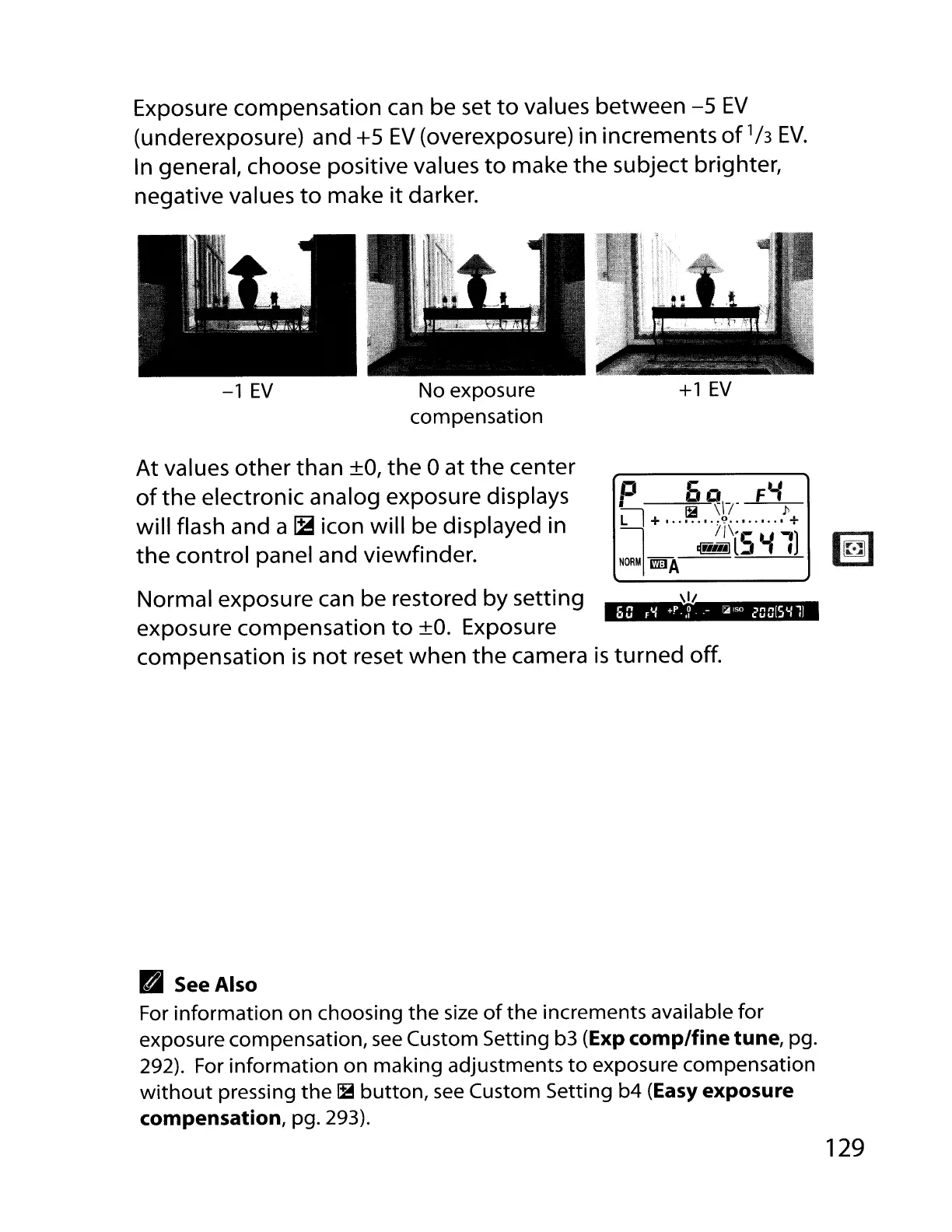
Exposure compensation can be set
to
values between
-5
EV
(underexposure) and +5
EV
(overexposure) in increments
of'h
EV.
In general, choose positive values
to
make
the
subject brighter,
negative values
to
make
it
darker.
-1
EV
No exposure
compensation
+1
EV
At values
other
than +0,
the
0 at
the
center
of
the
electronic analog exposure displays
will flash and a
~
icon will be displayed in
the
control panel and viewfinder.
p
~
~IT
Ft.f
p
II
+
:t?
•••••.••
+
~
//\'5
u-')
~l
-..
NORM
l'mIA
60
r'-l
+f'
.•
?
.-
~ISO
20015'-111
Normal exposure can be restored by setting
~II
exposure compensation
to
+0. Exposure
compensation
is
not
reset when
the
camera
is
turned off.
B See
Also
For
information
on
choosing
the
size
of
the
increments available
for
exposure compensation,
see
Custom Setting b3 (Exp comp/fine tune, pg.
292). For
information
on making adjustments
to
exposure compensation
without
pressing
the
~
button,
see
Custom Setting
b4
(Easy exposure
compensation,
pg. 293).
129



 To Next Page