·
...
---,.
._.
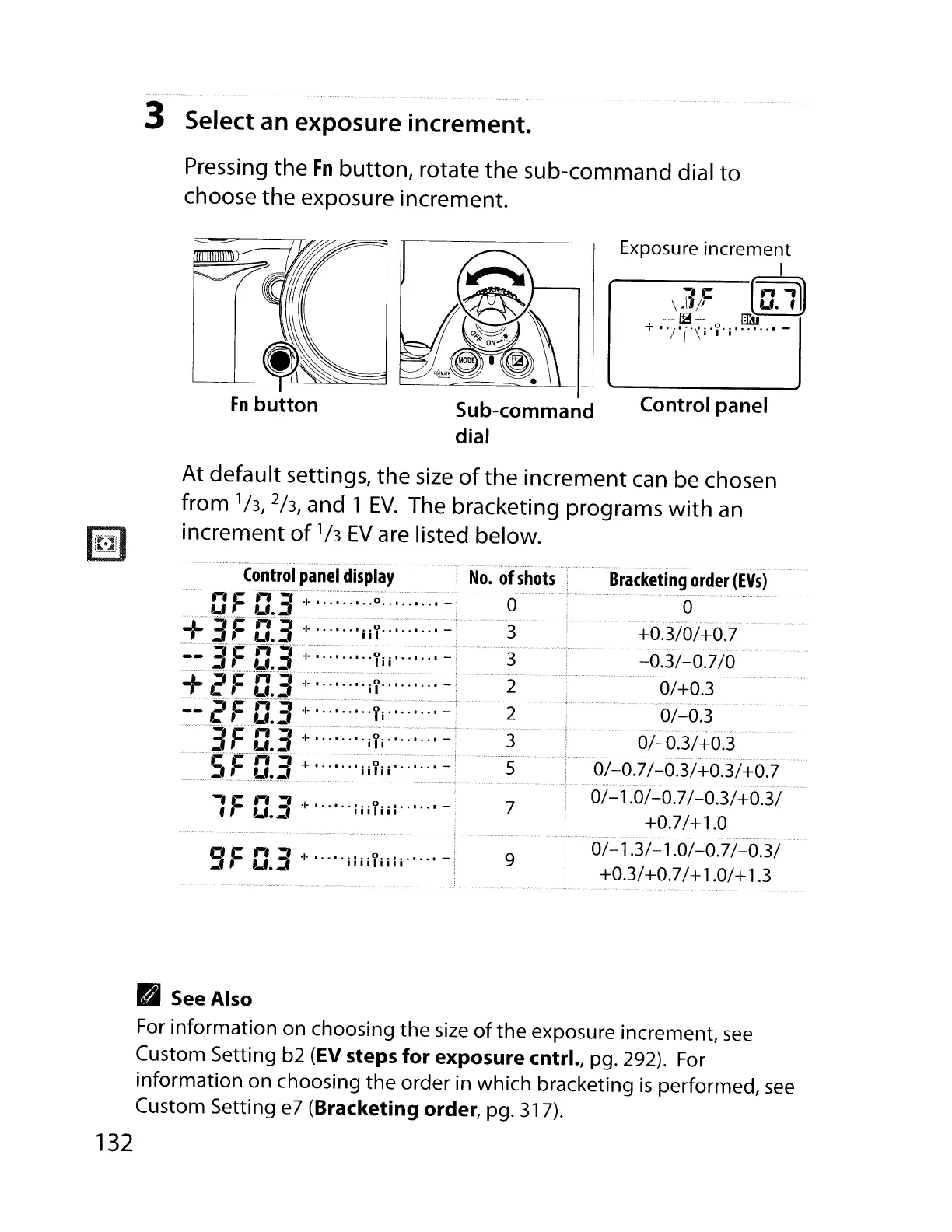
3 Select an exposure increment.
Pressing the
Fn
button, rotate the sub-command dial
to
choose the exposure increment.
Control panel
Exposure increment
I
~c
[n"l)
\.I1p
u.
f
_.
~-
m:ii
+
'"I'j'\i·y·j·······-
Sub-command
dial
At default settings, the
size
of
the increment
can
be chosen
from '/3,2/3, and 1
EV.
The bracketing programs
with
an
increment
of'/3
EV
are listed below.
9
9F
D.3
+ ·
..
··iliiYiili··
..
·-
Control
panel
display
Bracketing
order
(EVs)
.......
'rfF'O~'3'
·:I:-:~.::.·:~:
;;~
..
:
'-
+. . - L............. -_···0·····
+'IF
'Cf3'
~:-·-:~··::··i-if::·:-:-···:~~-·-
+0.3/0/+0.7
::3F-c:.3'·+
::'1;;:':'
.:~
-_.'...............................
-0.3/-0.7
/0
-::t'e-
FC~3':,:::':·
.-::.
i y.....:::. - .
0/
+0.3
::e-'FCf3-:;·:::·:·
...
·Yi········
-"""
....
0/-0.3
-
...
JF1J.3-~:·:·:··-:·:·:·;ii~:······
-
O/-oj/-t-O.3
~StCL3·;:·~·:···i:.i!ii.·
-
0/-0.7
/.
__
?~!
+0.3/+.?'?
1F
0.3
+
•··•
..
;iiYiii···
..
·
-'
7
0/-1.0/-0.7/-0.3/+0.3/
+0.7/+1.0
0/-1.3/-1.0/-0.7/-0.3/
+0.3/+0.7/+1.0/+1.3
• See Also
For information on choosing the
size
of
the
exposure increment,
see
Custom Setting b2
(EV
steps
for
exposure
cntrl., pg. 292).
For
information on choosing
the
order in which bracketing
is
performed,
see
Custom Setting e7 (Bracketing order, pg. 317).
132



 To Next Page