EasyManua.ls Logo

Nikon D700 - The Built-in Flash

Nikon D700
533 pages
Print Icon
To Next Page IconTo Next Page
To Previous Page IconTo Previous Page
Loading...
II
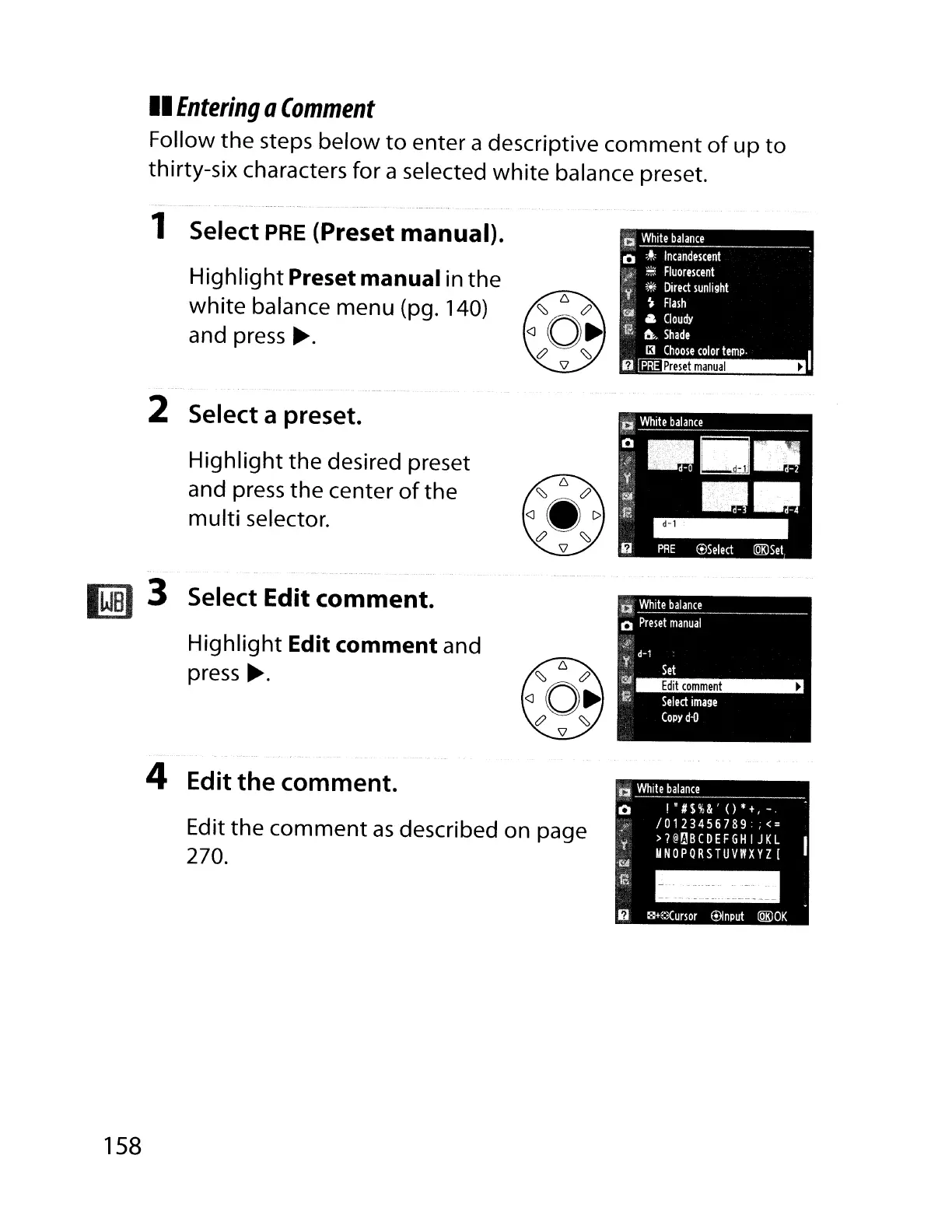
Entering
Q
Comment
Follow the steps below
to
enter a descriptive
comment
of
up
to
thirty-six characters for a selected
white
balance preset.
1 Select
PRE
(Preset manual).
Highlight
Preset manual in
the
white
balance menu (pg. 140)
and press
.-.
2 Select a preset.
Highlight
the desired preset
and press the center
of
the
multi
selector.
m3 Select Edit comment.
Highlight
Edit comment and
press
.-.
4 Edit
the
comment.
Edit the
comment
as
described on page
270.
158
CI
White
balance
o
I"#$%&'()*+,-.
/0123456789
;<=
>?@t:'!BCDEFGH
I JKL
UNOPQRSTUVI'IXYZ[
- -
--
- -
~
--
-
--
--
------
~
c<JH:;(ursor
®Input
tQKJOK

Table of Contents

Other manuals for Nikon D700

Related product manuals