Quick
adjust
~
~
Description
~_'_"'_"'U'
._~,~,
••
_
_.
_'.
._
."
.•••
_~
•
__
~~._
•••
<r
~"
_
••
_~
•••
~
__
•
.......
y
••
_._~
• "
•..
_.
••
_._
••
__
~
••
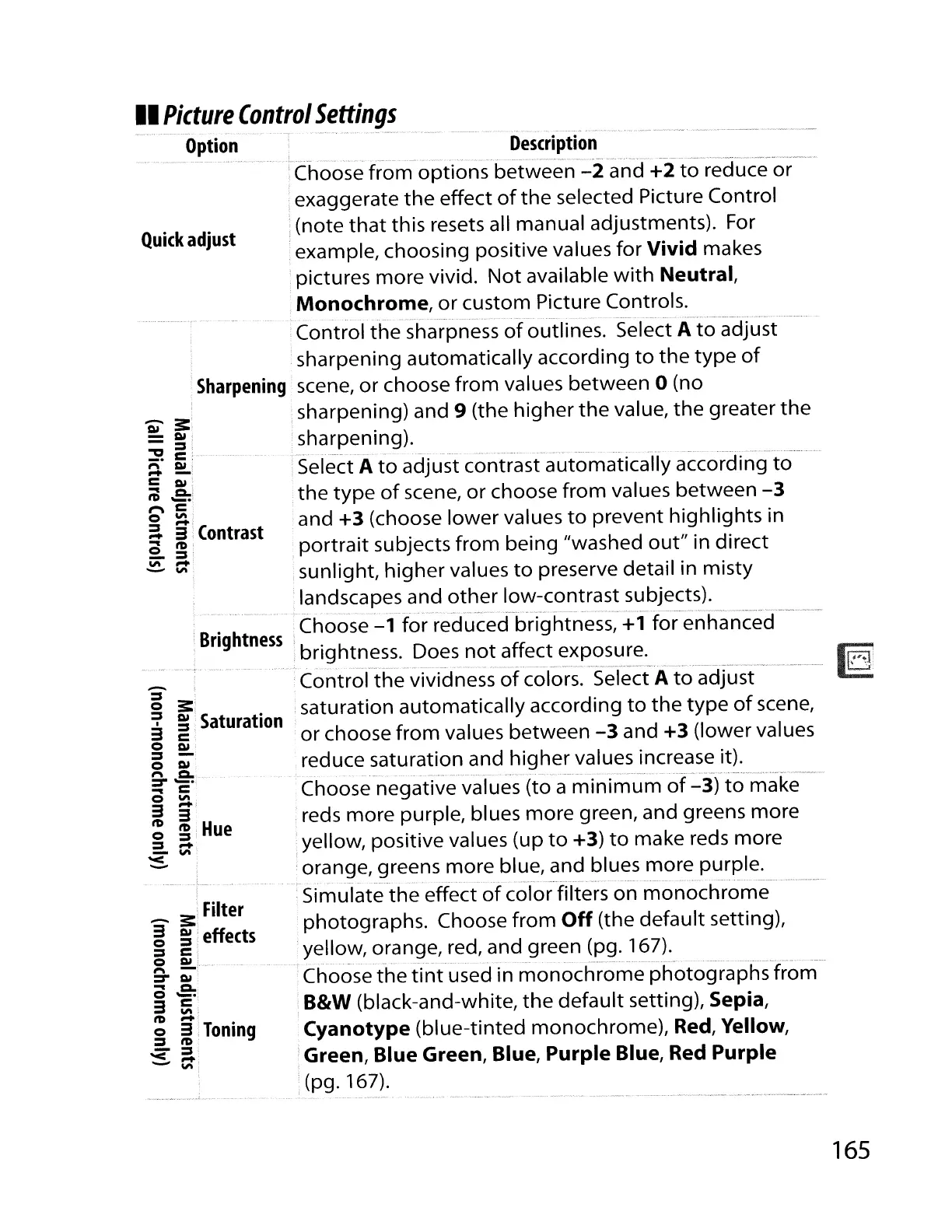
'Choose from options between
-2
and
+2
to
reduce or
exaggerate
the
effect
of
the
selected Picture Control
:(note
that
this resets all manual adjustments). For
example, choosing positive values for
Vivid
makes
pictures more vivid. Not available
with
Neutral,
Monochrome,
or
custom Picture Controls.
.................
_
..
_.....
.
•..........
---
-.-
.
Control
the
sharpness
of
outlines. Select A
to
adjust
·sharpening automatically according
to
the
type
of
Sharpening
scene,
or
choose
from
values between 0 (no
,sharpening) and
9 (the higher
the
value,
the
greater
the
sharpening).
....
, .
Select A
to
adjust contrast automatically according
to
the
type
of
scene,
or
choose from values between
-3
and
+3
(choose
lower
values
to
prevent highlights in
portrait
subjects from being "washed
out"
in direct
sunlight, higher values
to
preserve detail in misty
,landscapes and
other
low-contrast subjects).
___
."._.
•
__
••
~
_.
_
•••
__
•
~
~·_.v
__
•••.
~_.
~
•••••
"
•••
•
__
••
~
•••••
.~__
• _
..
_._.
._
•B . h
'.
Choose
-1
for reduced brightness,
+1
for enhanced
:
ng
tness' .
, bnghtness. Does
not
affect exposure.
•••••
,
•.
_.
··
__
·r
••
~·.'
.. '
••
' " "
.'.
.
__
",'"
.-,,·····
".·."'N"'··
_,
.,
..•
,.,~~,."_,_."
..
,.".,,'
__
,,.,,"_.~
__
,,,___
'
••
",
"v,·,·,-"
._.·_·_·
__
.'N·"""",,~
"'·""~_~',,·w,
.......
".N_",""~
'_
Control
the
vividness
of
colors. Select A
to
adjust
·saturation automatically according
to
the
type
of
scene,
or
choose from values between
-3
and
+3
(lower values
reduce saturation and higher values increase it).
••••
·.·"m'
.......
••• "
"""W·
~
.. _
•.••
" _
_._
_,
__
u-
__
Choose negative values (to a
minimum
of
-3)
to
make
'reds more purple, blues more green, and greens more
yellow, positive values (up
to
+3)
to
make reds more
orange, greens more blue, and blues more purple.
.......
-.
-
..
--
' _...............
~..........
,
~
.
Simulate
the
effect
of
color filters on
monochrome
photographs. Choose
from
Off
(the default setting),
yellow, orange, red, and green (pg.
167).
Choose
the
tint
used in
monochrome
photographs from
B&W
(black-and-white,
the
default
setting), Sepia,
Cyanotype
(blue-tinted monochrome), Red, Yellow,
Green,
Blue
Green, Blue,
Purple
Blue, Red
Purple
·(pg. 167).
_ 3:'
Filter
g
g::
effects
::::lI
c.
o
AI
.
f'\
-;
::::r
AI
...
Cl..
0-·,
:3
~,
tD
-;
o
:3
i
Toning
::::lI
tD'
-
::::lI
'<
-
-
'"
-
::::lI
o
3:
~
g
Saturation
o
AI
::::lI
-
o
AI
f'\
Cl.
::::r
_
•.
... c
3
~i
~
g;:
Hue
::::lI
_
- '"
'<
-
'iii
3:.
-
AI
-::::lI
~c
f'\
AI,
--
=
AI
~
.e:'
1""\=
o
'"
a
3'
Contrast
...
tD'
o ::::lI'
i;;"
_:
- '"
II
Picture
Control
Settings
---
-.
,'-'
---_&~.
¥.'
--.~..
•••
• -
----
Option
_.
__
A~
__
.
__
,,·_·V
__
.••.
165



 To Next Page