EasyManua.ls Logo

Nikon D700 - Page 270

Nikon D700
533 pages
Print Icon
To Next Page IconTo Next Page
To Previous Page IconTo Previous Page
Loading...
Direct
USB
Connection
If
the
camera
is
connected
to
a PictBridge printer via
the
supplied
USB
cable, selected
JPEG
pictures
can
be printed directly from
the
camera.
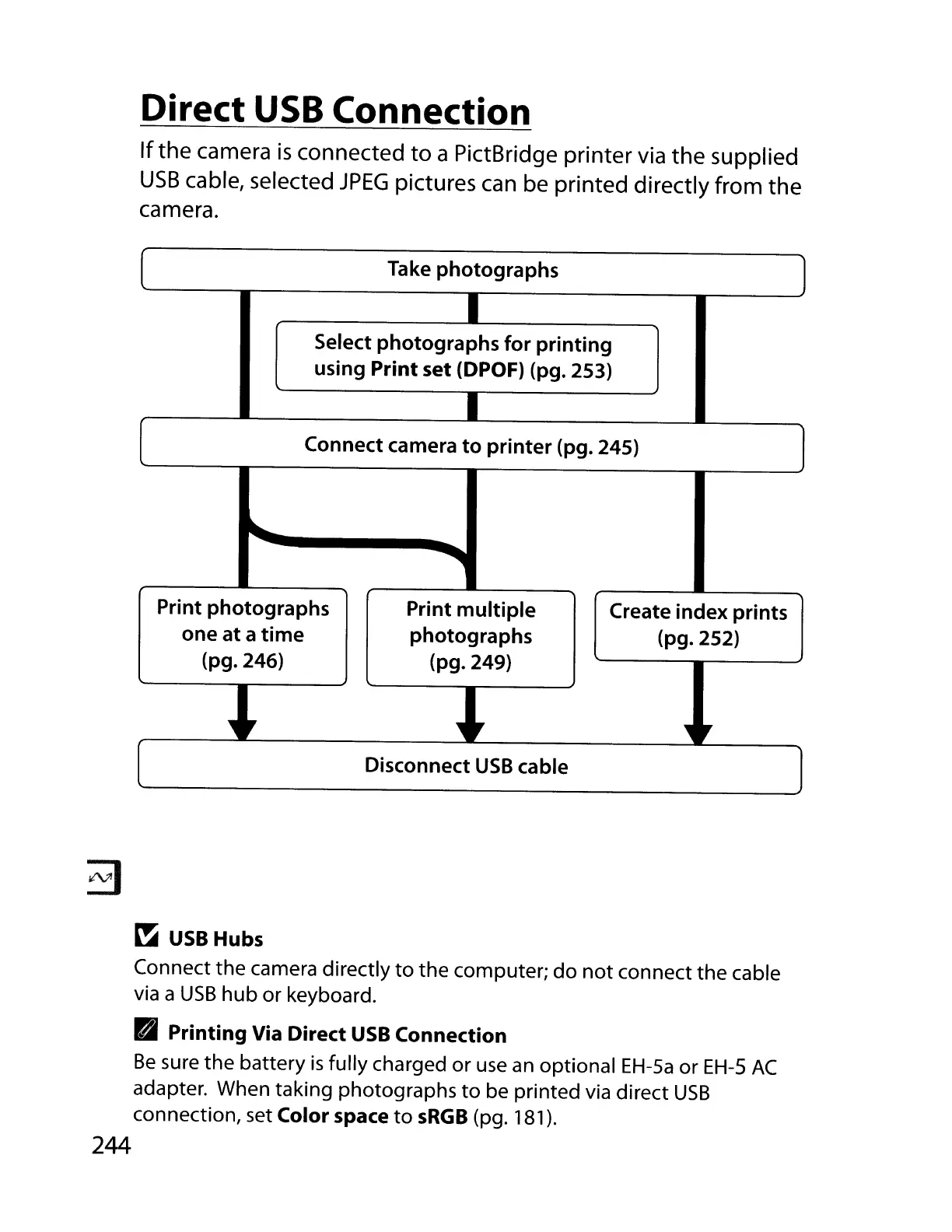
Take
photographs
I
Select
photographs
for
printing
using
Print
set (DPOF) (pg. 253)
I
Connect camera
to
printer
(pg. 245)
.....
""OIlllll
Print
photographs
Print
multiple
Create index prints
one at a
time
photographs
(pg.252)
(pg.246)
(pg.249)
.,
,
.,
,.
.,
,
Disconnect
USB
cable
~
USB
Hubs
Connect the camera directly
to
the computer;
do
not
connect the cable
via
a
USB
hub or keyboard.
Printing
Via
Direct
USB
Connection
Be
sure the battery
is
fully charged or
use
an
optional
EH-Sa
or
EH-S
AC
adapter. When taking photographs
to
be printed via direct
USB
connection, set Color space
to
sRGB
(pg. 181).
244

Table of Contents

Other manuals for Nikon D700

Related product manuals