EasyManua.ls Logo

Nikon D700 - Page 281

Nikon D700
533 pages
Print Icon
To Next Page IconTo Next Page
To Previous Page IconTo Previous Page
Loading...
Viewing Photographs
on
TV
The supplied EG-Dl 00 video cable
can
be used
to
connect
the
camera
to
a television or
VCR
for playback
or
recording. A type C
mini-pin High-Definition
Multimedia
Interface (HDMI) cable
(available separately from commercial sources) can be used
to
connect
the
camera
to
high-definition video devices.
Standard Definition Devices
To
connect
the
camera
to
a standard television:
1 Turn
the
camera off.
Always
turn
the
camera
off
before connecting
or
disconnecting
the
video cable.
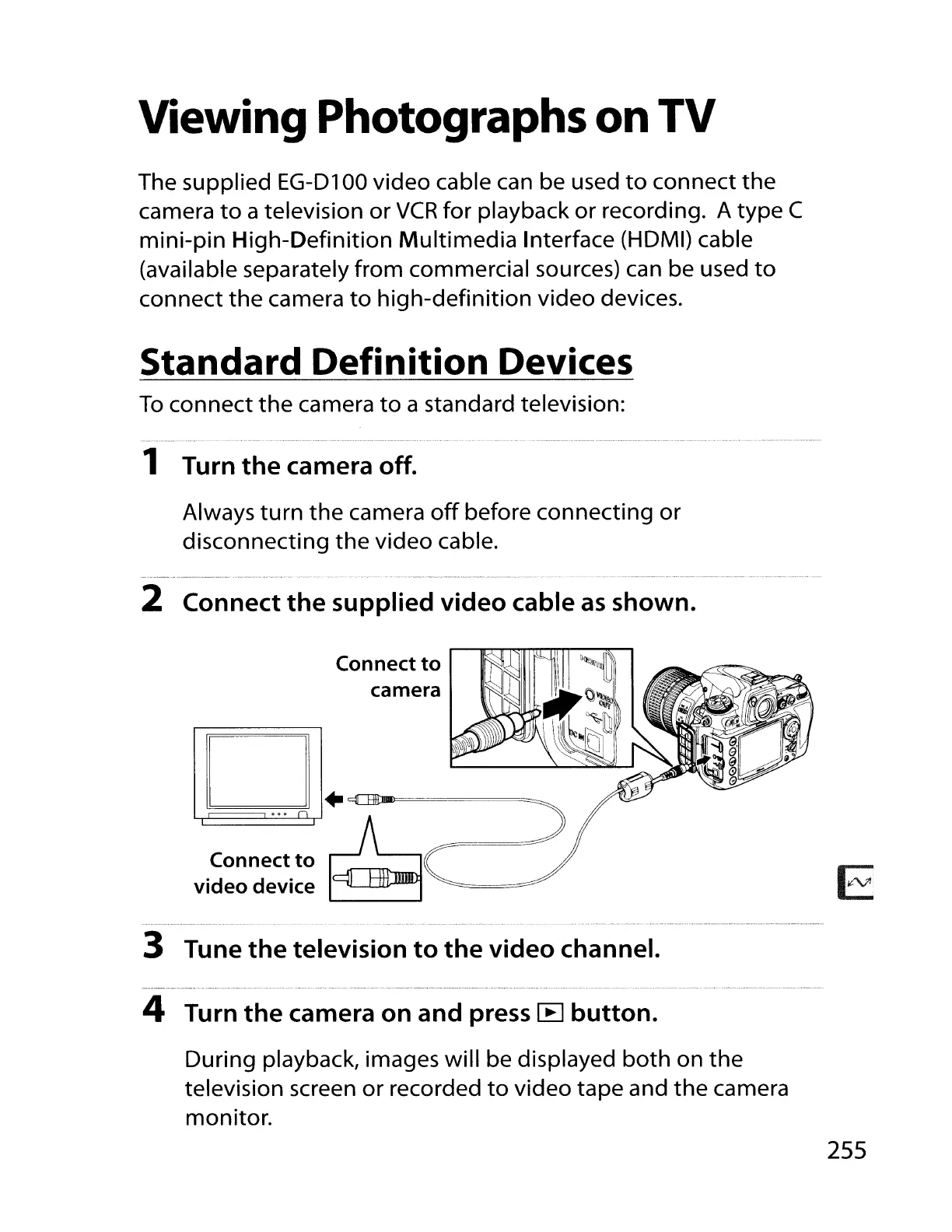
2 Connect
the
supplied
video
cable
as
shown.
Connect
to
camera
EJ
D+~
ooon
Connectto
~
video
device
~
3 Tune
the
television
to
the
video
channel.
4 Turn
the
camera
on
and press
[B
button.
During playback, images will be displayed
both
on
the
television screen
or
recorded
to
video tape and
the
camera
monitor.
255

Table of Contents

Other manuals for Nikon D700

Related product manuals