EasyManua.ls Logo

Nikon D700 - Page 283

Nikon D700
533 pages
Print Icon
To Next Page IconTo Next Page
To Previous Page IconTo Previous Page
Loading...
High-Definition Devices
The camera can be connected
to
HOMI devices using a
type
C
mini-pin HOMI cable (available separately from commercial
sources).
1 Turn
the
camera off.
Always
turn
the
camera
off
before connecting
or
disconnecting
an
HOMI cable.
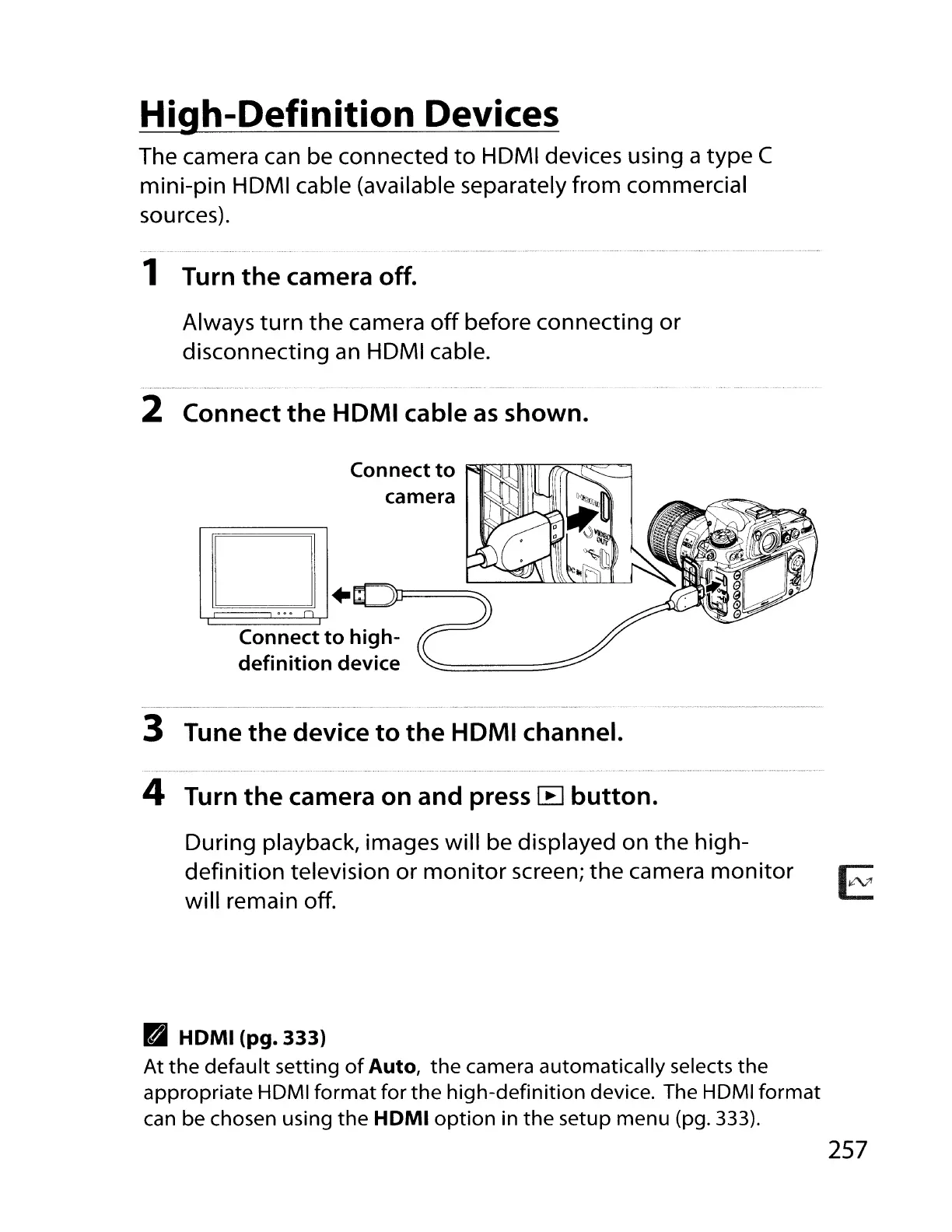
2 Connect
the
HDMI cable
as
shown.
Connect
to
camera
D+~~~
L.c::~==oo=o
n~
..........--~~-
Connect
to
high-
definition
device
3 Tune
the
device
to
the
HDMI channel.
4 Turn
the
camera
on
and
press
lB
button.
During playback, images will be displayed on
the
high-
definition television or
monitor
screen;
the
camera
monitor
will remain off.
PaJ
HDMI
(pg.
333)
At
the
default setting
of
Auto,
the
camera automatically selects
the
appropriate HOMI
format
for
the
high-definition
device. The HOMI
format
can be chosen using
the
HDMI
option
in
the
setup menu (pg. 333).
E
257

Table of Contents

Other manuals for Nikon D700

Related product manuals