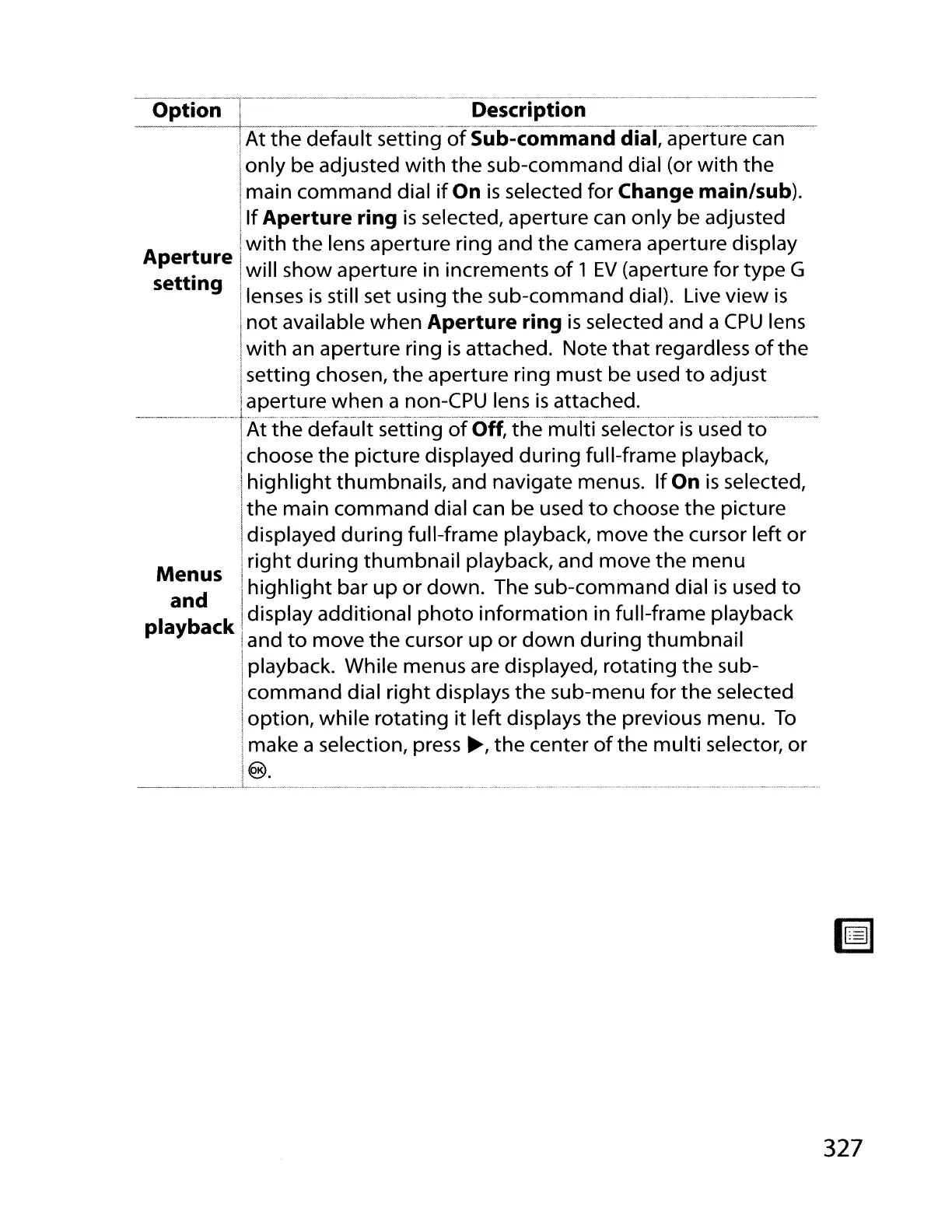
-Option~-"l-'"~~-'""-~~---"------------"~--'-De-sc-r'rptron--~--------------'---------'------~
___
- I _
--_._~.
.
..
__
....
~_._.
__
..
__
.
__
..
_~_.
~
__
,_.---------.-~
..
------
..
-,-~----
IAt
the
def~ult
setti~g
of
Sub-command
di~l,
apert.ure
can
Ionly be adjusted
with
the
sub-command dial (or
with
the
Imain command dial
if
On
is
selected for Change main/sub).
Ilf
Aperture ring
is
selected, aperture can only be adjusted
A
t I
with
the lens aperture ring and
the
camera aperture display
::~;i~re
!will
sh~w
~perture.in
increments
of
1
EV
(a~ertu~e
for.
typ~
G
g Ilenses
IS
stili set usmg
the
sub-command dial). Live view
IS
I
not
available when Aperture ring
is
selected and a
CPU
lens
I
I
with
an
aperture ring
is
attached. Note
that
regardless
of
the
Isetting chosen,
the
aperture ring must be used
to
adjust
!aperture when a non-CPU lens
is
attached.
--.---------'--
.•
-
•...
t--'--.-,.-
.....
---."..,.-.--
..
,_.---,--,--.--,------
..
----.---..-.---..-------.,-,--,--------------
..
---,-.---,.-..
-----,
..
--.-......
..-.-
..
IAt
the
default setting
of
Off,
the
multi
selector
is
used
to
I
Ichoose
the
picture displayed during full-frame playback,
I
highlight
thumbnails, and navigate menus.
If
On
is
selected,
Ithe main command dial
can
be used
to
choose
the
picture
i displayed during full-frame playback, move
the
cursor left
or
M I
right
during
thumbnail
playback, and move
the
menu
en;s
i
highlight
bar
up
or
down. The sub-command dial
is
used
to
I
a~
k Idisplay additional
photo
information in full-frame playback
p ay
ac
Iand
to
move
the
cursor up or
down
during thumbnail
Iplayback. While menus are displayed, rotating
the
sub-
Icommand dial right displays
the
sub-menu for
the
selected
Ioption, while rotating
it
left displays
the
previous menu.
To
Imake a selection, press
~,
the
center
of
the
multi selector, or
1
!@.
_.
__
.. _
,_
...
_._L_
•.
_.
__
._
...
_._.
__
..... •
__
..
__
..
_.
~
....
.
__
..
__
,
__
,
327



 To Next Page