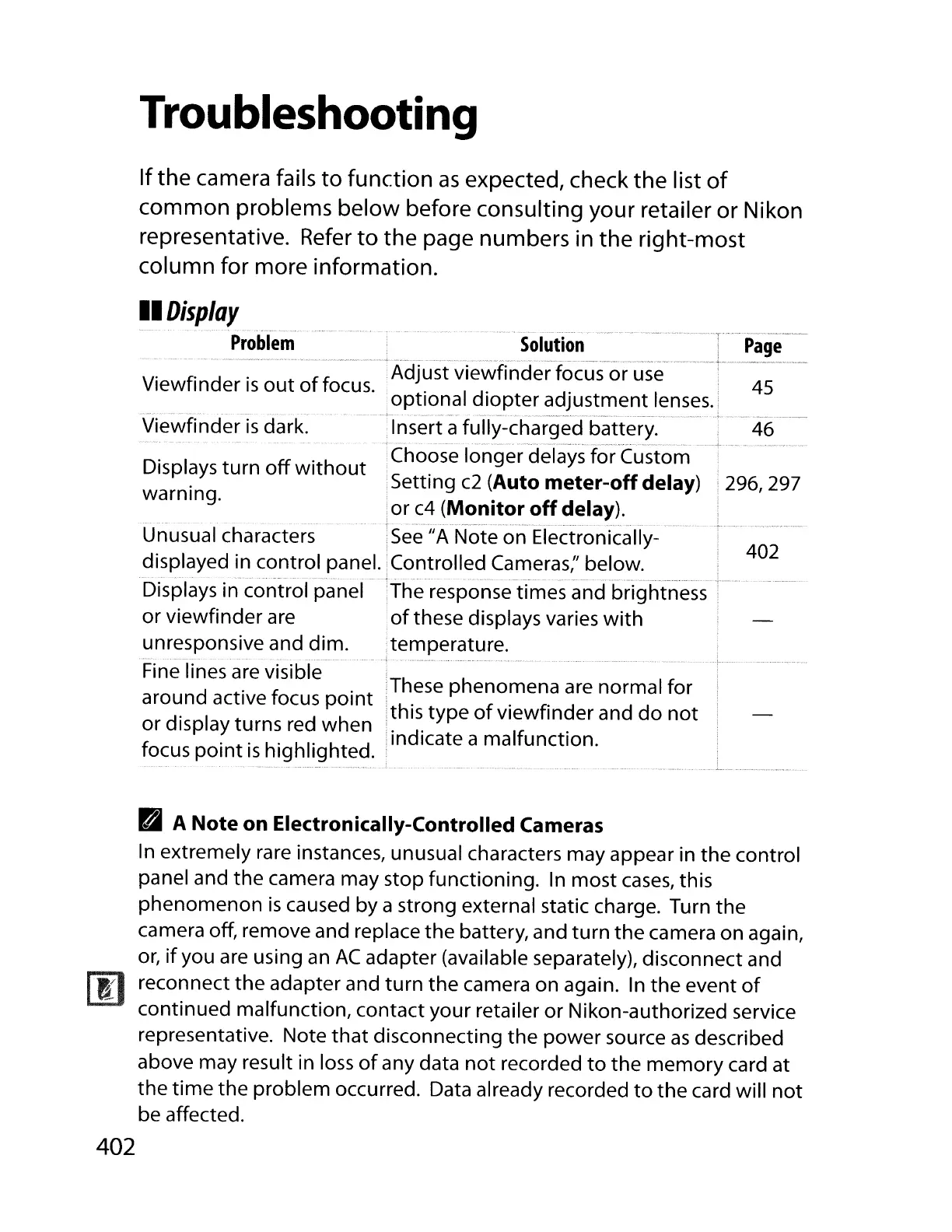
Troubleshooting
Ifthe camera fails
to
function
as
expected, check the list
of
common problems below before consulting your retailer or Nikon
representative.
Refer
to
the page numbers in the right-most
column for more information.
402
.These phenomena
are
normal for
!this type
of
viewfinder and
do
not
indicate a malfunction.
Viewfinder
is
dark.
,
..
'solutio'n'"
.....
..--
..
'
--'T'
-
..
P~ige---
~
__
¥,,¥
•••
_
•.•••
__
.
__
._
••••
....
~._.~_,_
..
_
..
~
.•••••
,_~_w
._,_,
__
._._w,
._
•.
Viewfinder
is
out
of
focus. Adjust viewfinder focus or
use
45
Op!!?_n.~
I
~i~pter
,~.~l~.~~e~~.I~~,se~·i_
._.'
...
,Insert a fully-charged battery. .
46
·C·hoose longer'delays'
r6r'Cu'sto-m'~'-'
-'~-'-
Displays turn
off
without
,Setting
c2
(Auto
meter-off
delay) !
296,
297
warning.
or
c4
(Monitor
off
delay).
............•
.
....
......•................
Unusual characters
See
JJA
Note on Electronically-
displayed in control panel. Controlled Cameras;' below.
••••
• •
•.
¥
.•.••
¥.
_
•••••
_...
·w·····_·
....•..
_._".¥., _ _
..
_ __ _........
..
•
..
_'.
._
•.
_.•
_._
.
Displays in control panel The response times and brightness
or viewfinder are
of
these displays varies
with
unresponsive and dim. temperature.
.................................
Fine lines are visible
around active focus
point
or display turns red when
focus
point
is
highlighted.
II
Display
Problem
B A
Note
on
Electronically-Controlled
Cameras
In
extremely rare instances, unusual characters may appear in the control
panel and the camera may stop functioning.
In
most
cases,
this
phenomenon
is
caused by a strong external static charge. Turn the
camera off, remove and replace the battery, and
turn
the
camera on again,
or,
if
you
are
using an
AC
adapter (available separately), disconnect and
reconnect
the
adapter and
turn
the camera on again.
In
the event
of
continued malfunction, contact your retailer or Nikon-authorized service
representative. Note
that
disconnecting the power source
as
described
above may result in loss
of
any data
not
recorded
to
the memory card at
the
time
the problem occurred. Data already recorded
to
the card will
not
be affected.
402



 To Next Page