EasyManua.ls Logo

Nikon D700 - Page 441

Nikon D700
533 pages
Print Icon
To Next Page IconTo Next Page
To Previous Page IconTo Previous Page
Loading...
244
Indicator
Control
Monitor
panel
Problem
Solution
Page
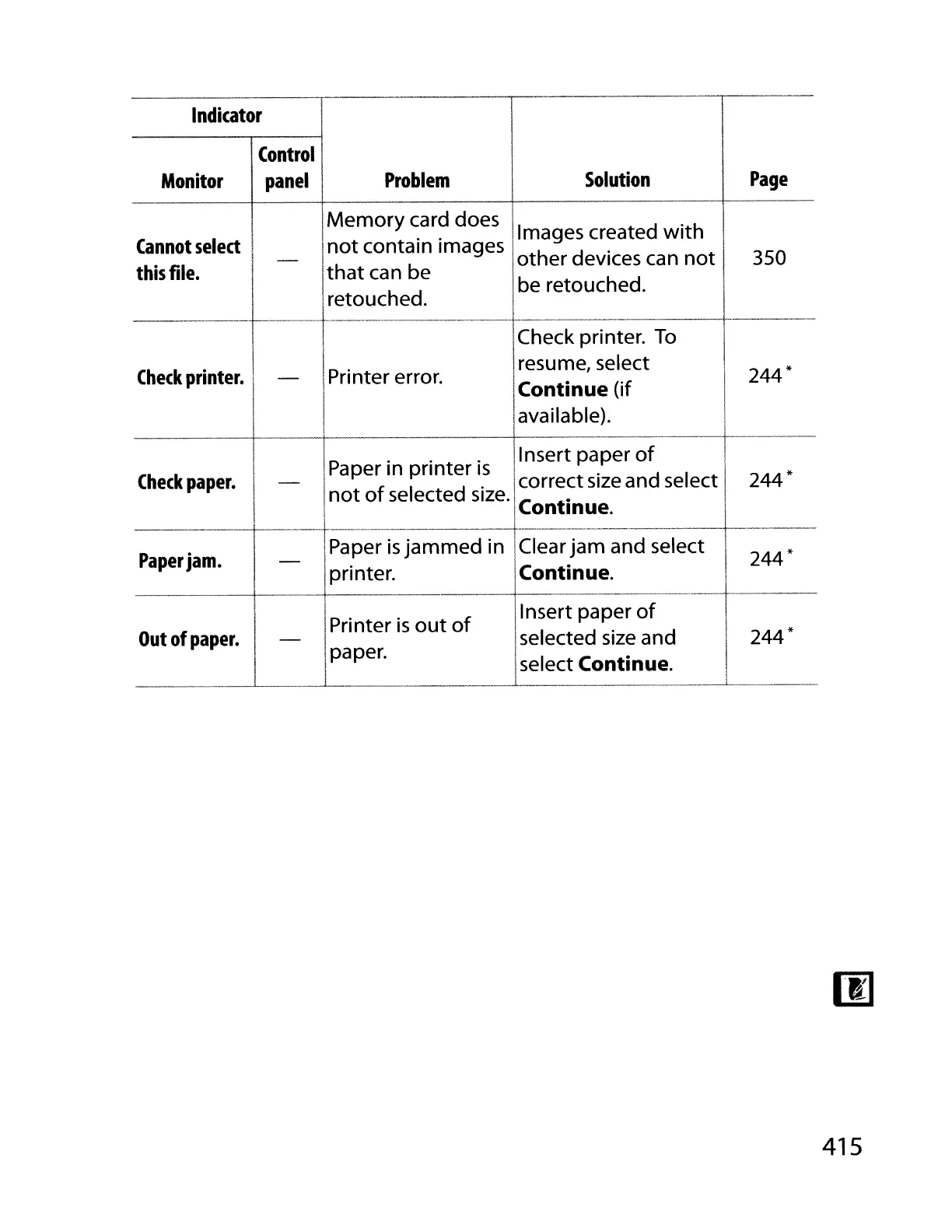
Memory
card does
Images created
with
Cannot
select
i
not
contain images
I
-
other devices can
not
350
this
file.
that
can be
retouched.
be retouched.
----
--
Check printer.
To
Check
printer.
Printer error.
resume, select
244*-
Continue (if
I
available).
Paper in printer
is
Insert paper
of
Check
paper.
-
correct
size
and select
244*
not
of
selected
size.
Continue.
I
8aper
is
jam-m~d
in .
-------------------
f------------
Paper
jam.
Clear
jam
and select
244*
pnnter. Continue.
1--·------
-------
------
Printer
is
out
of
Insert paper
of
*
Out
of
paper.
Iselected
size
and
____
--'-
__
--'-p_:per.
--l~elect
Continue.
415

Table of Contents

Other manuals for Nikon D700

Related product manuals