Defaults
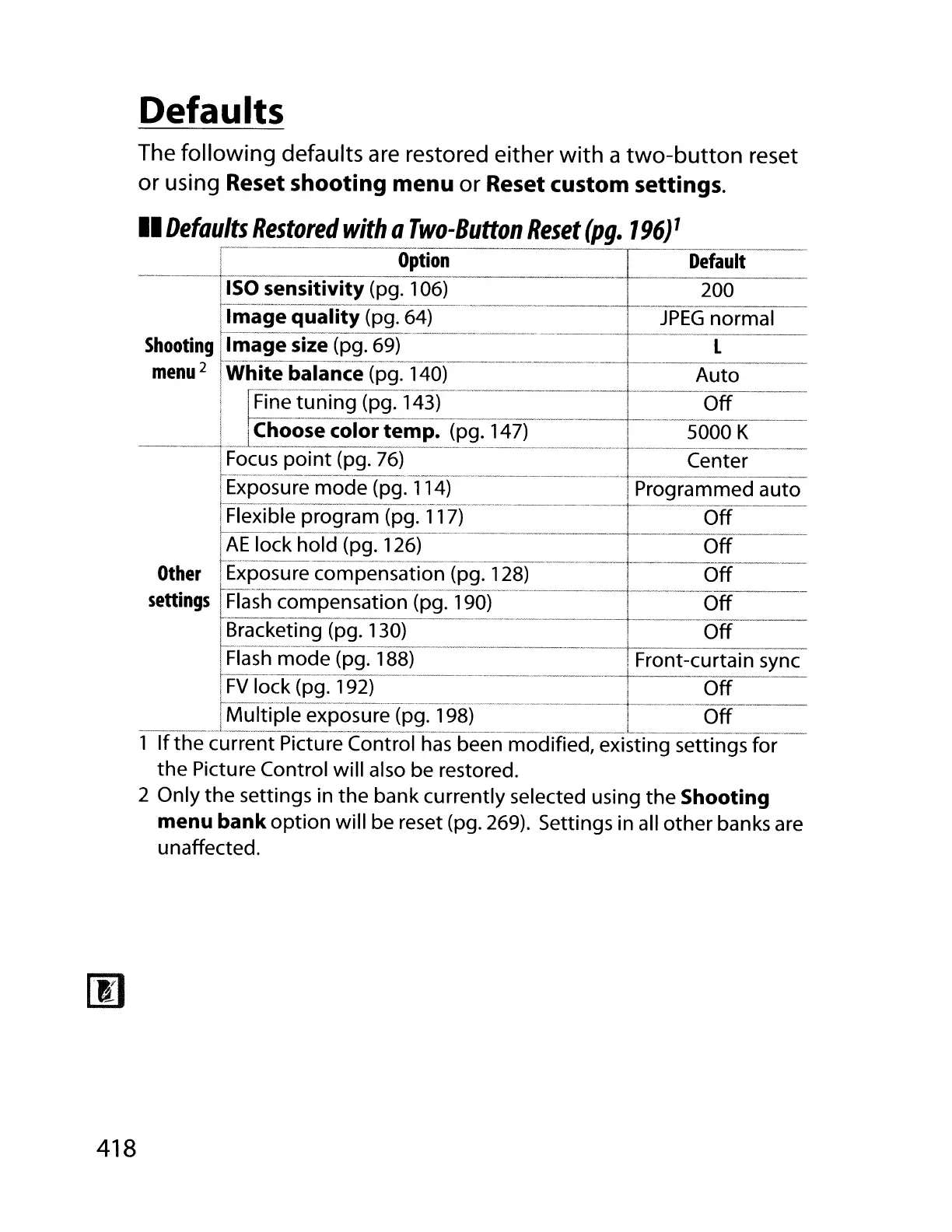
The following defaults
are
restored either
with
a
two-button
reset
or using
Reset shooting
menu
or Reset custom settings.
II
Defaults
Restored
with
a
Two-Button
Reset
(pg.
196)
1
I
Option
=r=--De-t-au-It---
1150
sensitivity (pg.
106)____
_ 200
llmage
quality
(pg.
64)
JPEG
normal
Shooting
[Image
size (pg.
69)
------------
,----
L
menu
2
~Whi-te-ba-Ia-n-c-e
(pg~,_40T---------------------c------A-ut-o----
I
fin-e-t-uni-ng-(p-g.T4-3)------------------
-
Off
____ I IChoosecolor
te~p~lP~47)"
50-0-'-0-K---
1Focus
point
(pg.
76)
Center
I
Expos_~re
mode (pg.
114)
Programmed auto
~Iexible
program (pg.
117_)
Off
I
AE
lock hold (pg.
126)
Off
t-------------------------------·----
..
-----
..
-----
-.------
..
---.
s:~~:;s
~:-~~-sic:~~o-em-nf-a~1-;~t;;~.(-~i-~)_-128l-_-
..
---
-.----_-__
~_Z_=__--
~iracketing
(pg.
130)
Off
~Iash
mode (pg.
188)---
Front-curtain sync
L
FV
Tack
(pg.
192)
L
Off
_____
J
Multi~!:._exposure
(pg.
198~
L
O_ff
_
1
If
the current Picture Control
has
been modified, existing settings for
the Picture Control will also be restored.
2 Only the settings in the bank currently selected using the
Shooting
menu
bank
option will be reset (pg.
269).
Settings in all other banks are
unaffected.
418



 To Next Page