EasyManua.ls Logo

Nikon D700 - Page 49

Nikon D700
533 pages
Print Icon
To Next Page IconTo Next Page
To Previous Page IconTo Previous Page
Loading...
--------_._------_
..•...•.
__
..•
_.
__
.
__
..
_
..
_--
---
-_.-
-
_._._----._.
--._-----_._-_
..
_--
....
__
._
...•..
_._--._-_.
-
..
-
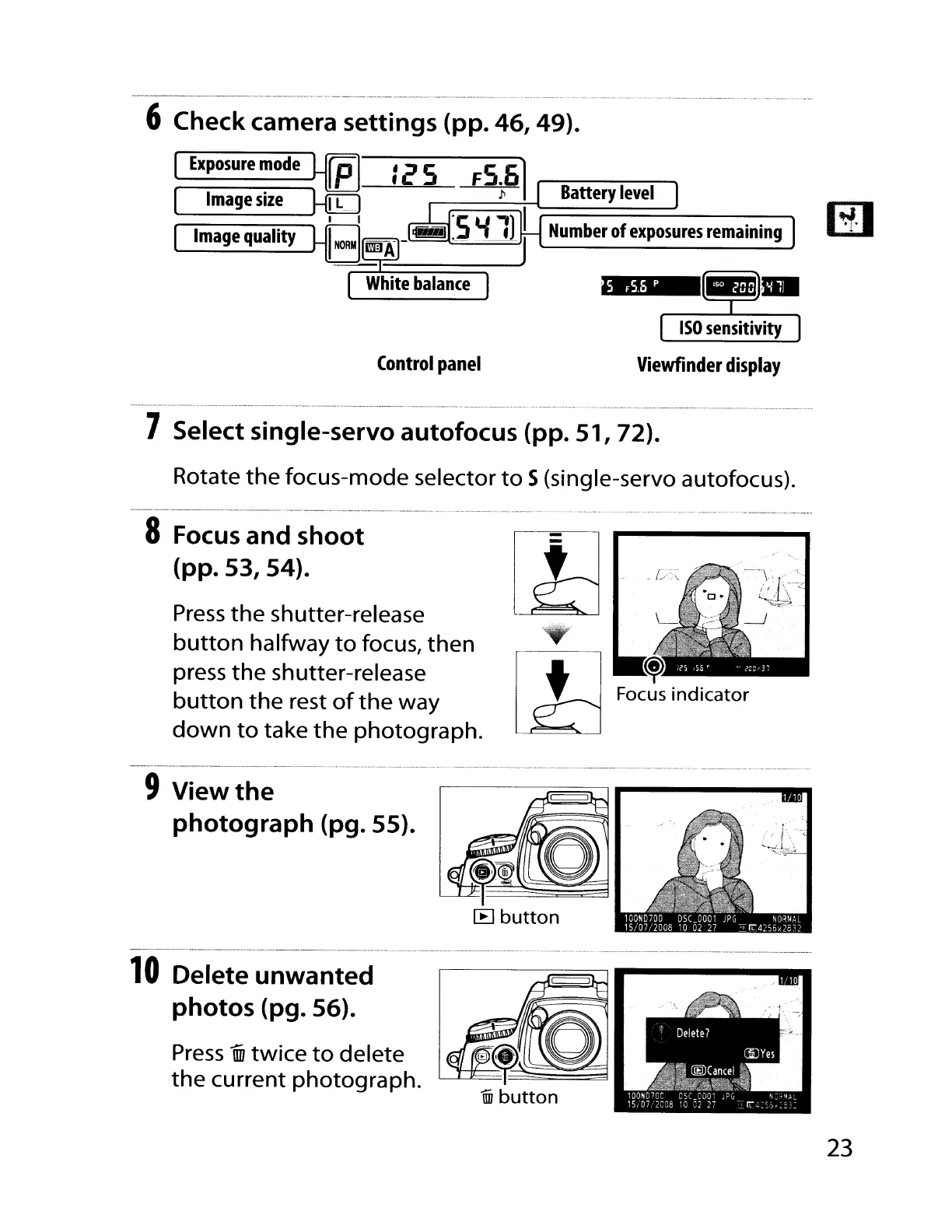
6 Check camera settings (pp. 46, 49).
Control
panel
Battery
level
Number
of
exposures
remaining
Viewfinder
display
7 Select single-servo autofocus (pp. 51, 72).
Rotate
the
focus-mode selector
to
S(single-servo autofocus).
--
..
_
__
.•.....
_
.•......
_._
__
......•- _..
__
.•..
-.
.
_.......
.
..
...•.. .
..
. _ _
..
--
.....•..
-
-""
._
..
_._
..
,.".,.,.,.
8
Focus
and shoot
(pp. 53, 54).
Press
the
shutter-release
button
halfway
to
focus,
then
press
the
shutter-release
button
the
rest
of
the
way
down
to
take
the
photograph.
9 View
the
photograph (pg. 55).
10
Delete unwanted
photos (pg. 56).
Press
iiD
twice
to
delete
the
current
photograph.
23

Table of Contents

Other manuals for Nikon D700

Related product manuals