EasyManua.ls Logo

Nikon D700 - Page 65

Nikon D700
533 pages
Print Icon
To Next Page IconTo Next Page
To Previous Page IconTo Previous Page
Loading...
World
time
~
Language
En
.
D
SETUP
MENU
__
Format
memory
card
J
LCD
brightness
0
Clean
image
sensor
Y
Lock
mirror
UP
for
cleaning
~
Video
mode
IEillJ
~
HDMI
AUTO
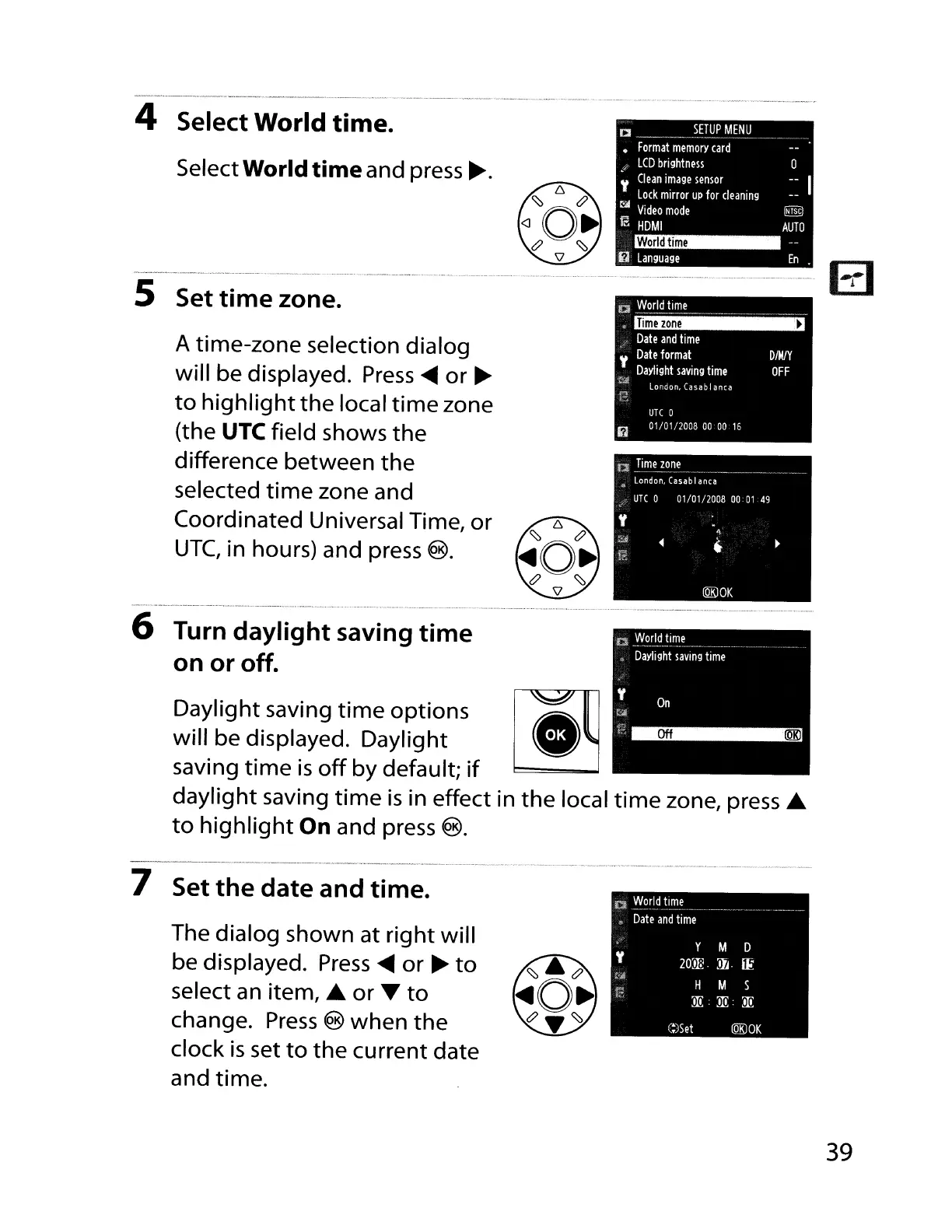
A time-zone selection dialog
will be displayed.
Press
~
or
~
to
highlight
the
local
time
zone
(the
UTe field shows
the
difference
between
the
selected
time
zone and
Coordinated Universal Time, or
UTC,
in
hours) and
press
®.
Daylight saving
time
options
will be displayed. Daylight
saving
time
is
off
by default; if
daylight saving
time
is
in
effect
in
the
local
time
zone,
press
....
to
highlight
On
and
press
®.
Select World
time
and
press
~.
..
__
.~.
..
--
.•....
_.-~-.-
_
......•
"
~
. " ...•........
-.
6 Turn daylight saving
time
on or off.
5 Set
time
zone.
4 Select World
time.
-_
..
_---_._------_
..•..
__
._----
..
_
....
__
._
.•...
_._
..•.
-_
..
_.----_
.....
_--
....
_._
.....
_-_
..
_---
7 Set
the
date and time.
The dialog shown at right will
be displayed.
Press
~
or ~ to
select an item,
....
or T to
change.
Press
®
when
the
clock
is
set
to
the current date
and time.
D~~rldtime
Date
and
time
y
M D
Y
20m;
.
JIJ.
ilt
;'i!
M S
t"
H
ll!
ll!:
ll!
C:)Set
lQK)OK
39

Table of Contents

Other manuals for Nikon D700

Related product manuals