40
Non-TTL auto flash mode
Non-TTL auto A flash
The SB-800’s built-in sensor measures the flash illumination reflected from the
subject, automatically controlling the SB-800’s light output to give the correct
exposure. This allows you to make exposure compensation (p. 54) easily by
varying the aperture set on the camera or lens.
• No limitation on usable cameras.
• Auto Aperture flash (p. 38) is automatically set (default setting) when a CPU lens is
mounted on cameras compatible with CLS, digital SLRs not compatible with CLS,
cameras in Groups I and II and COOLPIX cameras compatible with i-TTL. To cancel
Auto Aperture flash and set to Non-TTL auto flash, use Custom settings (p. 67).
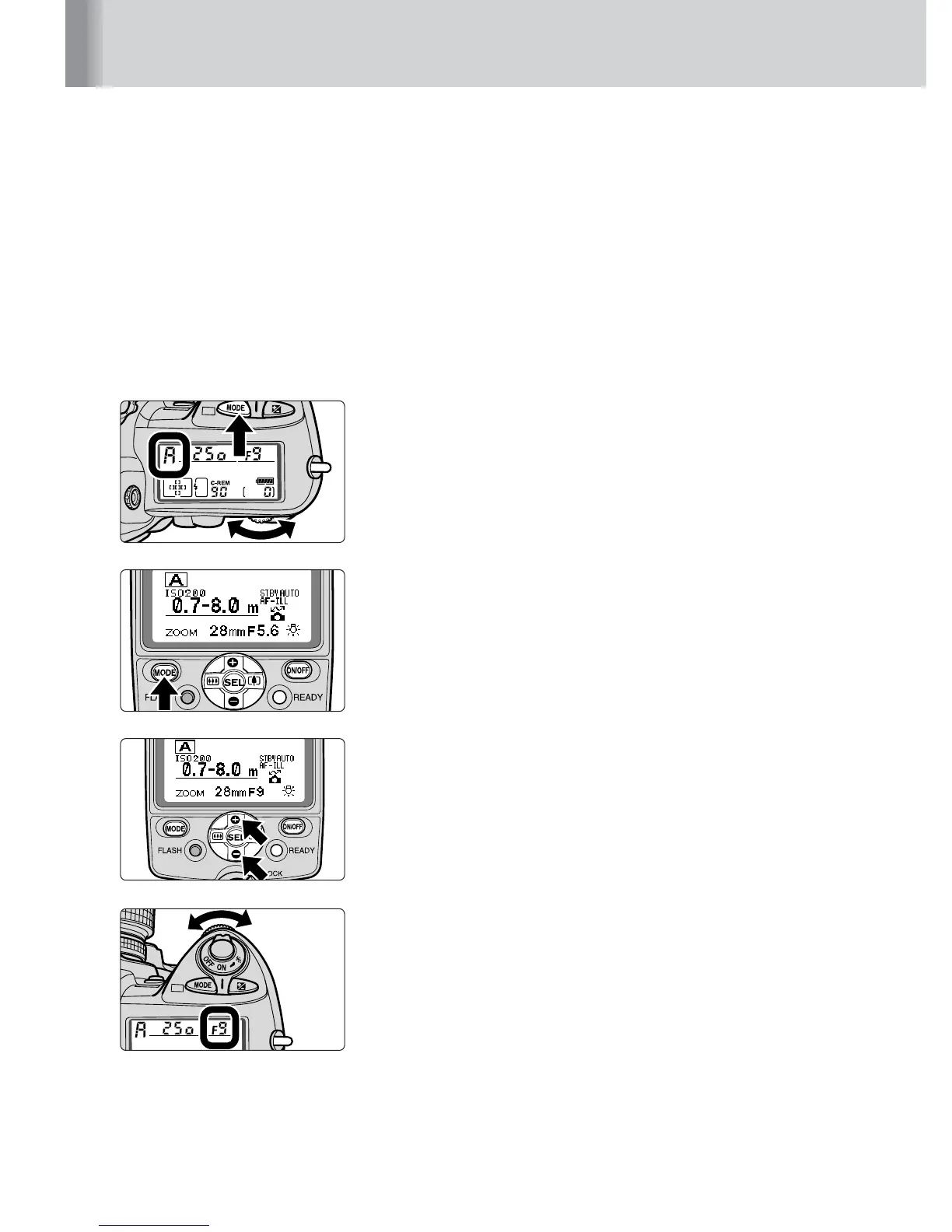
1
Set the camera’s exposure mode to Aperture-
Priority Auto (A) or Manual (M).
2
Press the a button to display A on the
LCD panel.
3
Press the e or f button to change the aperture,
bringing the subject within the flash shooting
distance range.
4
Set the aperture that appears on the SB-800’s
LCD panel on the lens or camera.



 To Next Page