Detailed operation
41
5
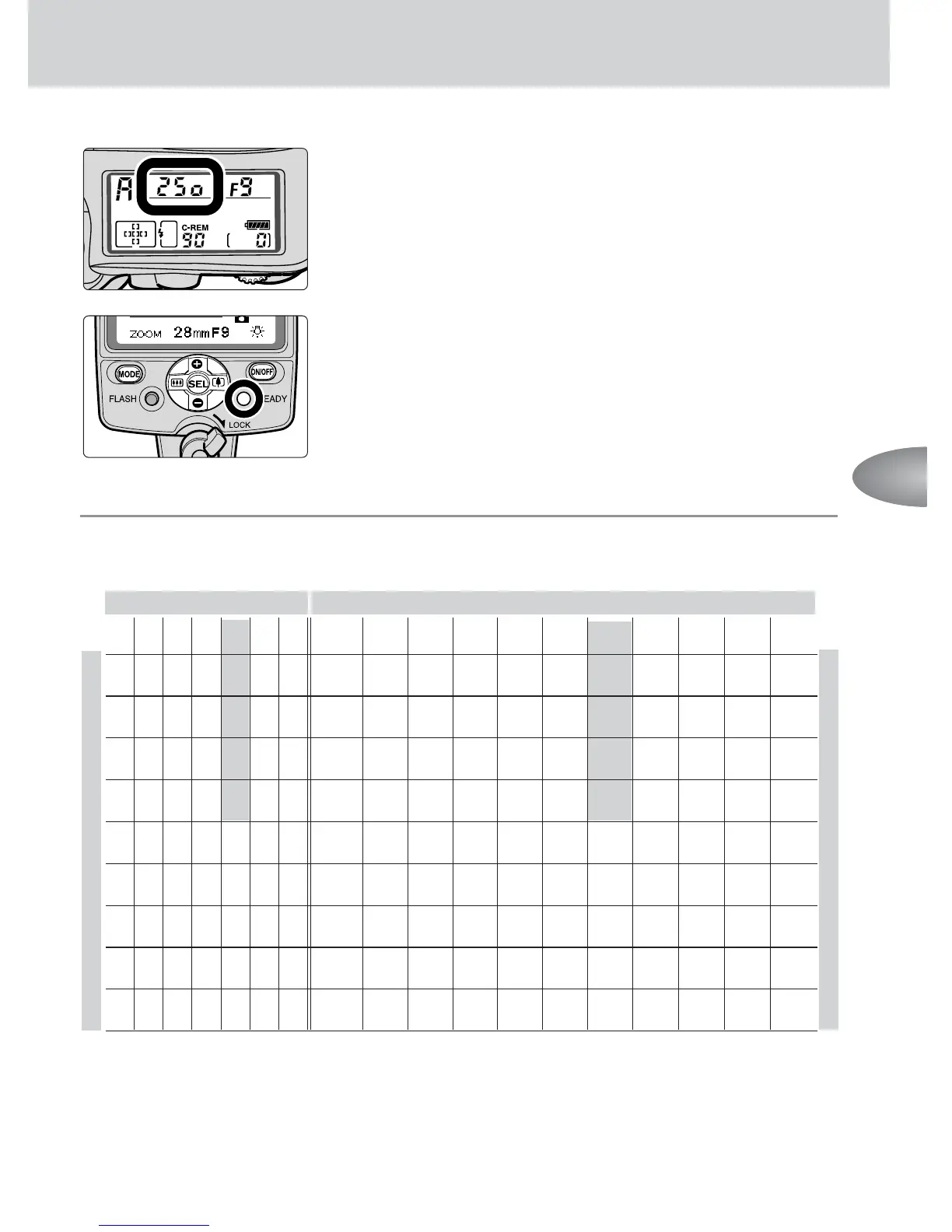
Set the camera to its highest flash sync shutter
speed.
• For details, see your camera’s instruction manual.
6
Compose the picture, make sure the ready-light is
on, then shoot.
• When the flash has fired at its maximum output and
underexposure may have occurred, the ready-light on
the SB-800 blinks for approx. 3 sec. To compensate,
use a wider aperture or move closer to the subject
and reshoot.
■
■
■
Setting the aperture in Non-TTL auto A flash operation
Set the aperture within the available range as shown in the table below.
Usable flash shooting distance ranges in Non-TTL auto flash operation
*1 With the Nikon Diffusion Dome attached and the wide-flash adapter in place
*2 With the Nikon Diffusion Dome attached
*3 With the wide-flash adapter in place
• For example, for an ISO sensitivity of 100, with the zoom-head position adjusted to
35mm, and the subject at a distance of 5m (16.4 ft.), selecting apertures from f/2 to f/5.6
from the table will give the correct exposure.
•To set the aperture on Zoom-Nikkor lenses having variable maximum apertures, refer to
“The flash shooting distance range with zoom lenses having a variable aperture” (p. 57).
Aperture
Flash shooting distance range (m/ft.)
ISO sensitivity Zoom-head position (mm)
1600
800 400 200 100
50 25
∗1 ∗2
14 17 24 28 35 50 70 85 105
8 5.6 4 2.8 2 1.4
11 8 5.6 4 2.8 2 1.4
16
11 8 5.6 4 2.8 2
22 16 11 8 5.6 4 2.8
32 22 16 11 8 5.6 4
32 22 16 11 8 5.6
32 22 16 11 8
32 22 16 11
32 22 16
0.6-6.3/ 0.7-8.0/ 0.8-9.0/ 0.8-10/ 1.3-15/ 1.4-16/ 1.7-19/ 2.0-20/ 2.2-20/ 2.4-20/ 2.5-20/
2.0-21 2.3-26 2.6-29 2.6-33 4.3-49 4.6-52 5.5-62 6.6-66 7.4-66 7.8-66 8.3-66
0.6-4.5/ 0.6-5.7/ 0.6-6.3/ 0.7-7.0/ 1.0-10/ 1.0-11/ 1.2-13/ 1.4-16/ 1.6-18/ 1.7-19/ 1.8-20/
2.0-15 2.0-19 2.0-20 2.0-23 3.1-35 3.3-37 3.9-44 4.6-52 5.2-59 5.5-62 5.8-66
0.6-3.2/ 0.6-4.0/ 0.6-4.5/ 0.6-5.0/ 0.7-7.5/ 0.7-8.0/ 0.8-9.5/ 1.0-11/ 1.1-13/ 1.2-13/ 1.3-14/
2.0-10 2.0-13 2.0-14 2.0-16 2.2-25 2.3-26 2.8-31 3.3-37 3.7-42 3.9-44 4.1-47
0.6-2.2/ 0.6-2.8/ 0.6-3.1/ 0.6-3.5/ 0.6-5.3/ 0.6-5.7/ 0.6-6.7/ 0.7-7.6/ 0.8-9.0/ 0.8-9.5/ 0.9-10/
2.0-7.4 2.0-9.3 2.0-10 2.0-11 2.0-17 2.0-19 2.0-22 2.3-26 2.6-29 2.8-31 2.9-33
0.6-1.6/ 0.6-2.0/ 0.6-2.2/ 0.6-2.5/ 0.6-3.7/ 0.6-4.0/ 0.6-4.8/ 0.6-5.3/ 0.6-6.3/ 0.6-6.7/ 0.6-7.1/
2.0-5.2 2.0-6.6 2.0-7.3 2.0-8.2 2.0-12 2.0-13 2.0-16 2.0-19 2.0-21 2.0-22 2.1-23
0.6-1.1/ 0.6-1.4/ 0.6-1.6/ 0.6-1.8/ 0.6-2.6/ 0.6-2.8/ 0.6-3.4/ 0.6-4.0/ 0.6-4.5/ 0.6-4.8/ 0.6-5.0/
2.0-3.7 2.0-4.6 2.0-5.2 2.0-5.8 2.0-8.7 2.0-9.3 2.0-11 2.0-13 2.0-15 2.0-16 2.0-17
0.6-0.8/ 0.6-1.0/ 0.6-1.1/ 0.6-1.2/ 0.6-1.8/ 0.6-2.0/ 0.6-2.4/ 0.6-2.8/ 0.6-3.2/ 0.6-3.4/ 0.6-3.6/
2.0-2.6 2.0-3.3 2.0-3.7 2.0-4.1 2.0-6.2 2.0-6.6 2.0-7.8 2.0-9.3 2.0-10 2.0-11 2.0-12
_
0.6-0.7/ 0.6-0.7/ 0.6-0.8/ 0.6-1.3/ 0.6-1.4/ 0.6-1.7/ 0.6-2.0/ 0.6-2.2/ 0.6-2.4/ 0.6-2.5/
2.0-2.3 2.0-2.6 2.0-2.9 2.0-4.4 2.0-4.6 2.0-5.5 2.0-6.6 2.0-7.4 2.0-7.8 2.0-8.3
____
0.6-0.9/ 0.6-1.0/ 0.6-1.2/ 0.6-1.4/ 0.6-1.6/ 0.6-1.7/ 0.6-1.8/
2.0-3.1 2.0-3.3 2.0-3.9 2.0-4.6 2.0-5.2 2.0-5.5 2.0-5.8
∗
3
∗
3



 To Next Page