47
Detailed operation
6
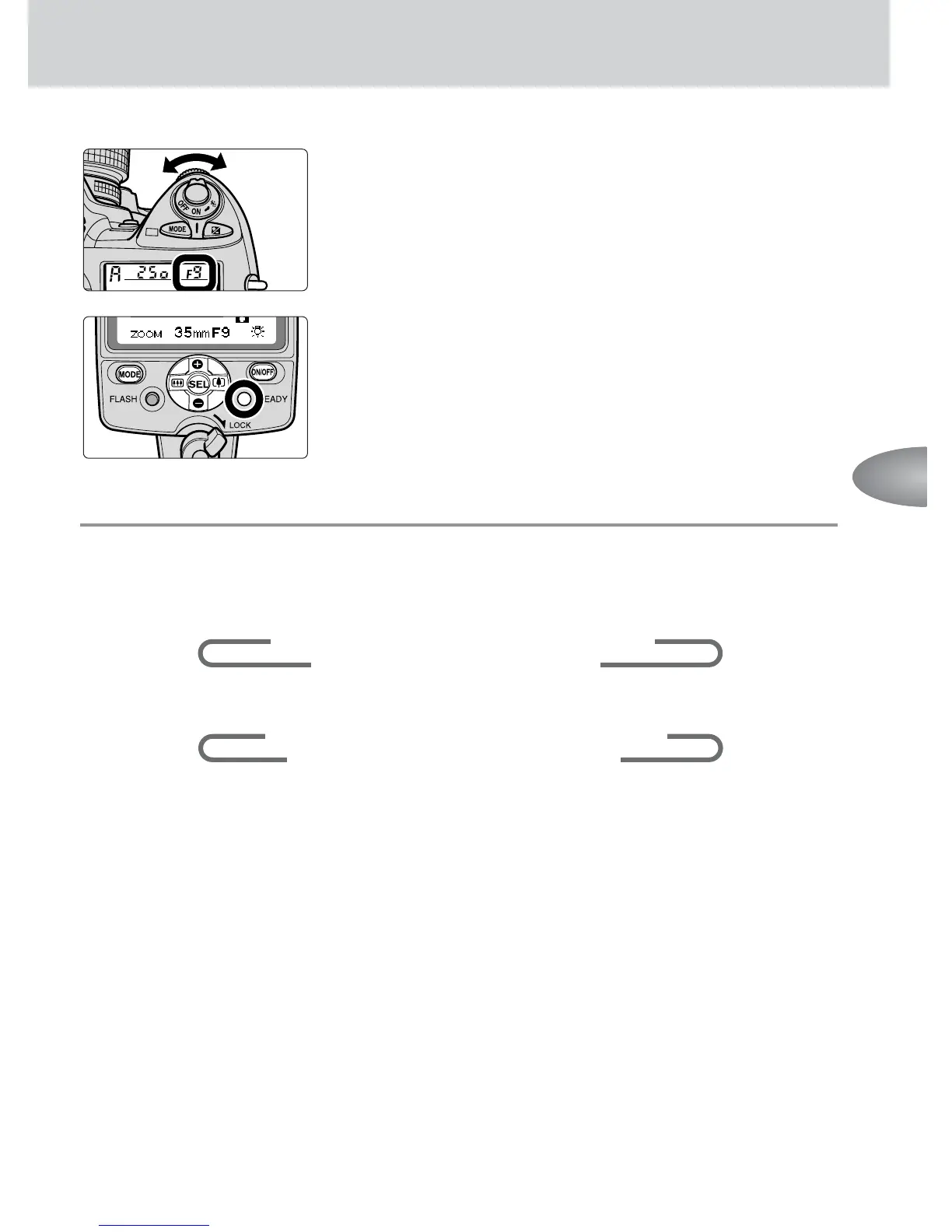
Set the same aperture on your camera or lens
that is set on the SB-800.
•With cameras in Groups III to VII.
7
Confirm that the ready-light comes on,
then shoot.
■
■
■
Setting the flash output level
Press the g button to highlight the flash output level display. The flash output
level changes every time you press the e or f button as shown below.
When you press the f button:
∞
1/1
∞
1/2
∞
1/2 (–1/3)
∞
1/2 (–2/3)
∞
1/4
1/128 ... 1/4 (–2/3)
±
1/4 (–1/3)
±
When you press the e button:
∞
1/128
∞
1/128 (+1/3)
∞
1/128 (+2/3)
∞
1/64
1/1
±
1/2 ... 1/64 (+2/3)
±
1/64 (+1/3)
±
• The numbers in parentheses represent the adjustable flash output level in ±1/3 steps
except between 1/1 and 1/2. Therefore, 1/32 (-1/3) and 1/64 (+2/3) represent the same
flash output level.
•To extend the flash shooting distance, choose a flash output level close to M1/1.



 To Next Page