May be subject to change page 15 of 27
Setting of clock
In case of power cut the clock will function for at least 24 hours. If the time function is lost there will
be a alarm.
Changing to daylight saving time has to be done manually.
” ” indicates that the menu point flashes and can be set to another value.
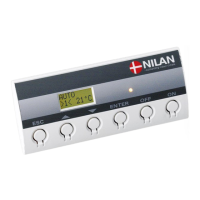
Use of t he CTS 600 panel :
- pr ess ESC t o go one st ep back i n t he menu
- pr ess qpt o move up or down i n a menu or t o
adj ust an act i vat ed menu
- pr ess ENTER t o act i vat e a menu
- pr ess ENTER t o conf i r m a menu
- pr ess OFF t o t ur n of f t he uni t
- pr ess ON t o t ur n t he uni t on


 To Next Page