FORM NO. 56043093 / Captor
™
4300, 4800, 5400 - 33
SWEEPING SYSTEM
TROUBLESHOOTING GUIDE
Possible Symptom
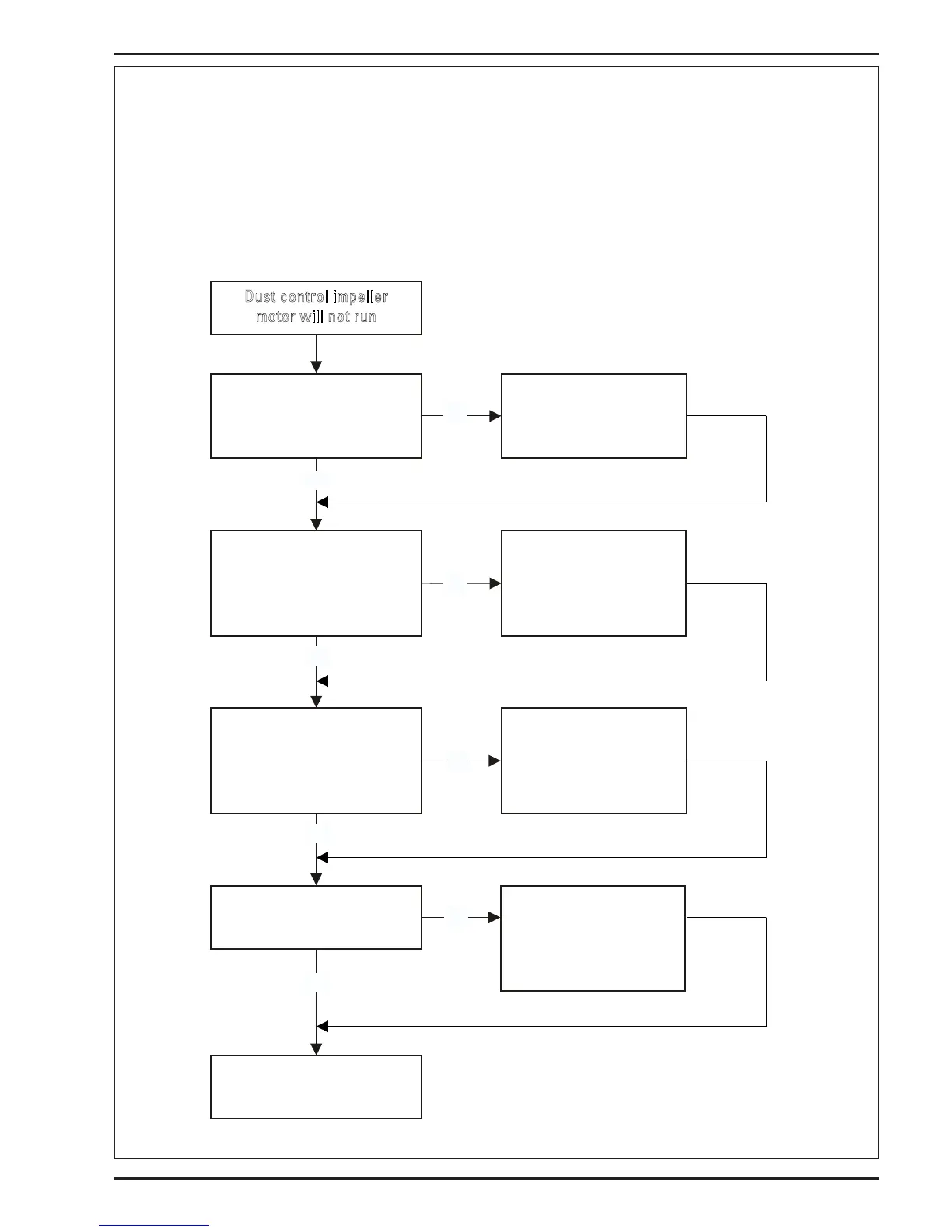
1 Dust control impeller will not run
Part A: Electrical
Note: Do all testing with the key switch ON, and the hopper closed. Also dust control switch must be activated on the display panel and the drive
pedal must be activated (placed in forward or reverse).
Dust control impeller
motor will not run
Press the dust control switch,
(located on the A2 display
panel).
Is its green indicator light on?
Substitute a new
A2 display panel.
Does impeller operate?
Check for 12V at L9 impeller
motor coil.
Wire colors
(+) ORG
(-) BRN/YEL
Repair or replace L9 coil
wiring.
Does impeller motor
operate?
Check L9 coil resistance
(9 ohm)
Repair or replace L9
coil.
Does impeller motor
operate?
See Hydraulic impeller
motor troubleshooting
section Part B
Yes
Yes
Yes
No
No
No
On the A1 board is the S9
impeller motor relay light
on?
Replace A1 control
board.
Does impeller motor
operate?
No
Yes



 To Next Page