62 - FORM NO. 56043093 / Captor
™
4300, 4800, 5400
ENGINE SYSTEM
ENGINE SYSTEM
CHECK ENGINE LIGHT TROUBLESHOOTING FOR 1.6L GM ENGINE (TIER II CERTIFIED)
The engine ECM will light (turn on) the dash panel (C) check engine light if there is a problem associated with the computerized engine control
system.
Note: Tier II Engine type identication, the LP engine uses an EPR (electronic pressure regulator) for the main component in its fuel delivery
system. The gasoline engine uses a special fuel sensor manifold (mounted on the fuel tank). The manifold records the temperature of the fuel
and controls the fuel pressure sent to the fuel rail. This fuel system is different in that it doesn’t use a fuel pressure regulator and has a small
amount of fuel returned to the tank.
The following steps explain how to correctly access the engine controller’s fault code outputs.
1 On the operator display panel the engine check light (MIL ) comes on steady will not shut off.
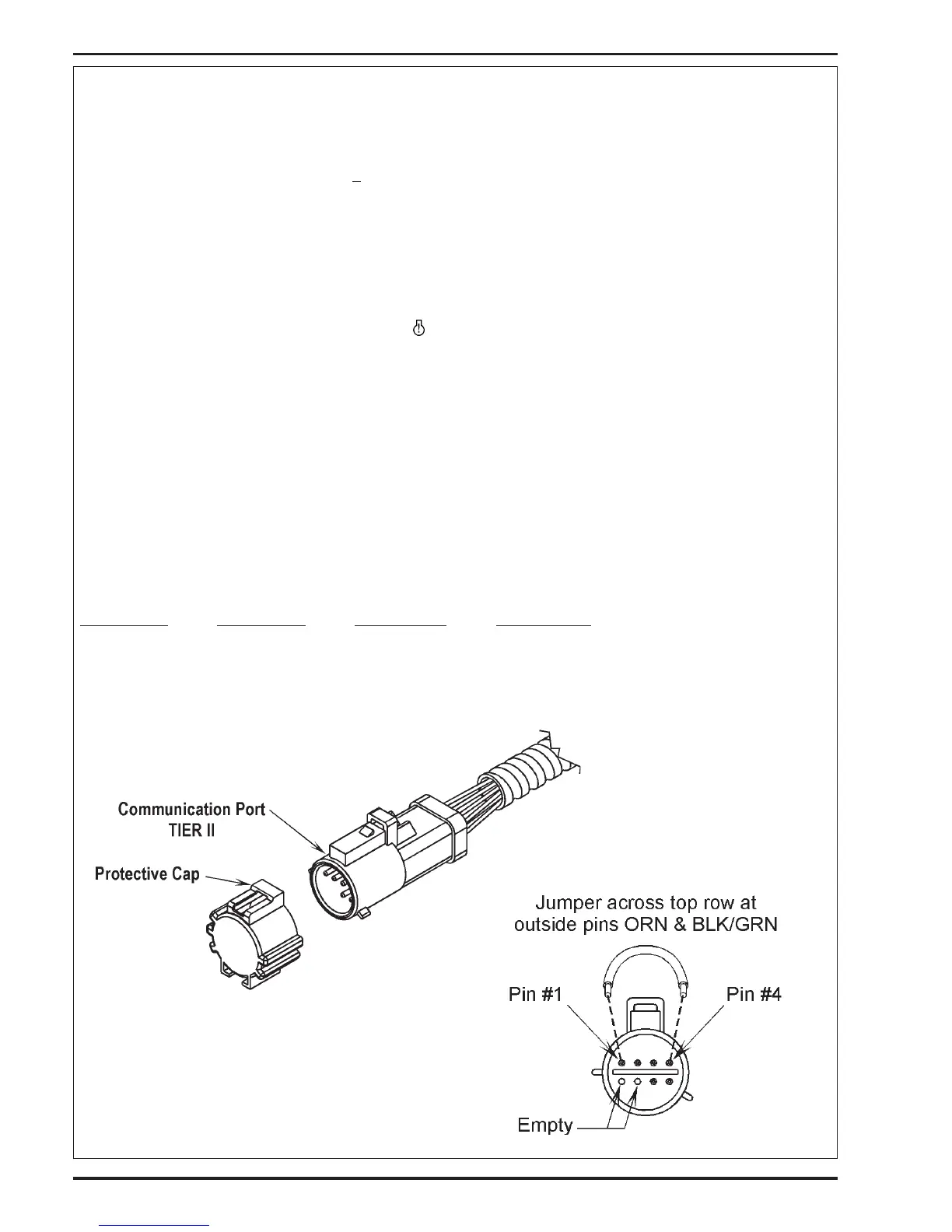
2 Locate the 8 way ECM communication test port, which is a part of the engine wiring harness.
3 Next remove the test port protective cap. See Figure 1.5. Insert a suitable jumper wire across pin “1” (black/green wire) & pin “4” (orange
wire).
Blink Code Function
Although the DST (Diagnostic Service Tool software) is considered a required tool to access the DTC codes, codes may be retrieved without a
laptop computer using the blink code function. To enable this function follow the steps below:
4 Turn the ignition key to the on position.
5 The system will now enter the self diagnostic blink code mode. Be ready with pen and paper to write down any codes that may be
stored.
6 The ECM will ash the MIL indicator with a pause between represented numbers that represent DTC codes. The sequence starts with
code 1654. Code 1654 conrms the system has entered the blink code mode. The ECM will ash code 1654 (3) times before displaying
the actual DTC code that may be set.
Example:
One short blink (pause) six short blinks (pause) veshortblinks (pause) four short blinks.
• If no DTC codes are found, the ECM will continue to ash 1654 only. This means no stored DTC codes were found.
FIGURE 1.5
revised 7/08



 To Next Page