EasyManua.ls Logo

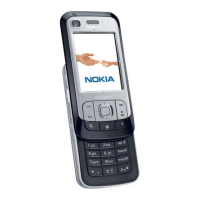
Nokia 6108 - User Manual

Nokia 6108
110 pages
Print Icon
To Next Page IconTo Next Page
Loading...
User’s Guide for Nokia 6108

Table of Contents

Other manuals for Nokia 6108

Questions and Answers

  • T
    Terry HarrisonJul 30, 2025
    What to do if my Nokia Camcorder says 'Memory Full'?
    • R
      Reginald LarsenJul 30, 2025
      If your Nokia Camcorder displays 'Memory Full', it means the storage is at capacity. To resolve this, either replace the SD/MMC card with a new one or delete some files to create more free space.
  • H
    Holly WalkerAug 4, 2025
    Why does my Nokia Camcorder say 'Please Change Battery'?
    • I
      irodriguezAug 4, 2025
      If your Nokia Camcorder is showing 'Please Change Battery', it means the battery is low. You should replace the battery or recharge it immediately to continue using the camcorder.
  • A
    Anne Jennings PhDAug 9, 2025
    What to do if my Nokia Camcorder shows 'Card Error'?
    • C
      Christine PerkinsAug 9, 2025
      If your Nokia Camcorder displays 'Card Error', it means the inserted card might not be compatible. Try changing the card, or format the current card to resolve the issue.
  • H
    hannahgreenAug 13, 2025
    Why does my Nokia Camcorder say 'Please Unlock SD Card'?
    • T
      Timothy FlemingAug 13, 2025
      If your Nokia Camcorder shows 'Please Unlock SD Card', this message appears because the SD card is set to 'Protected'. This prevents the camcorder from writing data to the card.
  • N
    Nicholas AlexanderAug 25, 2025
    Why does my Nokia Camcorder say 'File Format Error'?
    • D
      david86Aug 25, 2025
      The 'File Format Error' message on your Nokia Camcorder means that the file you're trying to play isn't compatible with the camcorder.
  • S
    Scott GardnerSep 10, 2025
    What to do if my Nokia Camcorder displays 'Memory Error'?
    • B
      barkerjacksonSep 12, 2025
      If your Nokia Camcorder shows 'Memory Error', it means the device can't access data in the internal memory. To fix this, format the memory.

Summary

FOR YOUR SAFETY

Call Handling and Emergency

Procedures for making, answering, ending, and emergency calls.

1. Your Phone

Phone Controls and Interface

Covers the physical controls, input methods, and ports of the phone.

2. Getting Started

Phone Assembly and Setup

Instructions for assembling the phone and inserting SIM card and battery.

Basic Phone Operations

Explains essential operations like charging, powering, menu access, and keypad security.

3. Call Functions

Basic Call Handling

Core procedures for initiating, receiving, and ending calls.

4. Handwriting Input Method

6. Menu Functions

Messages and E-mail

Managing text, multimedia, and e-mail communications.

8. Battery Information

Charging and Discharging

Instructions and advice on charging, discharging, and maintaining the phone's battery.

10. Care and Maintenance

11. Important Safety Information

Traffic and Operating Environment Safety

Rules for safe phone use while driving and in regulated environments.

Device and Health Interference

Potential interference with electronic devices, pacemakers, and hearing aids.

Hazardous Environments and Vehicle Safety

Safety precautions for explosive atmospheres, vehicles, and general storage.

Emergency Calls and RF Exposure

Procedures for emergency calls and information on radio frequency exposure limits.

Nokia 6108 Specifications

General IconGeneral
BrandNokia
Model6108
CategoryCell Phone
LanguageEnglish

Related product manuals