AG 5500
System Administration 139
Managing SMTP Redirection {SMTP}
When SMTP redirection is enabled (for misconfigured or properly configured subscribers), the
AG 5500 redirects the subscriber’s E-mail through a dedicated SMTP server, including SMTP
servers which support login authentication. To the subscriber, sending and receiving E-mail is
as easy as it’s always been. This function is transparent to subscribers.
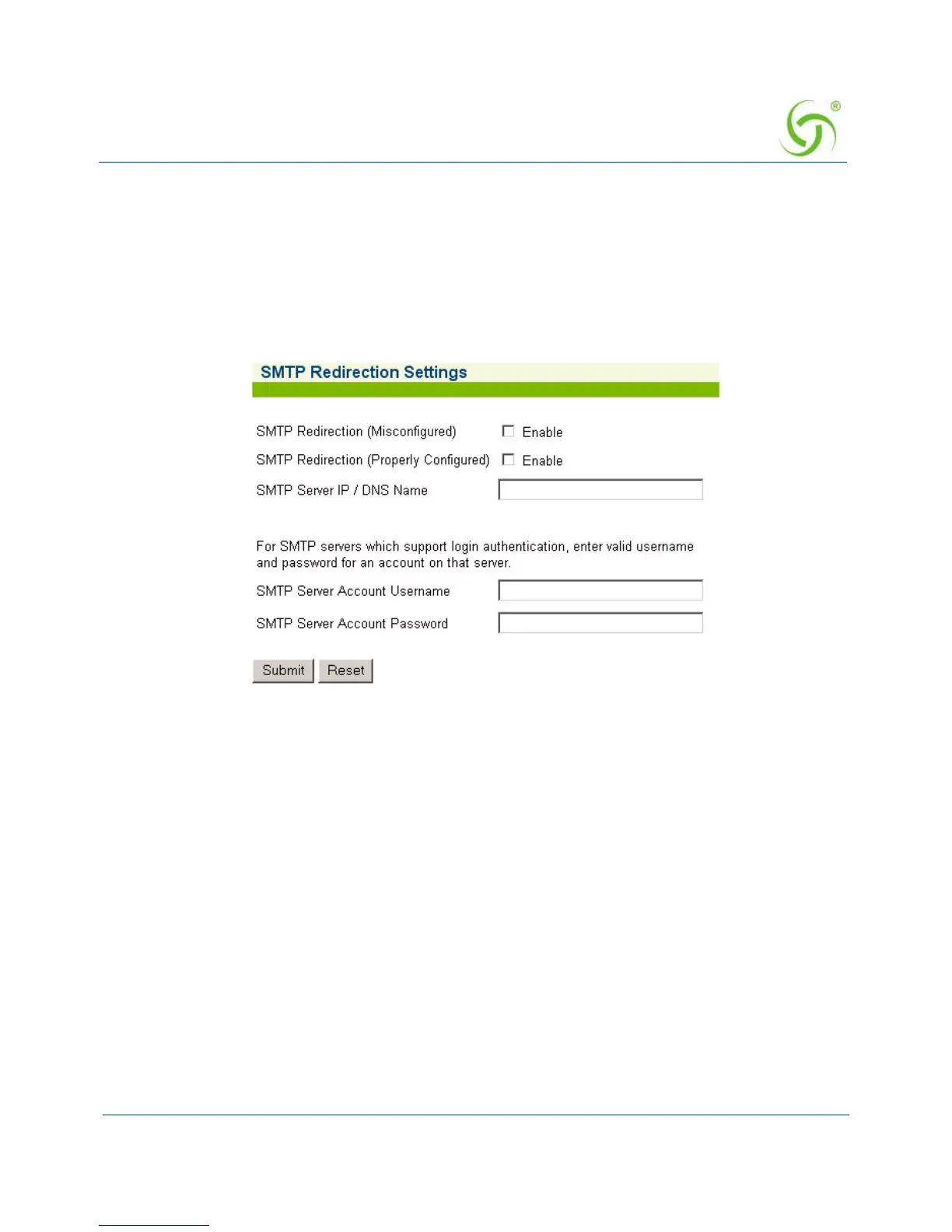
1. From the Web Management Interface, click on Configuration, then SMTP. The SMTP
Redirection Settings screen appears:
2. Click on the check box for SMTP Redirection (Misconfigured) to enable this feature for
“misconfigured” subscribers.
3. Click on the check box for SMTP Redirection (Properly Configured) to enable this
feature for “properly configured” subscribers.
If you enable SMTP redirection, you must provide the IP address of the SMTP server.
4. In the SMTP Server IP/DNS field, enter the address of the SMTP server you want to use.
5. For SMTP servers which support login authentication, enter a valid username in the SMTP
Server Account Username
field.
6. For SMTP servers which support login authentication, enter a valid password in the SMTP
Server Account Password
field.
7. Click on the Submit button to save your changes, or click on the Reset button if you want
to reset all the values to their previous state.
ag5500_userguide.book Page 139 Tuesday, June 5, 2007 7:31 PM



 To Next Page