36
IP2449EN
16.3 Shortcuts
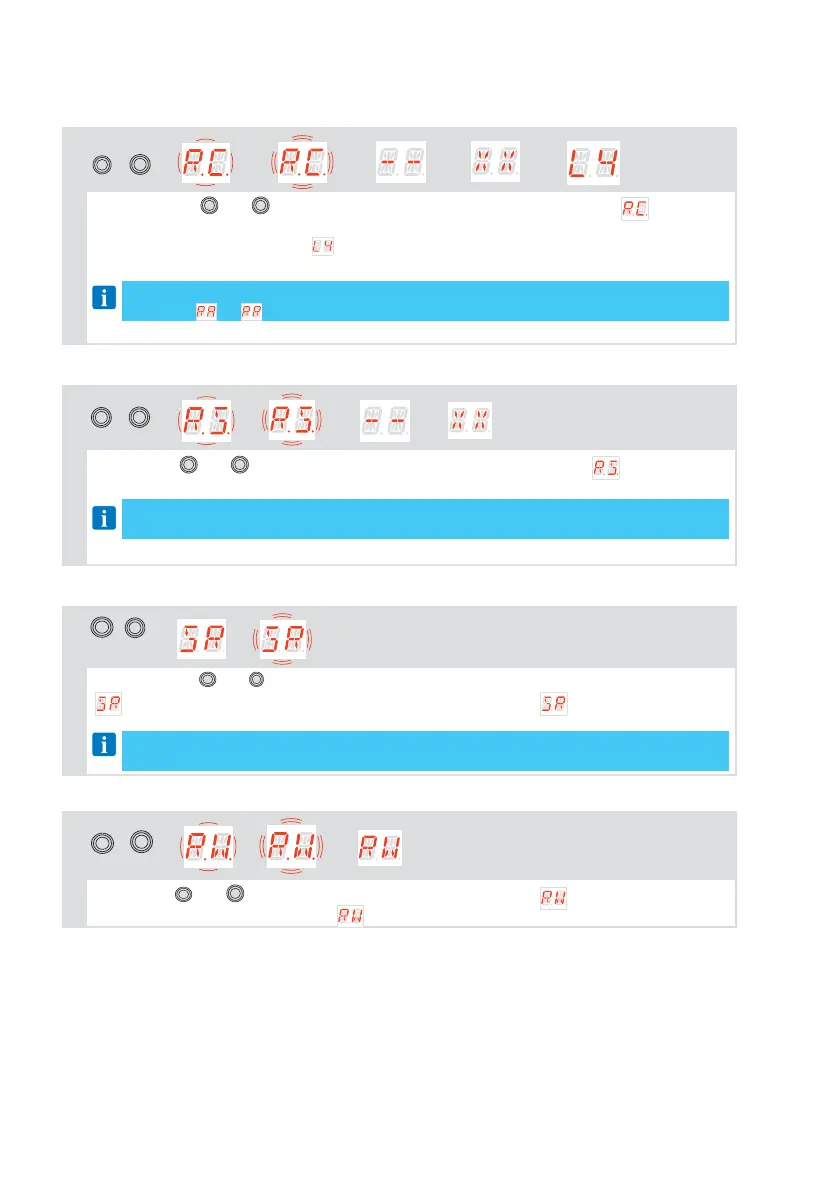
16.3.1 Calibration reset
ENTER
+
ESC
→ → → → →
By pressing the
ENTER
and
ESC
buttons simultaneously, causes the display to flash , first slowly
and then faster. Continue to hold (for about more than 4 seconds) until the system performs
a reset and the display shows (all calibration run values have been cleared). Now you
can release the keys, the system is ready to perform a new learning procedure
NOTE: the stored calibration can also be deleted by acting on the appropriate parame-
ter in the → menu
16.3.2 System restart
UP
+
DOWN
→ → → →
Pressing the
UP
and
DOWN
keys simultaneously will cause the display to flash , first slowly and
then faster. Continue to hold (for about more than 4 seconds) until the system performs a restart.
NOTE: it is only a system restart, calibration values, parameter setting and transmit-
ters are not deleted.
16.3.3
Radio remote control storage via control panel
ESC
+
DOWN
→ → →...
If you press the
ESC
and
DOWN
buttons simultaneously for more than 4 seconds, the display shows
, then release the buttons. When the display starts flashing , you can associate the
desired buttons.
NOTE: storage of remote controls can also be performed by acting on the appropriate
parameter in the menu
16.3.4
Wi-fi reset
ESC
+
UP
→ → →
If you press
ESC
and
UP
keys simultaneously, the display will flash first slowly, then faster.
When the display stops flashing and is fixed, the WiFi device will be reset, release the keys.



 To Next Page