37
IP2449EN
17. Parameters LCU60E
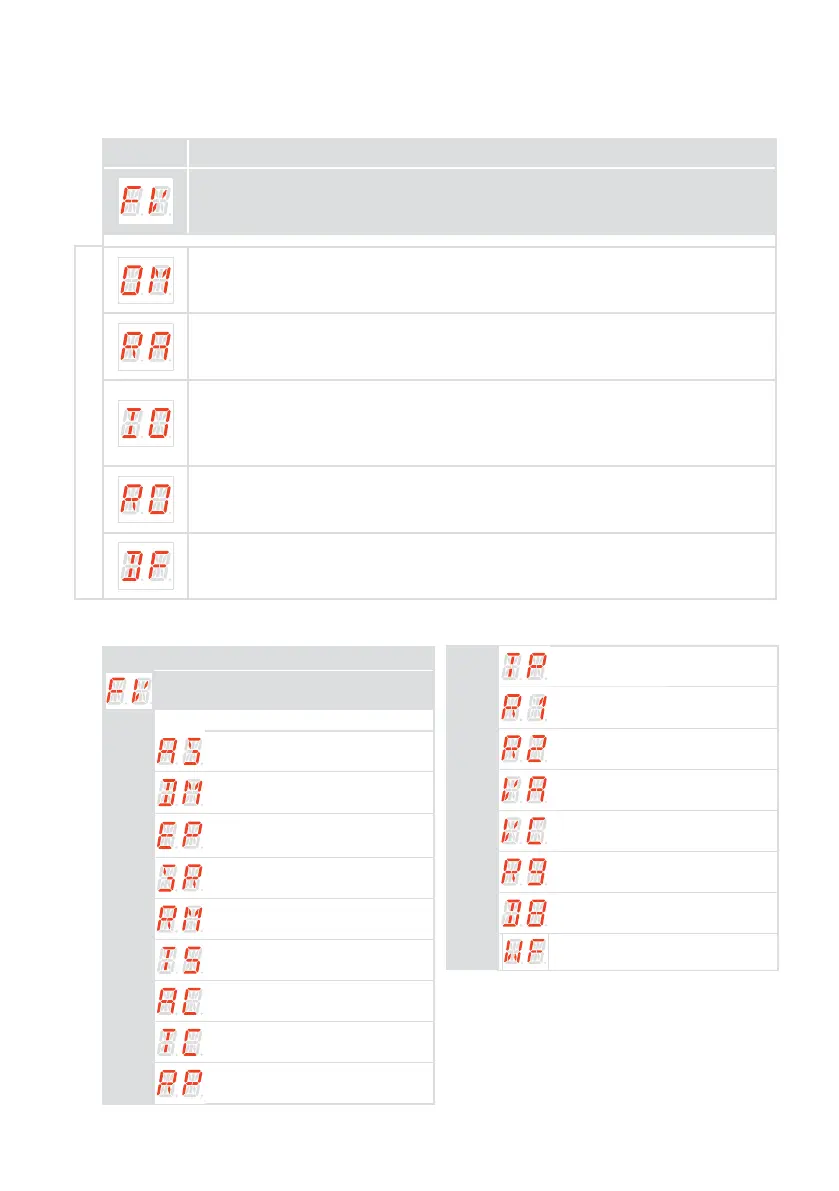
17.1 Main level menu
Display Description
Frequent use
The menu allows to manage the most commonly used parameters to customize the
functionalities of the automation
Operation Mode
The menu allows to manage all the parameters used for operation modes of the au-
tomation (type of automation installed, predefined settings, automatic closure, etc.)
Run Adjustment
The menu allows to adjust all the run parameters (opening/closure speed, slowdown
positions, obstacle thrust sensibility etc.)
Input/Output Configuration
The menu allows to configure the inputs/outputs functionalities of the automation
(selection of devices connected to the terminals, photocells, flashing light/electro-
lock setting, etc.)
Radio and Connectivity Operations
The menu is used to manage all parameters for the radio/wireless functions of the
control panel
Diagnostic Functions
The menu allows to manage all other parameters used for additional services
(diagnostic counters, FW updating, energy saving, etc.)
17.2
Frequent use menu map
MAIN LEVEL
FV - Frequent Use
PARAMETER LEVEL
AS - Selection of door type
DM - Open direction
EP - Setting encrypted radio
transmission protocol (AES 128bit
and PROTECTED mode)
SR - Remote control storage
RM - Radio receiver operation
T5 - Terminal 5 operation mode
AC - Automatic closure enabling
TC - Setting of automatic closing
time [s]
RP - Adjustment of partial opening
measurement [%]
TP - Setting of automatic closing
time after partial opening [s]
R1 - Adjustment of thrust on obstacles
in the opening
R2 - Adjusting thrust on closing ob-
stacles
VA - Opening speed [cm/s]
VC - Closing speed [cm/s]
R9 - Configuration of input 1-9
D8 - Selection of device connected to
terminals 1-8
WF - Setting of Wi Fi functionality
Complete menu



 To Next Page