40
IP2449EN
17.4 Frequent use parameters description
FV -
Frequent Use
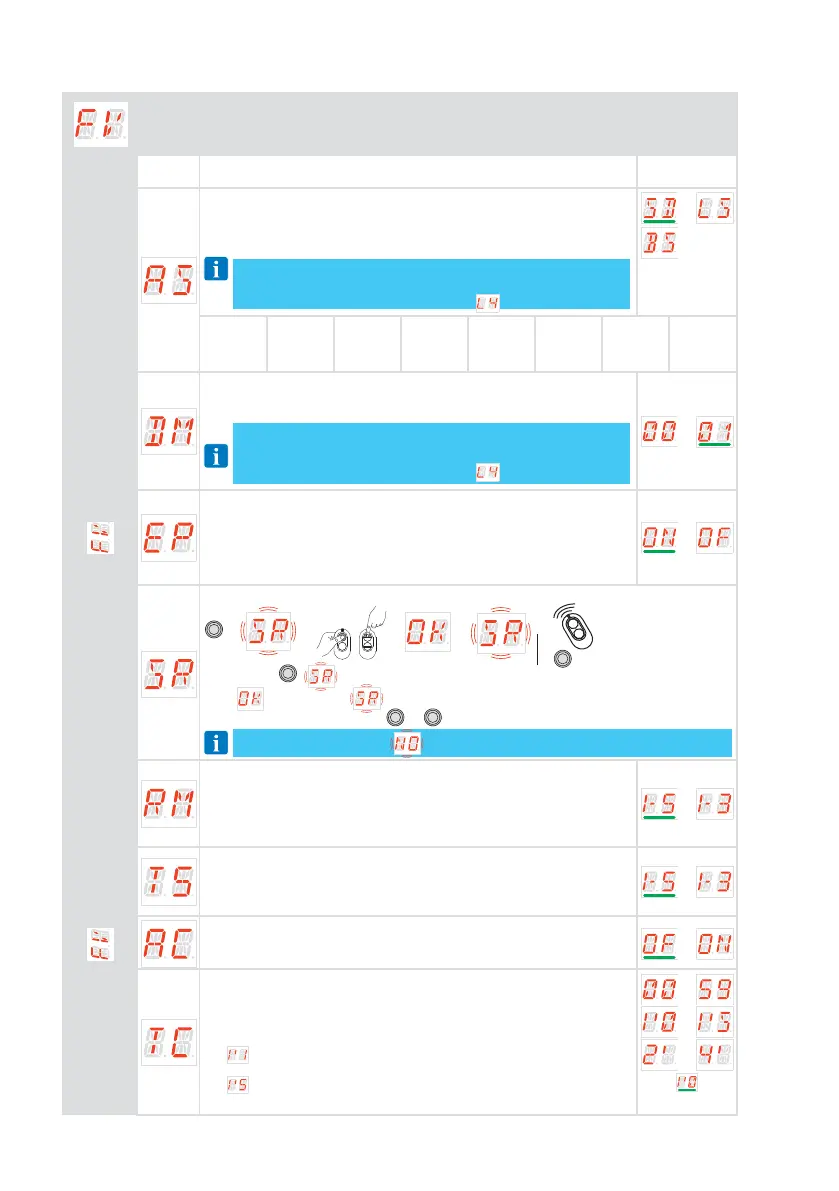
The menu allows to manage the most commonly used parameters to customize the
functionalities of the automation.
Parameter Description
Selections
available
AS - Selection of automation door installed
• SD: sectional door
• LS: side sectional door
• BS: up-and-over door with soft start
NOTE: NOTE: If the value has been changed, the previously ac-
quired stroke parameters will be deleted and the operator will
wait for a new self-learning maneuver
. See section 14
AS
SD
LS
BS
R1-R2
20
20
30
VA
20
20
15
OB
20
20
40
TA
2.0
2.0
2.5
TQ
2.0
2.0
2.5
TD
30
30
60
TU
20
20
40
DM -
Open direction
• 00: opening direction with SPARK guides and TSRFK retrofit kit
• 01: standard opening direction with MAGIC guides
NOTE: NOTE: If the value has been changed, the previously ac-
quired stroke parameters will be deleted and the operator will
wait for a new self-learning maneuver
. See section 14
EP - Setting up encrypted radio transmission protocol (AES 128bit and
PROTECTED mode)
If the possibility to receive coded messages is enabled
, the control panel will
be compatible with remote controls of the “CRIPTED or PROTECTED mode” type.
• ON: enabled
• OF: disabled
SR -
Remote control storage
ENTER
→ →
o
or
→ → → ... x2, x3...
→
ESC
By pressing
ENTER
,
starts flashing and it is possible to associate the desired buttons.
After
l
is displayed, flashes again on the display and it is possible to associate
the next button.
To exit, press
ESC
or
ENTER
for 2 seconds and move on to the next item.
NOTE: if the display shows flashing, the remote control may already be stored.
RM - Radio receiver operation
This is the function associated to radio command when only one channel
is stored (independently which one is)
• 1-5 - Step-by-step
• 1-3 - Opening
T5 - Terminal 5 operation mode
This parameter is associated to the functionality of the terminal 1-5
• 1-5 - Step-by-step
• 1-3 - Opening
AC - Automatic closure enabling
• OF - Disabled
• ON - Enabled
TC - Setting of automatic closing time [s]
It is set with different intervals of sensitivity:
• from 0” to 59” with intervals of 1 second
• from 1’0 to 1’5 with intervals of 10 seconds
For each interval, the display visualizes:
-
→ 1 minute and 10 seconds
- ...
-
→ 1 minute and 50 seconds
• from 2’ to 4’ with intervals of 1 minute
...
...
...



 To Next Page