34
IP2449EN
15. Memorizing / Deleting remote controls
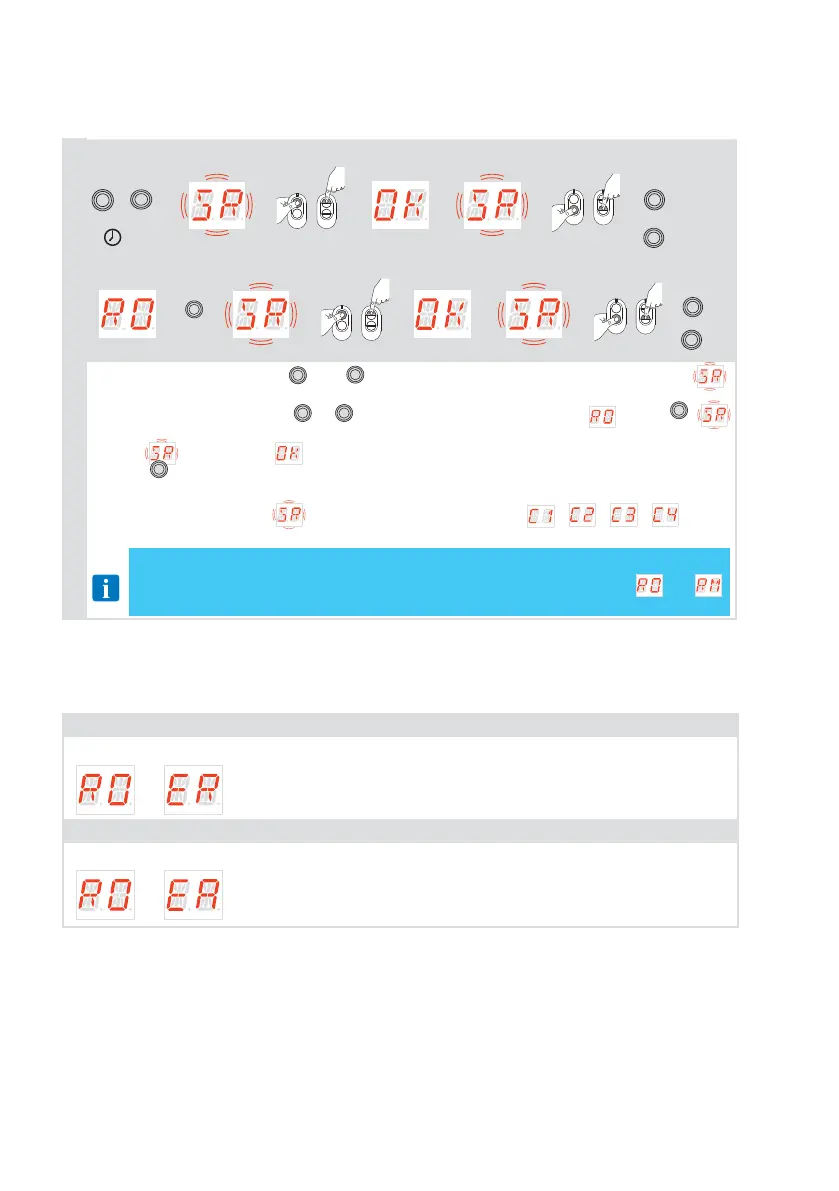
15.1 Memorizing remote controls
Quick memorization:
ESC
+
DOWN
→ →
o
or
→ → →
o
or
→
ESC
2”
→
ESC
x3
Memorization from menu:
→
ENTER
→ →
o
or
→ → →
o
or
→
ESC
→
ESC
• Quick storage: press the
ESC
and
DOWN
buttons simultaneously for about 2 seconds ,
flashing appears on the display and you can associate the desired buttons.
• Storage from menu: press
UP
or
DOWN
to scroll through menus. Select , press
ENTER
,
starts flashing and you can associate the desired buttons.
• Once is displayed, starts flashing again and the next button can be associated.
• Press
ESC
to exit.
• Once you finish to associate buttons if you want set a specific function to the buttons you
have to go in the menu
and acting on the parameters , , , other-
wise default functions will be associated.
NOTE: if only one button/channel is memorized then the associate function will be
automatic set to OPEN or STEP-by-STEP depending by the value of
→
parameter.
15.2 Deleting remote controls
The remote control can be deleted acting on the specific parameter in the menu and follow the
instructions:
Deletion of a single remote control
See the parameter:
→ see paragraph 17.4
Deletion of all remote controls
See the parameter:
→ see paragraph 17.4



 To Next Page