Administration / 43
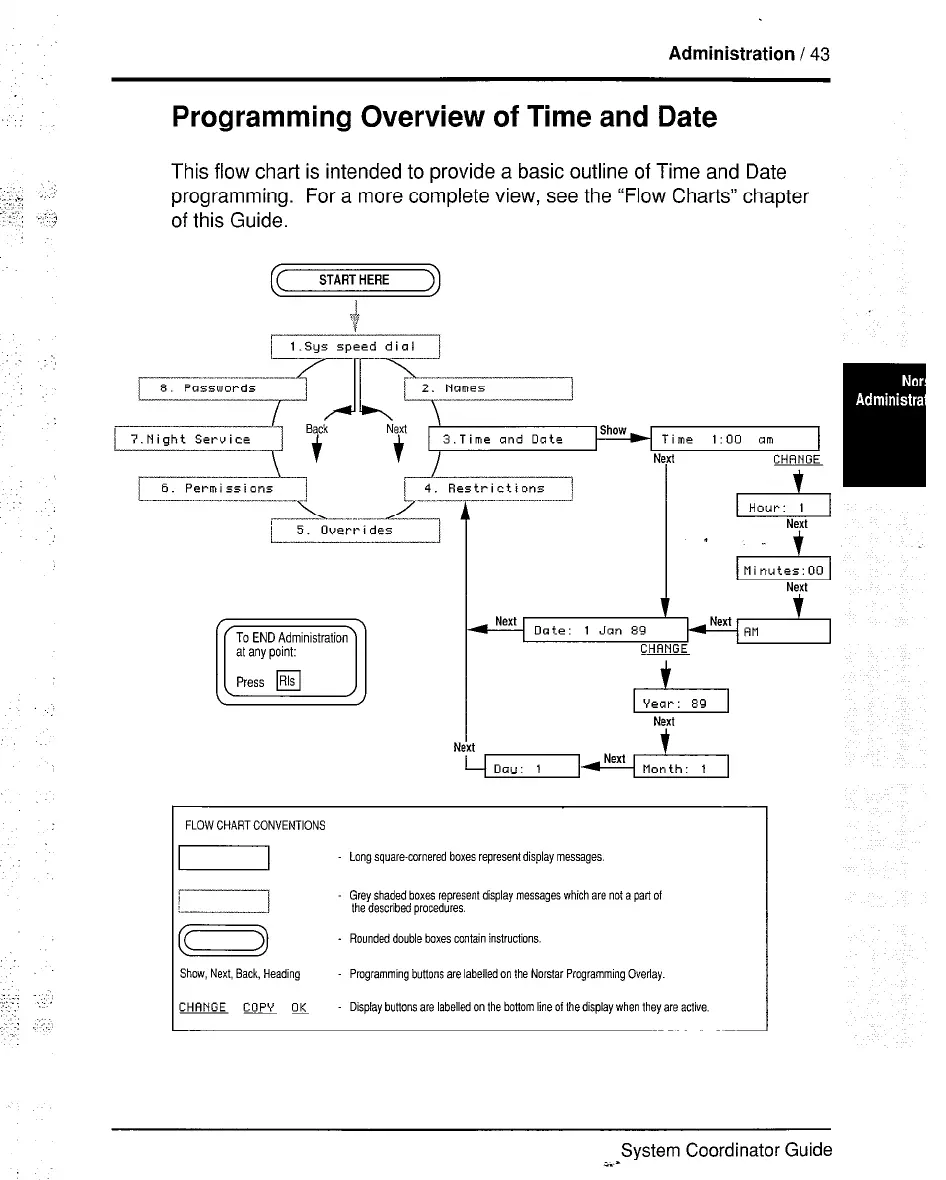
Programming Overview of Time and Date
This flow chart is intended to provide a basic outline of Time and Date
programming. For a more complete view, see the “Flow Charts” chapter
of this Guide.
f( STARTHERE 3
6. Permissions I
I
I 4. Restrictions
N
9
Date: 1 Jan 8’3
Next
t
Month: 1
FLOW CHART CONVENTIONS
Long square-cornered boxes represent display messages.
LIIxzIl
Grey shaded boxes represent display messages which are not a part of
the described procedures.
a
Rounded double boxes contain instructions.
Show, Next, Back, Heading Programming buttons are labelled on the Norstar ProgrammIng Overlay
CHANGE Copy OK Display buttons are labelled on the bottom line of the display when they are active.
System Coordinator Guide
i.s



 To Next Page