. ..., ._
-,
I.,: -1
Administration / 51
Programming Overview of Restrictions
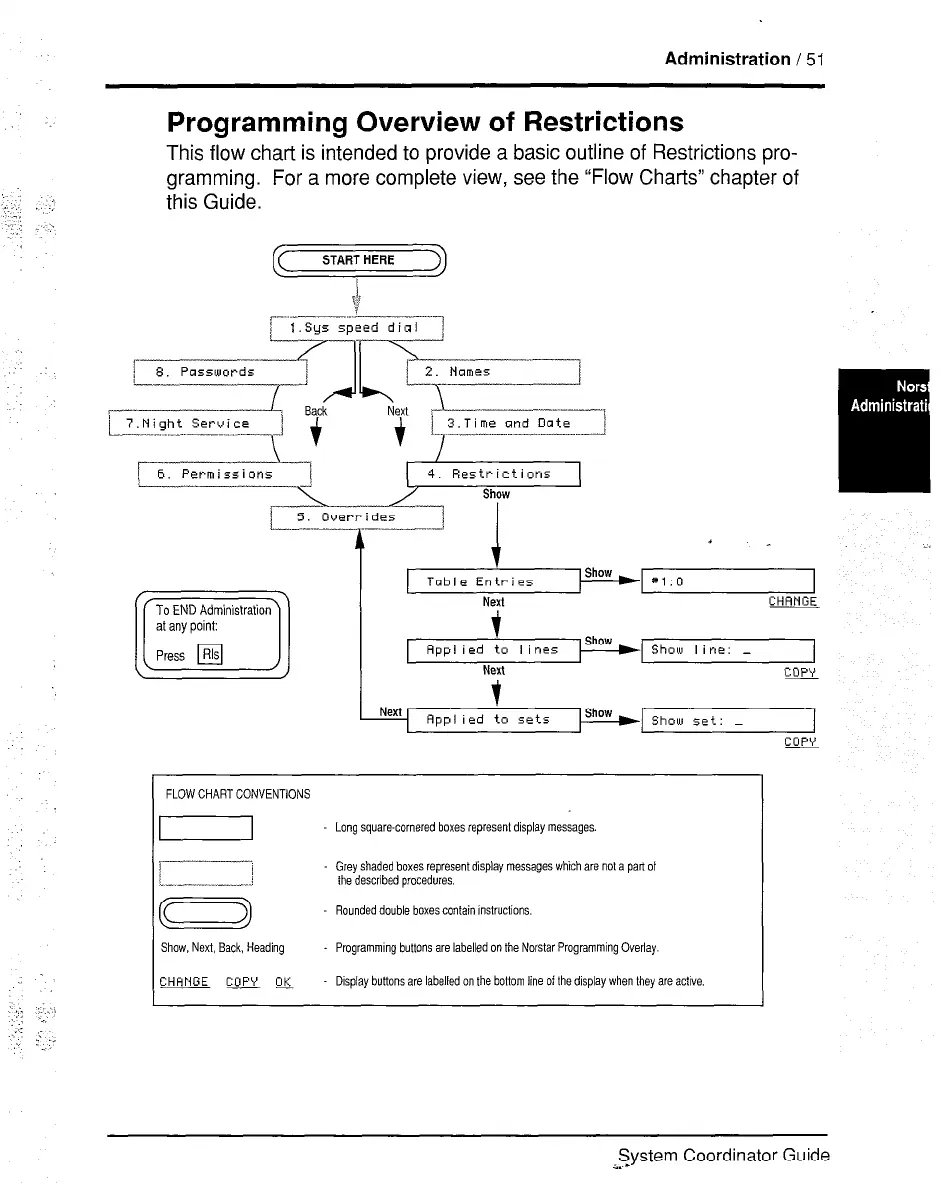
This flow chart is intended to provide a basic outline of Restrictions pro-
gramming. For a more complete view, see the “Flow Charts” chapter of
this Guide.
START HERE )
/
6. Permissions
-J
To END Administration
c
al any point:
Press Rls
El
Table Entries
Next
t
Rpplied to lines
NW
#l:O
CHANGE
Sholu line: -
Copy
Rpplied to sets
Show set: -
1
Cop\’
FLOW CHART CONVENTIONS
Long square-cornered boxes represent display messages
Grey shaded boxes represent display messages which are not a part of
the described procedures.
Rounded double boxes contain Instructions.
Show, Next, Back, Heading Programming buttons are labelled on the Norstar Programming Overlay.
CHHNGE
QJjyw
,-
Display buttons are labelled on the bottom line of the display when they are active.
System Coordinator Guide
a. -



 To Next Page