86 / Administration
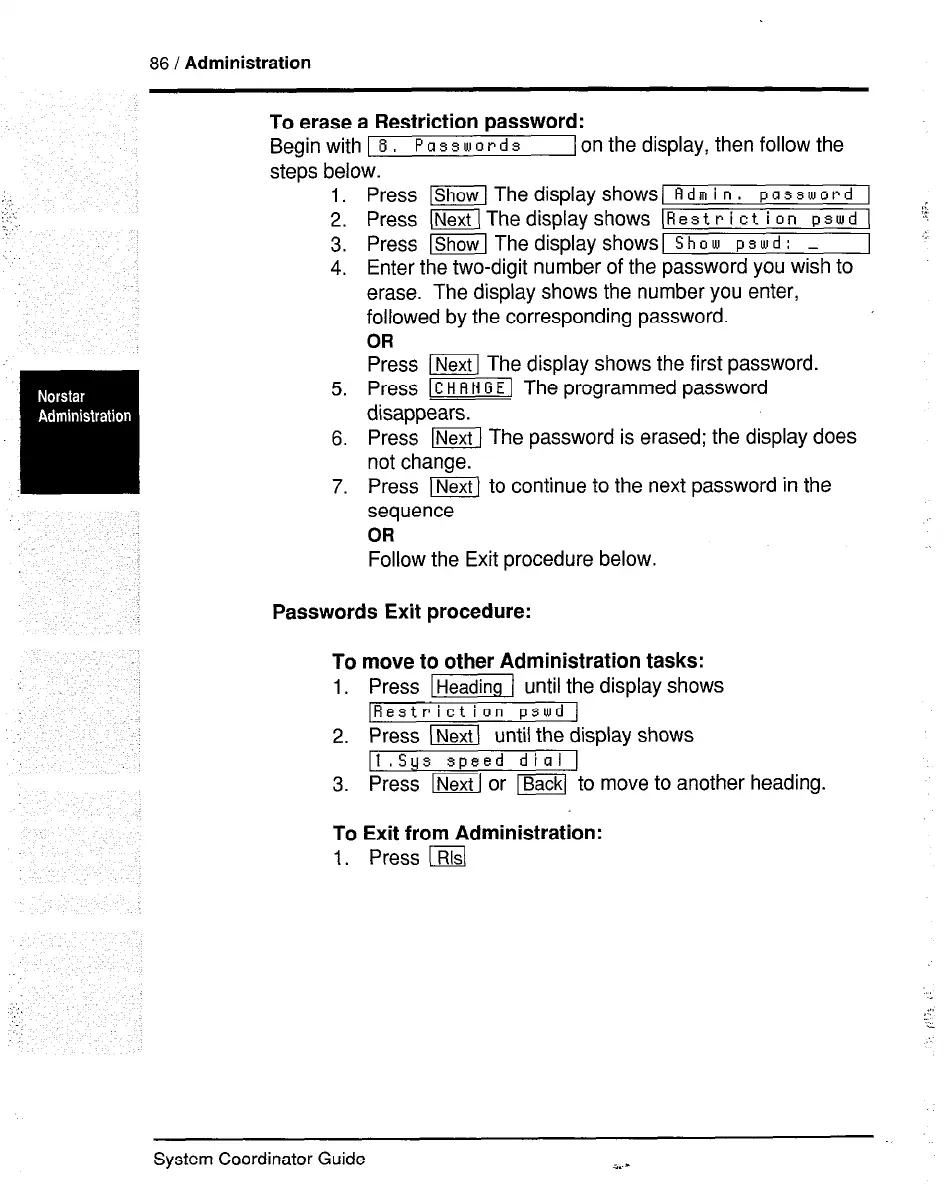
To erase a Restriction password:
Begin with 1 8,
Passwords
1 on the display, then follow the
steps below.
L.
3.
4.
5.
6.
7.
Press [Show1 Thedisplayshows
Adm in. password
Press (NextlThedisplayshows
Restriction pswd g
Press -1 The display shows
Show pswd : _
Enter the two-digit number of the password you wish to
erase. The display shows the number you enter,
followed by the corresponding password.
OR
Press m The display shows the first password.
Press m The programmed password
disappears.
Press (KkXj The password is erased; the display does
not change.
Press m to continue to the next password in the
sequence
OR
Follow the Exit procedure below.
Passwords Exit procedure:
To move to other Administration tasks:
1. Press w( until the display shows
IRestriction pswd (
2. Press (Nextl until the display shows
11 .Sgs speed dial 1
3. Press m or ~ to move to another heading.
To Exit from Administration:
1. Press lRlsl
System Coordinator Guide
i..-



 To Next Page