WARNING! If the device is already connected to vehicle power, remove the in-line fuse on the
MAIN POWER (+V) wire of the device power cable before connecting any of the IO.
l
For added security as an indicator against tampering, use torque/tamper seal on Molex, ground
and fuse connections.
Mounting Locations
When mounting the device, the Novatel Wireless label side must be facing up or out with an
unobstructed view of the sky. (See instructions on the device label.)
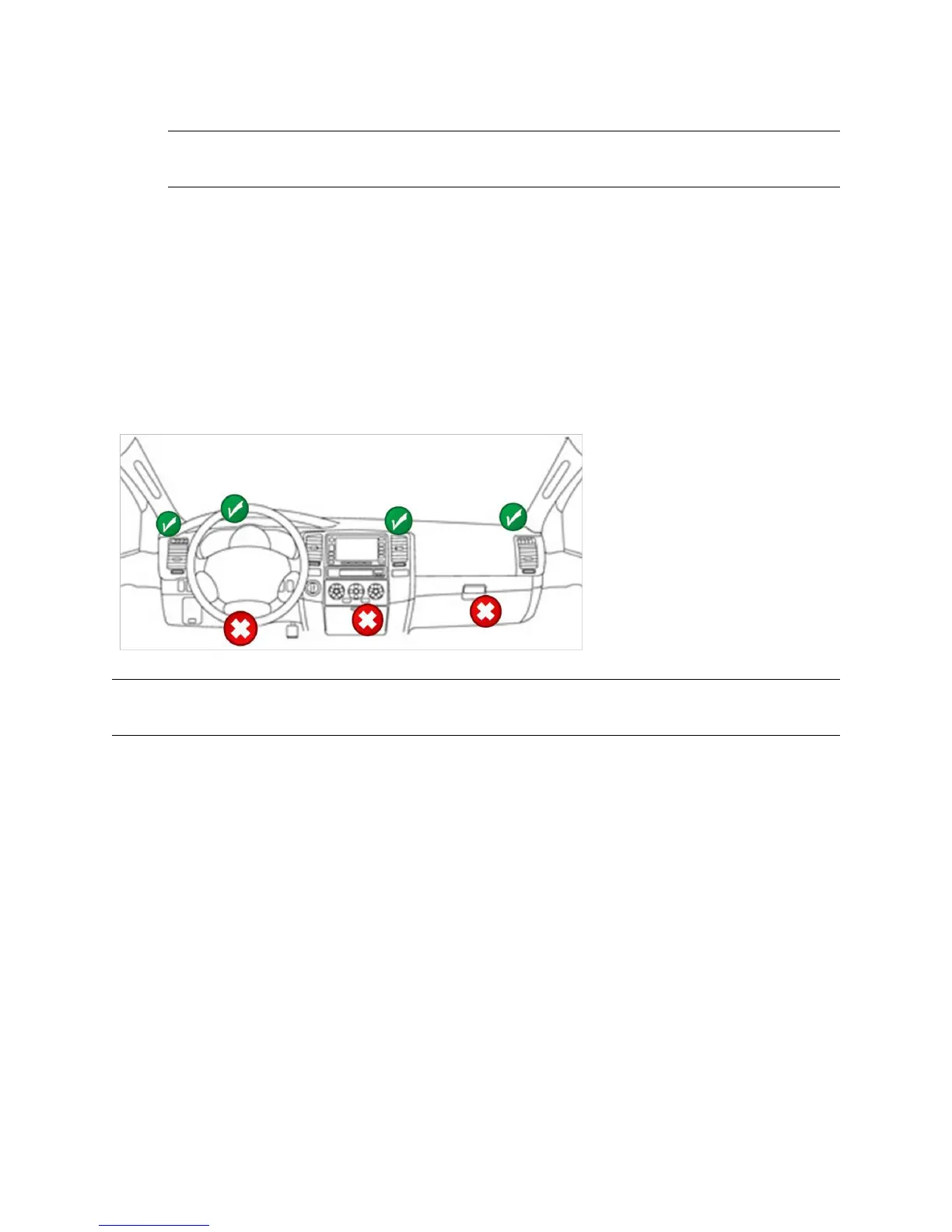
Select the best location for mounting the device within the vehicle, such as one of the following
locations:
l Above the air vents
l Above the steering wheel
l Above the instrument cluster
l Above the glove box
NOTE: Avoid locations identified
with a red X.
CAUTION! Both the cellular and GPS antennas are internal to the device. Therefore, it is critical to get
the device mounted as high on the dashboard as possible with minimal obstructions above it.
MT 4100 User Guide 22



 To Next Page