Red/blue LED indication
Normal operation
blue red Status
flashing off Normal operation pulsed operation (short flashing of the
blue LED every 5seconds)
flashing off Normal operation AR operation (short flashing of the blue
LED every 2.5seconds, 1Hz flashing during active open
time)
off on Learning cycle
flashing flashing Flashing sequence blue-red– error code indication (see
error diagnosis)
off off Control switched off or short circuit 24V
Prioritised position reached
blue red Status
flashing Alternating flashing blue-red
Settings menu
blue red Status
off flashing Selection of menu item (flashing sequence) (see program
overview)
flashing off Selection of parameters (flashing sequence) (see program
overview)
off off Control switched off or short circuit 24V
6Programming with IPD-S
6.1Programming procedure
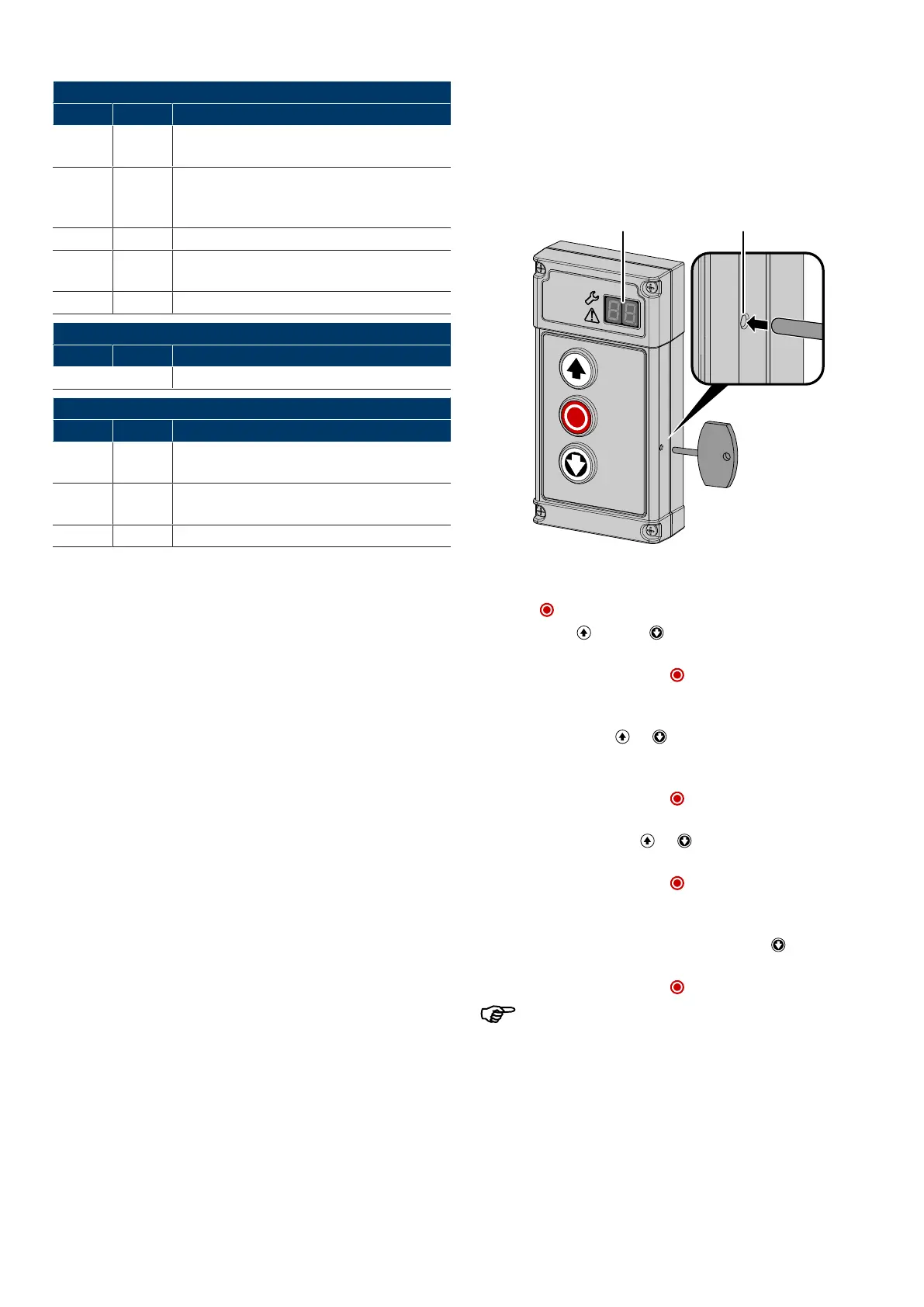
The control device IPD-S is equipped with a PROG(2) button. This button is protected
inside the control device. It can be operated via a small opening in the housing. Fur-
ther information on programming with IPD-S can be found in the IPD-Sinstructions
(WN909009-01-6-50).
1. To enter the programming mode of the DCC, press and hold the PROG(2) button
of the IPD-S until the 7-segment display(1) indicates––.
2. Press the button (HALT) to confirm the activation.
3. Navigate with the (OPEN) and (CLOSE)buttons to select the desired
menu. The 7-segment display(1) shows the current selection as value1–9.
4. Confirm the selection with the button . The 7-segment display(1) in the first
digit now shows the menu which you are in. The second digit shows the current
menu item in this menu.
5. Navigate with the buttons and to select the desired menu item. A total of
up to 10menu items is provided to you(0-9). The 7-segment display(1) shows
the current selection in the second digit as value0-9.
6. Confirm the selection with the button . The currently set value for the re-
spective menu item flashes on the 7-segment display(1).
7. Set the desired value using the and buttons. Depending on the menu
item, values between 0 and 99 can be entered.
8. Confirm the selection with the button . The 7-segment display(1) confirms
the entry by 5-time blinking of the decimal point and by returning the the menu
item selection.
9. If you want to complete the programming, press the button repeatedly until
–– appears on the 7-segment display(1).
10. Confirm the selection with the button to exit the programming.
After 120seconds of inactivity, the configuration menu is exited.
Novoferm|11


 To Next Page