6.7Menu9 Service
Limitation of cycles (menu item90)
Select a number of cycles upon the completion of which the service indication is ac-
tivated on the control. You can reset the maintenance counters by selecting the
number of cycles in the respective menu item again.
Overall cycle counter output door (menu item91)
By pressing the button, the cycle counter outputs the values digit by digit start-
ing with the highest decimal power. The counter cannot be reset.
Output of firmware version, SN, production date (menu item98)
Pressing the button starts the sequential output of the control information. "101
123456789 01012023" means firmware version "R1.01", serial number "123456789",
production date "01.01.2023".
Resetting to default setting (menu item99)
Press and hold the button to open the default settings. The drive starts automat-
ically with the setup wizard.
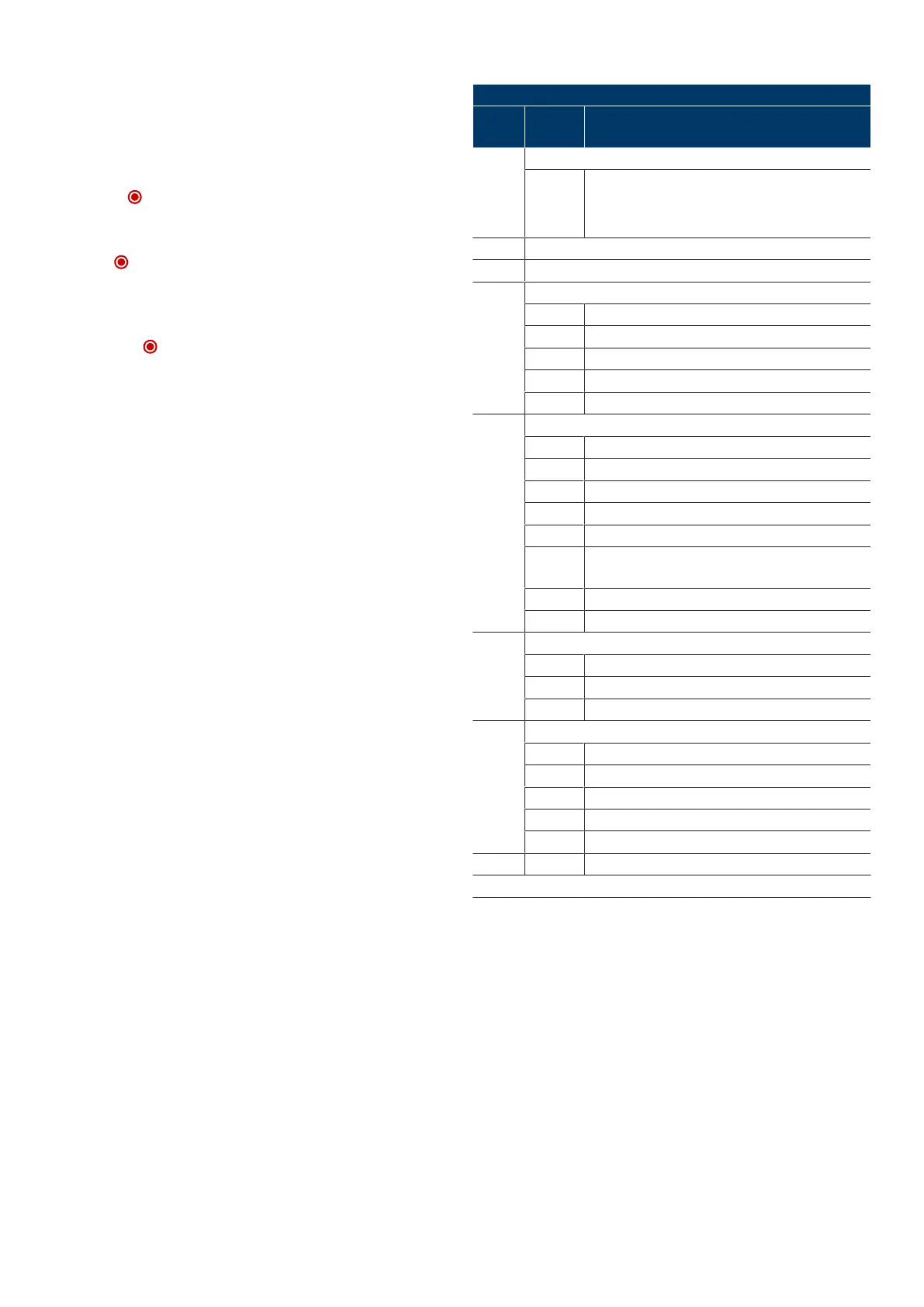
6.8IPD-S program overview
Menu3 Basic door settings
Menu
item
Entry Selection
30 Door setting of the end positions
OPEN+
STOP+
CLOSE
Reversal of the direction (5seconds)
32 Door setting for 1/2 opening position
33 Door setting prioritised position
35 Selection of closing edge safety device
STOP Auto detection (5seconds)
1* none
2 Optical closing edge safety device OSE
3 Electrical safety edge8K2
4 Pressure wave switch with testing
36 Selection of photoelectric sensor
STOP Auto detection photoelectric sensor on DCC (5seconds)
1* none
2 2-wire photoelectric sensor on DCC
3 2-wire photoelectric sensor on DCC in the frame
4 4-wire photoelectric sensor, reflective photoelectric sensor
5 4-wire photoelectric sensor, reflective photoelectric sensor
on DCC or IPD-S in the frame
6 2-wire photoelectric sensor on IPD-S
1)
7 2-wire photoelectric sensor on IPD-S in the frame
1)
37 Selection of the pre-limit switch position
0-1 20....10mm lower
2* as adjusted
3-10 10....50mm higher
38 Selection of the roll-up protection mechanism
STOP Auto detection (5seconds)
1* none
2 Stop roll-up protection mechanism at J4.2
3 Stop roll-up protection mechanism at J4.3
4 Stop roll-up protection mechanism at J4.2 and J4.3
- - STOP Exit menu
* Default setting
1)
Information on the pin assignment can be found in the IPD-Sinstructions
(WN909009-01-6-50).
Novoferm|15


 To Next Page