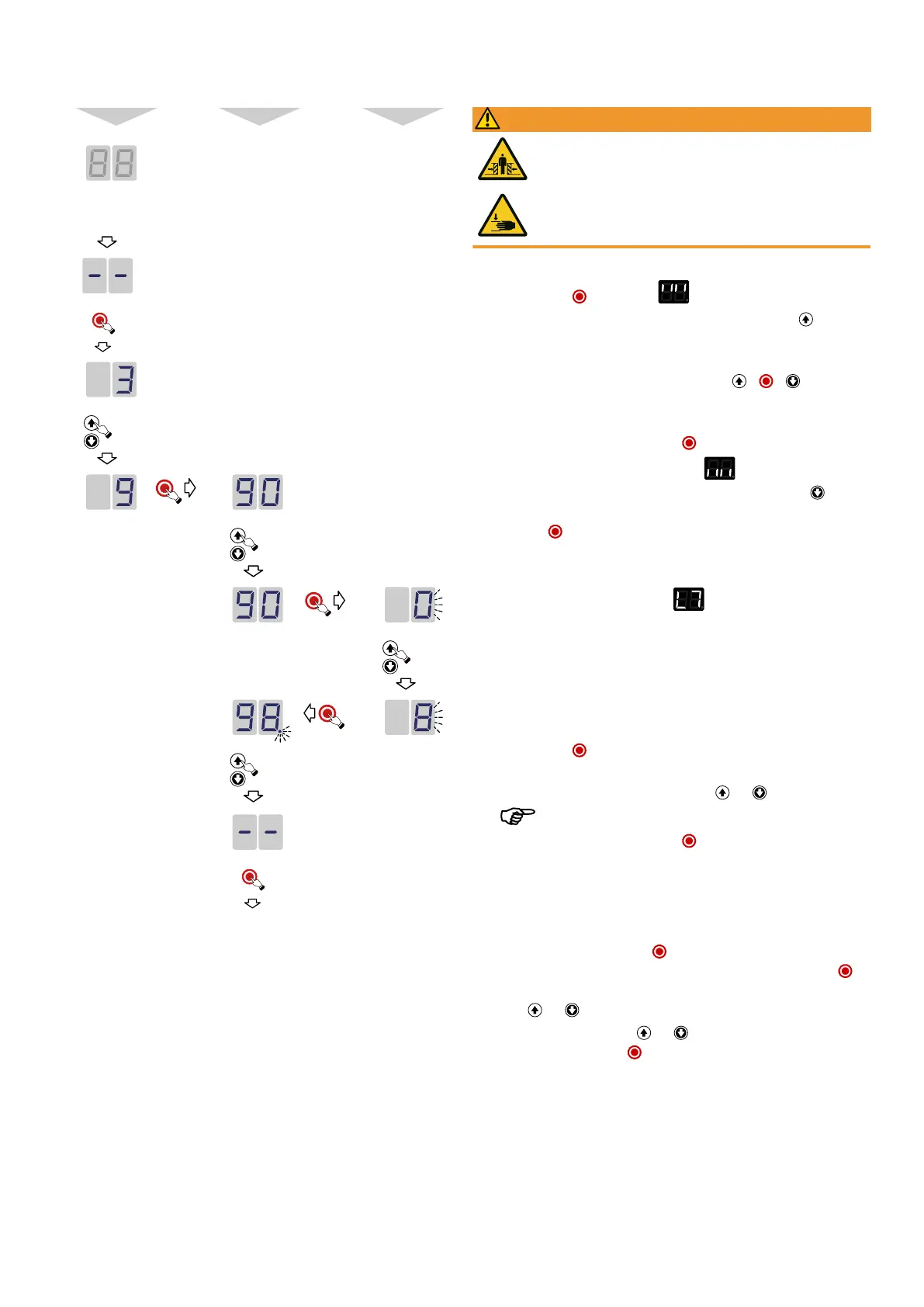
Graphical representation of the programming process with the IPD-S
Menu Menu item Selection
1.
Activation of programming
2.
Confirm activation
3.
Menu selection
4.
Confirmation of the main menu
selection
5.
Selection of the menu item
6. Confirmation of the menu item
selection
7. Setting of the desired value
8. Confirmation of the setting
9. Navigation to the next menu
item or to exit the program-
ming menu
Exit programming
10.
Exit
6.2Menu 3 Basic settings and initial operation
Setting the door end positions (menu item30)
WARNING
Crush hazard and risk of being struck by the closing door
Ensure that no closing edge or photoelectric sensor monitoring is active
whilst the end positions are set.
The door end positions OPEN and CLOSE must be set directly in succession.
1. Briefly press the button so that flashes on the 7-segment display.
2. In order to define the door end position OPEN, press and hold the button until
the door is completely open.
ð If the door moves in the wrong direction, a reversal of the direction must be im-
plemented. Press and hold the button combination + + for 5seconds.
The successful change of the direction of rotation is confirmed by an animation
on the 7-segment display. Then repeat step2.
3. Confirm the set position by pressing the button for a long time.
4. After confirming the door end position OPEN, flashes on the 7-segment
display to program the door end position CLOSE. Press and hold the button
until the door is completely closed and confirm the set position by pressing and
holding the button.
5. After confirming the door end position CLOSE, the settings menu is exited auto-
matically.
6. The 7-segment display now shows the symbol and the drive is in current
learning mode. A complete, failure-free opening and closing run must be carried
out in each case.
Setting the 1/2 door opening (menu item32), Prioritised position (menu
item33)
To set the position for a 1/2door opening or for a prioritised position, proceed as fol-
lows:
1. Briefly press the button so that the number32/33 flashes on the 7-segment
display.
2. Move the door to the desired position using the and buttons.
The minimum opening height is 15cm.
3. Confirm the set position by pressing the button for a long time.
ð The decimal point flashes 5times to indicate that the position has been taken
over.
Selection of closing edge safety device (menu item35)
1. You can make an auto detection or a manual selection.
ð Auto detection: Press and hold the button for 5seconds. The setting for the
closing edge safety device detected by the DCC appears. Briefly press the
button to accept the indicated configuration or select another configuration us-
ing the and buttons.
ð Without auto detection: Use the and buttons to select the desired config-
uration and briefly press the button to accept the indicated configuration and
complete the setting.
12|Novoferm


 To Next Page