NOVUS AUTOMATION www.fieldlogger.net 22/104
CONFIGURATION
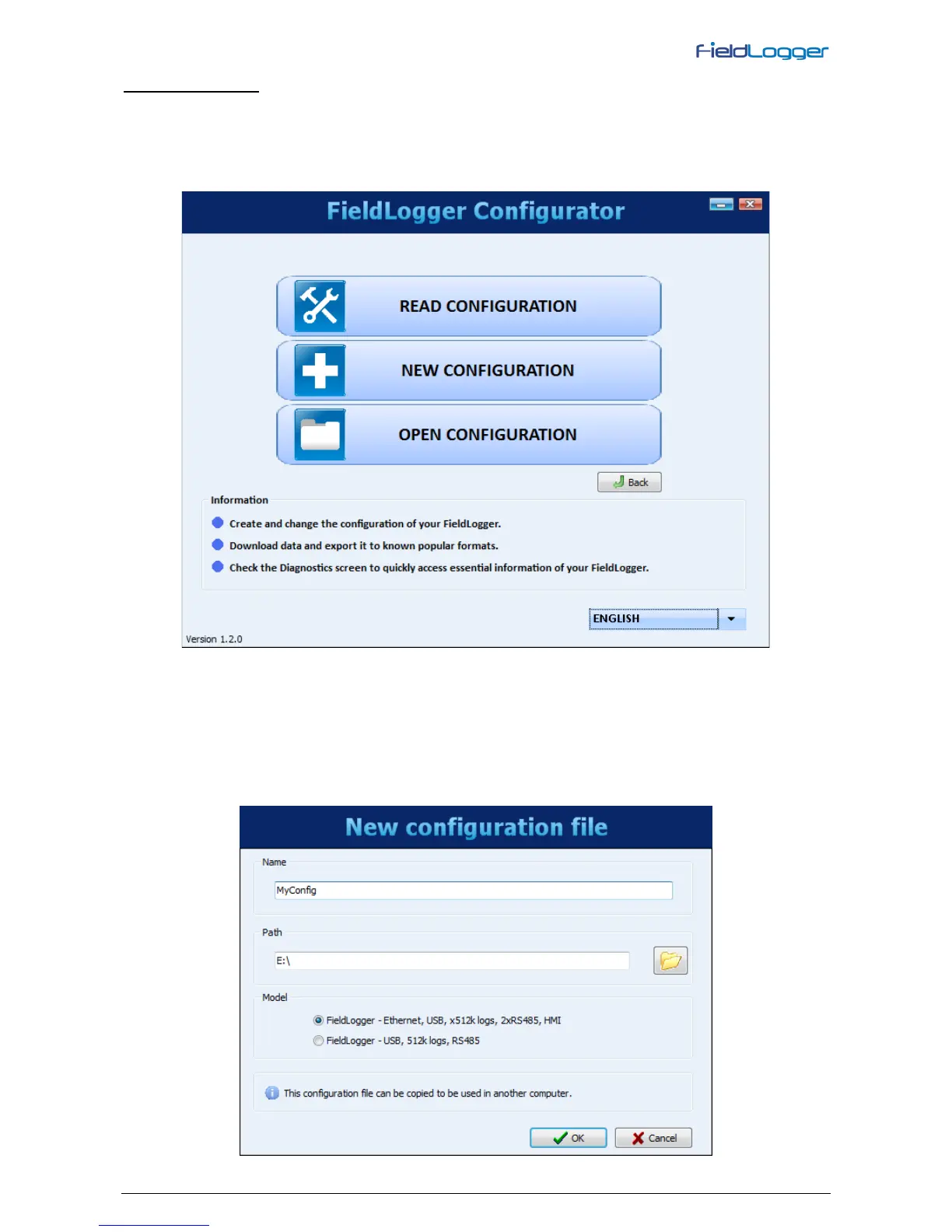
On the configuration screen, you can select one of the following options, as they are described below:
• Read Configuration: Reads the current configuration of a FieldLogger.
• New Configuration: Creates a configuration from the scratch.
• Open Configuration: Loads the previously configuration saved to a file.
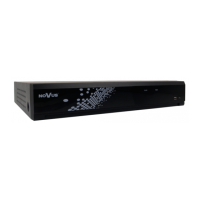
If the chosen option was to create a new configuration, you must specify a file where this configuration will be saved.
Besides that, from software version 1.40 on, you must select which FieldLogger model you are about to configure (power
– normal or 24 V – does not care on this case):
• Complete model, with Ethernet, USB, expansible memory using an SD Card and a second RS485 interface
ready to accept an optional HMI.
• Model with USB but no Ethernet, non-expansible memory (internal flash only – no SD Card) and only one
RS485 interface.


 To Next Page