NOVUS AUTOMATION www.fieldlogger.net 50/104
DIAGNOSTICS
When you select the Diagnostics, the login screen will appear and you should indicate what type of interface to be used
for reading the diagnostics parameters: RS485 (RS485 interface of the equipment should be selected as "slave"), USB
or Ethernet (the Ethernet interface of the equipment must be enabled, as well as Modbus TCP protocol).
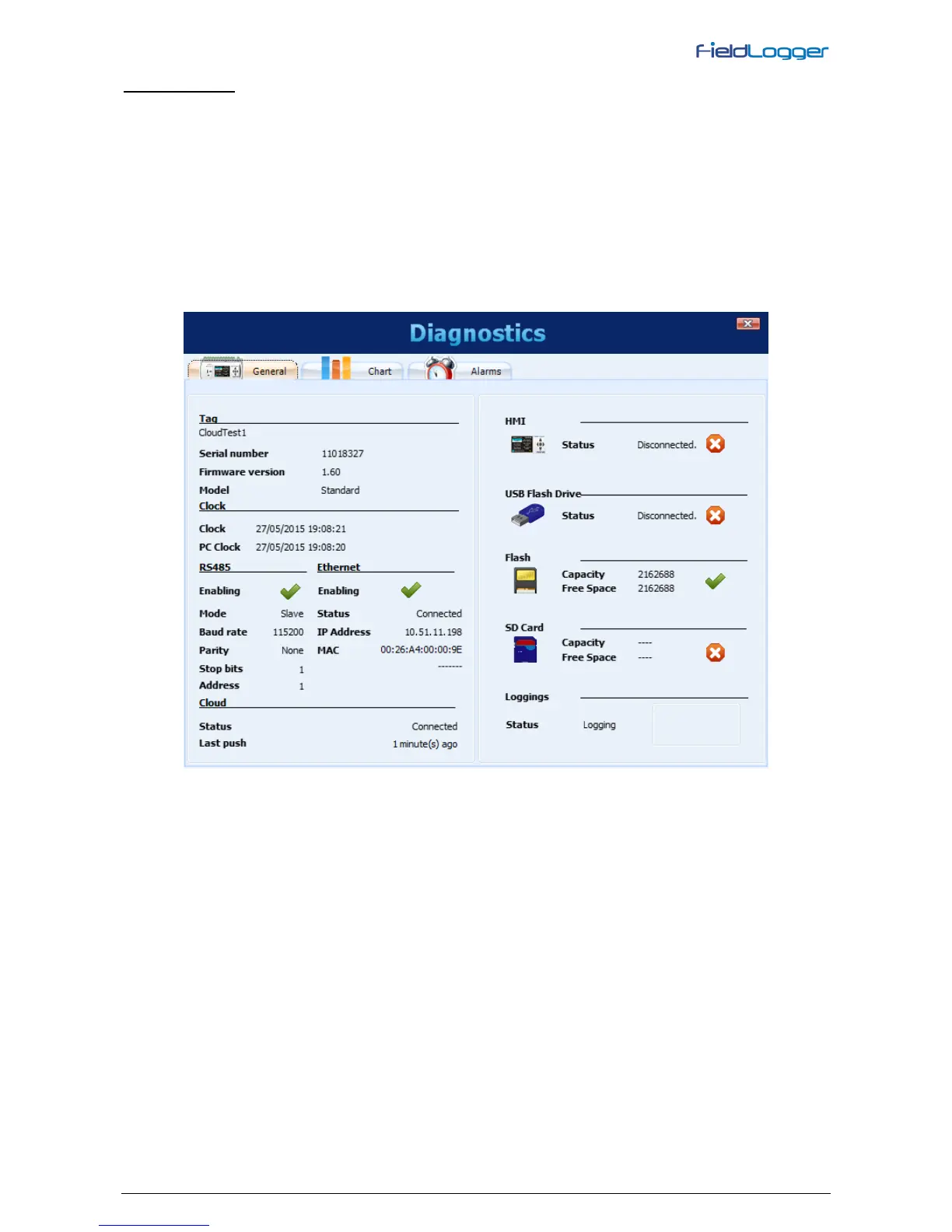
The reading of the parameters is then performed and the General parameters window is opened. This window shows the
equipment’s tag, serial number, firmware version and model. It also shows the time of its clock compared to the
computer's clock. In this window you can also see a series of configuration parameters of the RS485 interface. For the
Ethernet interface, the current status (connected or not) is indicated, as well as the IP and MAC numbers. Shows the
current status of the connection on the Cloud (usually disconnected, connecting from time to time for sending and after a
few seconds, returns to disconnect) and time since the last packet sent successfully. On the right side of the window,
there is an indication of the connection status of the HMI and the USB flash drive, in addition to the capacity and free
space of the internal flash memory and the SD card (when connected). Finally, there is an indication of the current state
of the loggings and, when the start or stop of these through Modbus commands is enabled, there are buttons in order to
perform the respective actions of starting and stopping the logs.
Diagnostics - General Status


 To Next Page