NV-DVR1104/CD, NV-DVR1108/CD and NV-DVR1116/CD ver. 1.1 - user's manual
All rights reserved © NOVUS Security Sp. z o.o.
16
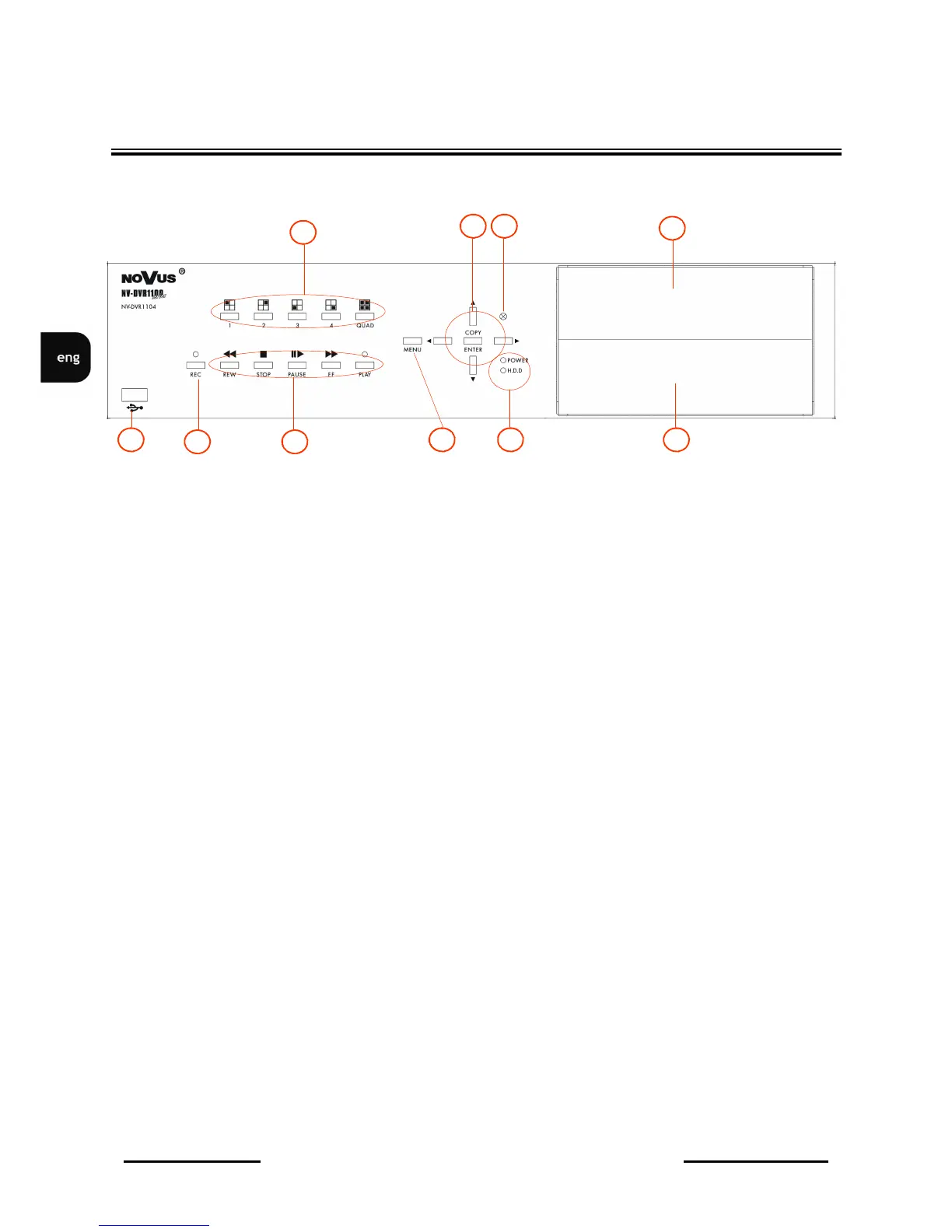
FRONT PANEL DESCRIPTION
1. Displayed channel or quad selection;
2. Cursor buttons;
In PTZ mode these buttons are used to control the camera;
ENTER in setting mode is used to enter submenu and edition bars ;
COPY in playback mode activates backup procedure on flash memory;
3. IR receiver;
4. HDD swappable bay;
5. CD-RW recorder;
6. LED's;
7. MENU On Screen Display menu activating;
8. Playback control buttons;
in PTZ mode some buttons are used for camera control;
9. REC manual recording activating/ deactivating (inactive in schedule recording mode);
10. USB port for flash memory connection;
NV-DVR1104/CD
1
5
4
8 9
2
7 10 6
3



 To Next Page