NV-DVR1104/CD, NV-DVR1108/CD and NV-DVR1116/CD ver. 1.1 - user's manual
All rights reserved © NOVUS Security Sp. z o.o.
65
BACKUP PLAYBACK
Subsequently following icon should be clicked.
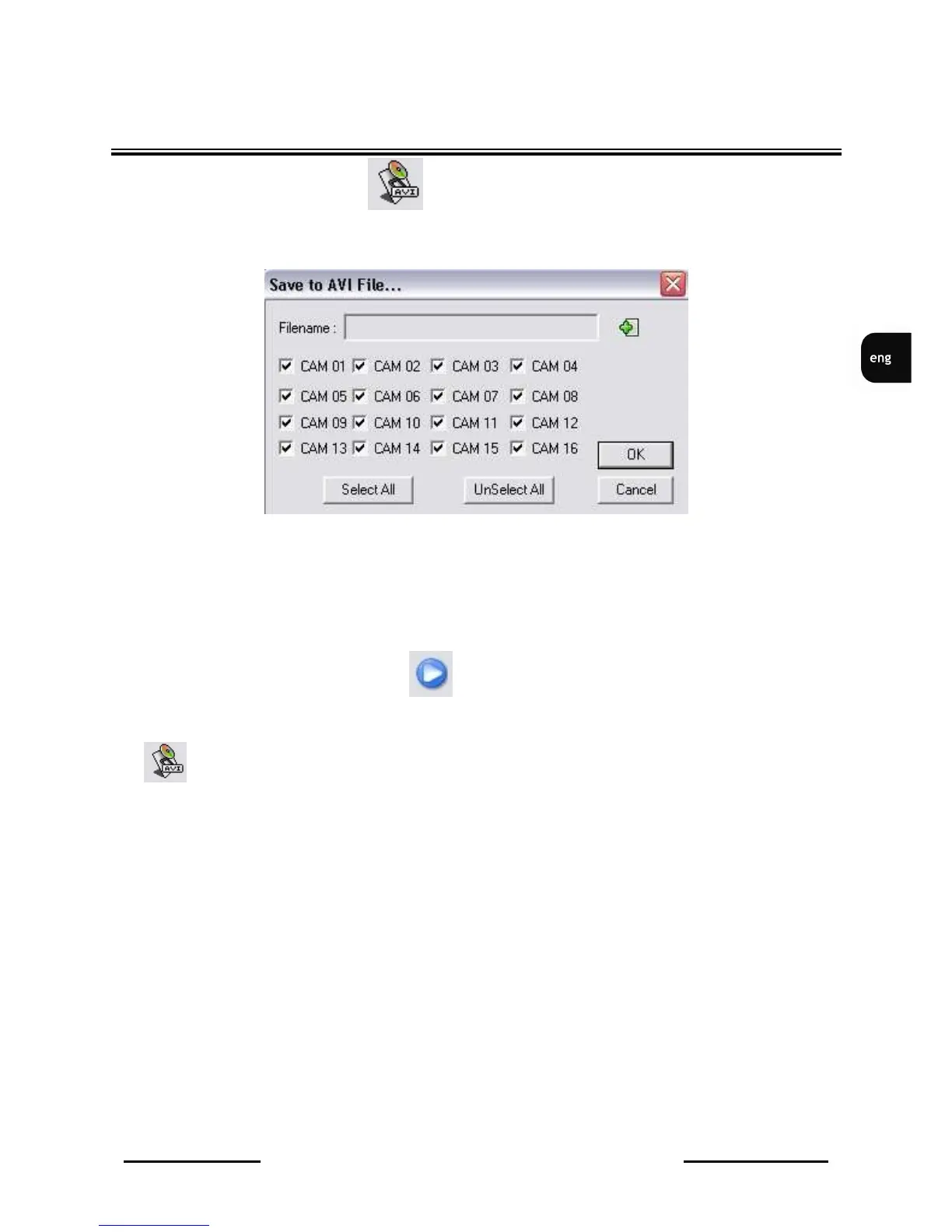
Camera selection and AVI file save path menu will be displayed.
Filename position is used to select AVI file save path (when green „plus” icon is clicked). CAM 01 to
CAM 16 positions are used to select backup channels. Select All and UnSelect All options are used
for quick selection or de-selection of all 16 channels.
When OK is clicked menu will be closed and system will wait to initiate playback and AVI file
recording.
In order to initiate these processes icon should be clicked..
During AVI file recording, playback will be run with lower playback speed.
Icon is used for any time conversion stopping.
CAUTION: Recorded AVI file’s resolution is 320x220, even if original record resolution is different.
Recorded AVI file can be played using any video player, like e.g. Windows Media Player. Video codec
installation might be required when file will be played on different PC than PC where was recorded.
File title consists of video channel information, whereof record was done, e.g.
capture_CH-01-1157113435.avi
means channel no1 record.



 To Next Page